If you mainly print text, even if the printer sometimes sits unused for a while, start with a black-and-white laser printer with a network connection and a paper tray suited to your studio’s needs. Choose a colour printer if colour conveys information, or a multifunction model if you also want to scan or copy paper plans. Whichever you choose, compare consumables with your expected print volume.
Who is this choice relevant to?
People creating text-based plans
You share a printer used mainly for black-and-white lesson plans and want a reliable network connection, automatic double-sided printing and a paper tray suited to your print jobs. Consumentenbond and Brother outline these factors when choosing printers and models for printing text.
People creating colour materials
You use colour in schedules or diagrams and want to consider your expected print frequency and ink costs before choosing a colour printer. Consumentenbond, Canon and Epson discuss these considerations when comparing printer types and specific models.
People working with paper notes
You want to scan or copy paper sheets as well as print lesson plans, so you’re comparing a multifunction printer with a print-only model. Brother lists these features for models including the DCP-L2660DW.
What should you look for when choosing?
Black-and-white laser, print only
Best for: lesson plans that are clear without colour, when several users print over a suitable network connection.
Bear in mind: no colour, scanning or copying; check the toner and whether the exact model has a separate drum.
Colour printer
Best for: when colour codes or diagrams convey information and you print in colour regularly.
Bear in mind: compare ink and maintenance costs against your own usage. Ink-tank printers are still inkjet printers and, as Consumentenbond explains, can use ink for cleaning when used infrequently.
Multifunction black-and-white laser
Best for: when you want to scan or copy paper notes as well as digital lesson plans.
Bear in mind: an automatic document feeder is only useful if you’ll use it; double-sided printing doesn’t automatically mean double-sided scanning.
Black-and-white printer with a large paper tray
Best for: studios that regularly print larger batches of text-based plans and can make use of the extra paper capacity.
Bear in mind: a large tray may be unnecessary for small print runs; this option doesn’t offer colour or scanning.
| What to consider |
What to look for |
Who is this for? |
| Shared text printing |
Check for A4, automatic double-sided printing and a suitable paper tray, and whether users’ devices can connect via Ethernet or Wi-Fi. |
When several of us print text-based plans, I want a connection that suits our studio and not to have to keep topping up the paper. Around 33% of consumers prioritise shared printing of text-based plans. |
| Colour in teaching materials |
View a representative plan in greyscale and, for a colour model, check the suitable ink and expected print volume. |
When colour codes or diagrams convey information, I want them to remain clear on paper. Around 27% of consumers prioritise colour reproduction in teaching materials. |
| Scanning or copying |
Decide whether you need these features and whether a document feeder suits the amount of paper you handle; also check which sides the exact model can scan. |
When we reuse existing paper notes, I want to be able to handle them easily. Around 20% of consumers prioritise scanning and copying. |
| Ongoing costs |
Estimate your print volume and compare suitable ink or toner for the exact model, along with any drum or maintenance cartridge. |
When we print lesson plans often, I want to consider consumables and maintenance as well as the printer itself. Around 20% of consumers give running costs top priority. |
Common buying mistakes
-
Comparing only the purchase price
For lesson plans you print regularly, it’s also worth considering the ink or toner and any model-specific parts you’ll need. Consumentenbond points out that running costs depend on the number of pages printed.
Compare the consumables for the exact printer model against your expected print volume.
-
Choosing an ink tank based only on its stated yield
An inkjet printer may use ink for cleaning if it’s used infrequently. So the stated bottle yield alone won’t tell you how many usable pages you’ll print in the studio.
Factor in any periods when you won’t be printing, and compare a black-and-white laser printer if you don’t need colour.
-
Confusing double-sided printing with double-sided scanning
If you want to digitise notes written on both sides, you may otherwise have to turn the sheets over by hand.
Check separately whether the document feeder on the exact model can scan both sides.
-
Assuming any compatible toner will work
HP states that the LaserJet Pro 4002dw has dynamic security that can block cartridges without an HP chip.
Check the current cartridge terms for this model and compare compatible toner before choosing.
Brands to consider
Brother
Brother offers black-and-white print-only models as well as multifunction models with scanning and copying.
- Brother lists Ethernet and Wi-Fi for the HL-L2445DW and DCP-L2660DW; according to Brother, the DCP-L2660DW also has a 50-sheet document feeder.
- According to Brother, the HL-L6210DW has a 520-sheet paper tray.
- The HL-L2445DW and DCP-L2660DW have separately replaceable toner and drum units, so include both in your cost comparison. These model features don’t necessarily apply to other Brother printers.
Canon
The MAXIFY GX4050 is a multifunction colour model with ink tanks, worth comparing when colour, network connectivity and handling A4 paper are all important.
- Canon lists Wi-Fi, Ethernet, automatic double-sided printing and a document feeder for up to 35 A4 sheets for this model.
- Compare the price of GI-56 ink and the replaceable MC-G03 maintenance cartridge. Stated bottle yields are estimates based on test conditions.
Epson
The EcoTank ET-2860 is an A4 colour model with printing, scanning and copying, worth comparing if you print in colour regularly.
- Epson lists refillable tanks and wireless printing for this model.
- An ink-tank printer is an inkjet printer, and cleaning may use ink if it’s used infrequently. Epson’s savings claims aren’t an independent measure of costs for your studio.
HP
The LaserJet Pro 4002dw is a black-and-white laser printer worth comparing for document tasks shared by several users.
- HP lists automatic double-sided printing and dual-band Wi-Fi for this model.
- HP states that dynamic security can block cartridges without an HP chip. So check the terms for compatible toner for the exact model.
Printer models at Joybuy
These Joybuy printer options are suited to shared printing of lesson plans and include colour and black-and-white models. Check that the print type, connections and features of each model suit your documents and studio.
 No image available
HP Smart Tank 7305 Wireless All-in-One
A multifunction colour printer worth comparing if you want to print wirelessly and handle paper sheets too.
The product information lists automatic double-sided printing, scanning, copying and a document feeder for 35 pages.
View at Joybuy
 No image available
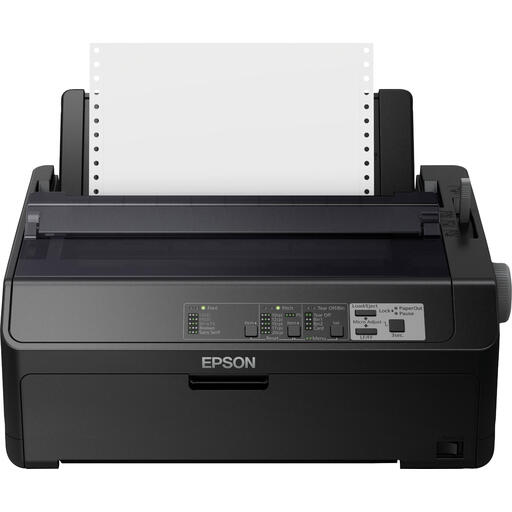
Epson FX-890IIN
A dot matrix printer worth comparing for black-and-white document tasks over a network connection.
Ethernet is listed as a connection option. Check that this print type suits the layout of your lesson plans.
View at Joybuy
 No image available
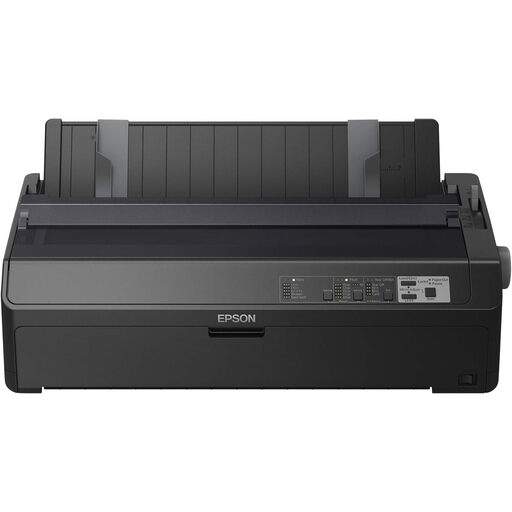
Epson FX-2190IIN
A dot matrix printer worth comparing for black-and-white document tasks over a network connection.
Ethernet is listed as a connection option. Check that this print type suits the layout of your lesson plans.
View at Joybuy
 No image available
Epson WorkForce Pro WF-C5390DW
An A4 colour printer worth comparing if several users print over Wi-Fi or Ethernet.
The product information lists automatic double-sided printing and a total paper capacity of up to 1.830 sheets.
View at Joybuy
 No image available
Brother HL-L6210DW
A black-and-white laser printer worth comparing for shared, higher-volume text printing.
Brother lists a 520-sheet paper tray, with expansion options up to 1,560 sheets. Wi-Fi is also listed.
View at Joybuy
Frequently asked questions
How do you connect a printer shared by several studio users?
Choose a printer with a connection that suits the studio’s devices and network. Brother lists Ethernet, 5 GHz Wi-Fi and USB for the HL-L2445DW; Canon lists Ethernet and Wi-Fi for the GX4050. Check the connections on the exact model and arrange suitable access to the printer.
What should you do if an inkjet printer produces faded prints after a break?
Follow the instructions for the exact model and check the nozzles first if print quality has dropped. Epson recommends checking them before cleaning the print head; unnecessary cleaning uses ink.
What costs and warranty details should you check when buying a printer?
Before you buy, compare the suitable ink or toner and any separate drum or maintenance cartridge. For consumer purchases in the Netherlands, the Dutch government states that you’re entitled to a product that works as it should. There’s no fixed statutory warranty period, and you should contact the retailer if there’s a problem. If you’re buying for business, check the applicable contract terms.
Do privacy rules apply to lesson plans left on a shared printer?
If an organisation processes personal data in lesson plans, the Dutch Data Protection Authority says it must decide on appropriate security measures based on the risks. This doesn’t mean that one specific printer model or feature is required. In that situation, agree who can access the printer and who will collect the printouts.


