First, test your internet connection using a wired connection, then test Wi-Fi where you watch: a new router won’t fix a slow broadband connection. If the connection is fine, choose a single router if it can reach the main rooms; if coverage is weak elsewhere, a wired access point or mesh system may be a better fit. Before buying, also check your provider’s connection requirements and the applicable requirements for the hardware version on offer.
Who should consider this router choice?
Housemates who stream at the same time
You share the connection with other active devices while watching. First, check whether your broadband connection or Wi-Fi network is the limiting factor; Netflix and the Consumers’ Association offer guidance on assessing streaming and your connection.
Viewers in a room with a weak signal
Your screen is further away from the current Wi-Fi access point or behind walls. In that case, router placement, a cable or extra Wi-Fi access points may matter more than a higher advertised speed. The Consumers’ Association discusses coverage and placement for Wi-Fi extenders.
People managing a shared network
You choose or manage the device for your housemates and need to consider your provider’s connection, updates and network access. ACM ConsuWijzer explains your freedom to choose a router; ASUS lists a guest network as a feature of the RT-AX58U.
What should you look for in Wi-Fi for a shared home?
First, test your broadband connection using a cable, then test Wi-Fi where you watch. This helps you work out whether a new router could solve the problem or whether you should focus on coverage and placement; the Consumers’ Association recommends testing with a wired connection.
Improve your existing equipment or add an access point
Choose this if: your wired connection is good, but Wi-Fi is poor where you watch.
Bear in mind: you may need to adjust the placement and run a cable to the access point; take your provider settings and existing equipment into account.
A single standalone Wi-Fi router
Choose this if: one centrally placed Wi-Fi access point can reach where you watch and the main rooms.
Bear in mind: a standalone router won’t automatically fix weak coverage behind walls or ceilings. Wi-Fi 6 won’t automatically give older devices the benefits of that standard.
Multiple mesh Wi-Fi access points
Choose this if: several rooms have poor coverage and you need extra access points in suitable locations.
Bear in mind: extra access points need suitable locations and power. The stated coverage won’t necessarily reflect the signal in your home; a wired connection between access points may be an option.
For consumers choosing a router solution for streaming in a shared home, the main considerations are simultaneous use, coverage, the connection and network management.
| What to consider |
What should you check? |
Who is this important for? |
| Streaming when several people are online |
Test using a network cable, then test where you watch. Netflix recommends a stable connection of at least 15 Mbps for one 4K stream; this isn’t the total speed needed by all your housemates combined. |
If I need to take housemates who are also online into account while watching a documentary, I want to know whether the broadband connection or Wi-Fi is the limiting factor. Around 36% of consumers put simultaneous use at the top of their purchase concerns. |
| Coverage in several rooms |
Check the signal where you watch and compare moving the router with adding a wired access point or mesh system. With mesh, the number of access points and how they connect both matter. |
When my screen is further from the router or behind walls, my main priority is having usable Wi-Fi where I watch. Around 29% of consumers say coverage is their main purchase priority. |
| Connection to your provider’s network |
Decide whether you’ll keep your existing equipment. If you’re replacing it, ask which provider settings and connection type you’ll need. |
If I want to keep or replace my provider’s equipment, I want to know in advance how the new setup will connect to it. Around 21% of consumers put this first. |
| Security and network management |
Check how updates, guest access and management work for the exact version. An extra management feature doesn’t replace a secure setup or applicable product requirements. |
When I manage the network for my housemates, I want to be able to manage updates and guest access. Around 14% of consumers cite management and security as their main purchase concern. |
Wi-Fi buying pitfalls in a shared home
-
Buying a faster router when your broadband connection is the bottleneck
A wired test and a Wi-Fi test tell you about different parts of your connection. Replacing your router without first identifying the issue could lead to a purchase or subscription change that doesn’t solve the problem.
Before changing your equipment or subscription, test your connection with a network cable, then test it where you watch.
This helps you avoid replacing equipment or changing your subscription unnecessarily.
-
Expecting one router to provide strong coverage through every wall
Distance and obstacles can weaken the Wi-Fi signal where you watch, even if the router advertises a high speed.
Test coverage in each room and compare a different placement with a wired access point or mesh system.
A solution with extra access points may also need suitable locations and possibly cabling.
-
Overlooking the placement and use of multiple Wi-Fi access points
Multiple access points need to be placed carefully and require power. The Consumers’ Association includes energy consumption in its testing method for Wi-Fi extenders.
Choose the number of access points based on the coverage you measure where you need it, not just the stated coverage area.
Extra devices need power sockets and suitable locations around your home.
-
Assuming a manufacturer’s warranty covers all your warranty rights
A manufacturer’s warranty doesn’t automatically replace your statutory rights against the seller. ACM ConsuWijzer explains that your statutory guarantee applies for as long as the product should reasonably be expected to last.
Keep your proof of purchase and speak to the seller about any fault, bearing your statutory rights in mind.
Brands to consider when choosing a router
TP-Link
The Archer AX55 is a standalone router; the Deco X50 is a mesh system for situations where coverage in several areas matters.
- TP-Link lists Wi-Fi 6 and OFDMA for the Archer AX55. For the Deco X50, TP-Link mentions optional Ethernet backhaul.
- These are model specifications, not a measure of coverage in your home. For the Deco X50, check how many units are included and which connection method you want to use.
ASUS
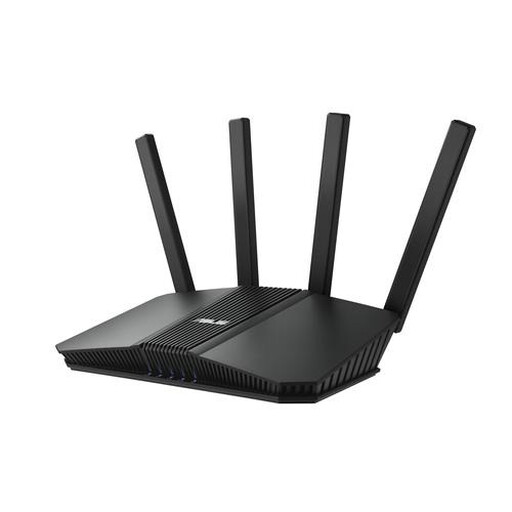
The RT-AX58U is a standalone router for anyone comparing network management features.
- For this model, ASUS lists features including a guest network, Adaptive QoS and AiMesh.
- Features don’t show how the device will perform in a particular home. Check the exact model and hardware version.
FRITZ!
The FRITZ!Box 4060 is a standalone Wi-Fi 6 router with connections and expansion options that may be useful if you want more than just a network for streaming.
- FRITZ! lists a 2.5-gigabit WAN connection, three gigabit LAN ports and expansion with compatible FRITZ! devices.
- The manufacturer’s description isn’t an independent performance comparison; telephony and smart home features aren’t needed just to watch a documentary.
Joybuy products for a single router or mesh system
These product picks include standalone routers and mesh systems for one central Wi-Fi access point or coverage in several areas of your home. Before buying, check that the hardware version on offer meets the applicable requirements; according to the Dutch Digital Infrastructure Inspectorate, radio equipment placed on the EU market from 1 August 2025 must also meet the applicable enhanced digital security requirements.
 No image available
ASUS ZenWiFi BD4 dual-band Wi-Fi 7 mesh system, white
Suitable if you want Wi-Fi in several areas of your home; the product description lists a mesh system and wired backhaul as an option.
Listed features: Wi-Fi 7, dual-band (2.4 GHz / 5 GHz), guest network and set-up via the ASUS Router app.
Joybuy
 No image available
ASUS RT-AX52 AX1800 Wi-Fi router
A standalone router to consider if one central Wi-Fi access point can reach where you watch and the main rooms.
Listed features: Wi-Fi 6, dual-band (2.4 GHz / 5 GHz), Gigabit Ethernet and AiMesh compatibility.
Joybuy
 No image available
Huawei eKit OptiX FG736 BE3600 Wi-Fi 7 mesh router
Suitable if you want to extend Wi-Fi to several areas; the product description lists a mesh set-up with multiple units.
Listed features: dual-band Wi-Fi 7 and management via the HUAWEI SmartLife app.
Joybuy
 No image available
ASUS RT-BE82U BE6500 Wi-Fi router
A standalone router to compare if you want one Wi-Fi access point and also need a wired connection.
Listed features: Wi-Fi 7, dual-band (2.4 GHz / 5 GHz) and a 2.5-gigabit Ethernet port.
Joybuy
 No image available
ASUS RT-AX52 Pro AX3000 Wi-Fi router
A standalone router to consider if one central Wi-Fi access point is enough and you may want to expand the network later.
Listed features: Wi-Fi 6, dual-band (2.4 GHz / 5 GHz), Gigabit Ethernet and AiMesh compatibility.
Joybuy
Frequently asked questions about Wi-Fi and streaming
How can you tell if your internet or Wi-Fi is too slow for a documentary?
First, measure the connection using a network cable, then test it on the device you watch on. Netflix recommends a stable connection of at least 15 Mbps for one 4K stream; this figure doesn’t automatically tell you whether the connection is fast enough for all your housemates at the same time.
Does a mesh access point need to be next to where you watch?
Not necessarily: position the access points so they maintain a usable connection with one another, then check coverage where you watch. If cabling is an option, TP-Link says the Deco X50 supports optional Ethernet backhaul.
Can you use your own router in the Netherlands?
Yes. ACM ConsuWijzer explains that you’re free to choose your own router. Ask your provider which settings are needed for the connection, and check which type of connection you have if you also want to replace the modem.
What product requirements apply to a Wi-Fi router?
Radio equipment sold in the Netherlands must meet the applicable European requirements and carry a CE mark. Radio equipment placed on the EU market from 1 August 2025 must also meet the applicable enhanced digital security requirements. Check the information for the hardware version on offer; a declaration for a different version doesn’t automatically apply to this one.
Does a two-year manufacturer’s warranty cover all your warranty rights?
No. ACM ConsuWijzer explains that your statutory guarantee also applies for as long as the product should reasonably be expected to last. Discuss any fault with the seller; the appropriate remedy depends on the circumstances.


