Who is this choice relevant to?

Library lending analyst working with figures

If you regularly enter quantities or other strings of numbers, compare a dedicated numeric keypad with an integrated or separate alternative. CHERRY and BakkerElkhuizen describe models with different layouts.

Employee at a quiet shared workspace

If you type close to other people, consider the connection and cleaning instructions for the specific version, as well as the manufacturer’s description of its keys. CHERRY and Trust describe specific models as having quiet keys.

Analyst with limited desk space

If you often switch between your keyboard and mouse and rarely use a dedicated numeric keypad, a compact model may be worth considering. BakkerElkhuizen describes the UltraBoard 950 V2 as compact.

What should you look for when buying?

Quiet keyboard with a dedicated numeric keypad

Choose this if: You regularly enter strings of numbers and have room for a full-size keyboard. Compare, for example, the CHERRY KC 1000 and Trust TK-150.

The trade-off: A dedicated numeric keypad makes the keyboard wider. Also check that the key layout and connection suit your needs.

Compact keyboard

Choose this if: You use the numeric keypad less often and want to save space for your mouse. Compare a compact model such as the wired UltraBoard 950 V2.

The trade-off: The UltraBoard 950 V2 does not have a traditional dedicated numeric keypad. According to BakkerElkhuizen, its integrated numeric section works via NumLock.

Full-size wireless keyboard

Choose this if: You want to avoid having a cable on your desk and your work computer supports the connection. Compare, for example, the Logitech Signature K650 or Kensington KB150 EQ.

The trade-off: Check whether Bluetooth or the required receiver is permitted. Also consider the physical key layout and power management.

Consideration What to look for Who is this important for?
Quiet typing Check whether the manufacturer describes the exact version as having quiet keys; also compare its connection and layout. If I work at a shared desk, I want to be considerate of people nearby without overlooking other practical requirements. Around 29% of consumers give quiet operation their highest priority.
Entering numbers Consider how often you enter strings of numbers and choose between a dedicated, integrated or separate numeric keypad. If I regularly enter quantities as part of library lending analysis, I want a numeric keypad that suits the way I work. Around 29% of consumers prioritise entering numbers.
Desk space Compare the space available for your keyboard and mouse with how you use the numeric section. If I want to keep my mouse close to the keyboard and don’t always need a dedicated numeric keypad, compactness matters more to me. Around 24% of consumers prioritise a compact setup.
Connection and shared use Check the available ports, permitted wireless connections, physical key layout and cleaning instructions. If I share a keyboard with others, I want to know whether it works with the work computer and how the manufacturer says it can be cleaned. Around 18% of consumers base their choice mainly on connection and shared-use requirements.

Common buying mistakes

  • Assuming ‘quiet’ means it has been independently sound-tested

    CHERRY and Trust’s descriptions of quiet keys come from the manufacturers; they do not provide sound levels that can be compared between products.

    Use quiet operation as a selection criterion, but also check the connection, physical key layout and typing feel.

  • Choosing a compact keyboard without considering how often you enter numbers

    The UltraBoard 950 V2 does not have a traditional dedicated numeric section, whereas a full-size model may have a separate keypad.

    Consider how often you enter strings of numbers and compare a dedicated, integrated or separate numeric keypad.

  • Assuming every spill-resistant keyboard can be cleaned with liquid

    Spill resistance and approved cleaning methods are not the same thing.

    Check the cleaning instructions for the exact version and follow them in your shared workspace.

  • Not checking the connection or key layout in advance

    The models mentioned differ in their connections and physical layouts. A version that is incompatible with your work computer may not be suitable for your workspace.

    Before buying, compare the exact version with the available ports, connection policies and key layout you need.

Brands to consider

CHERRY

The KC 1000 is a wired office option for anyone looking for quiet keys and a dedicated numeric keypad.

  • CHERRY lists quiet keys, USB-A, Windows support and a full-size layout for the KC 1000.
  • These features apply to the KC 1000 and do not mean that all CHERRY keyboards have the same specifications.

Trust

The wired TK-150 and wireless Trezo Comfort set offer different options for a shared workspace.

  • Trust describes the TK-150 as having quiet, low-profile keys and a USB-C cable with a USB-C-to-A adapter. The Trezo Comfort is a keyboard and mouse set with an integrated wrist rest.
  • If you only need a keyboard, remember that the Trezo Comfort also includes a mouse. Quiet operation and comfort are manufacturer descriptions.

BakkerElkhuizen

The UltraBoard 950 V2 is a compact, wired option for anyone who wants to position their mouse closer.

  • BakkerElkhuizen lists USB-C, a USB-A adapter and an integrated numeric section via NumLock.
  • It does not have a traditional dedicated numeric keypad. Its compact design does not automatically make it ergonomically beneficial for every user or workspace.

Logitech

The Signature K650 is a full-size wireless model with a palm rest.

  • Logitech lists Bluetooth, Logi Bolt and a design that is easy to clean.
  • Check the physical key layout and whether your work computer allows the connection you choose. The stated battery life comes from the manufacturer and is not a measurement for your particular workspace.

Kensington

The KB150 EQ is a full-size wireless model with a numeric keypad.

  • Kensington lists a 2.4GHz connection with AES-128 encryption, a numeric keypad and a spill-resistant membrane.
  • Encryption on its own does not demonstrate that library data is handled in line with all privacy requirements. Also check the version and key layout.

Joybuy products

This selection includes compact and full-size keyboards for a shared workspace, with both wired and wireless options.

Royalaxe X68 65% wired mechanical keyboard, 68 keys, US layout

Royalaxe X68 65% wired mechanical keyboard, US layout

Compare this compact model if you want to save desk space and the stated US key layout suits your work.

The product name lists a 65% layout, 68 keys, a wired connection and Gateron HE Magnetic Switches.

View at Joybuy

Trust Ody II wireless keyboard, quiet, full-size, numeric keypad, US QWERTY

Trust Ody II wireless keyboard, full-size, US QWERTY

Compare this model if you want a wireless keyboard with a numeric keypad and the US QWERTY layout suits your work.

The product name lists quiet keys, a numeric keypad and a spill-resistant design. This version runs on batteries and, according to the product information, is not rechargeable.

View at Joybuy
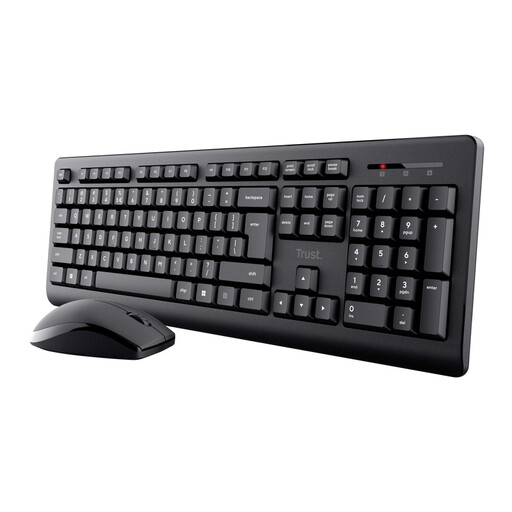
Trust Primo wireless keyboard and mouse set, quiet keys, US QWERTY

Trust Primo wireless keyboard and mouse set, US QWERTY

Compare this set if you need a mouse as well as a wireless keyboard and the US QWERTY layout suits you.

The product name lists quiet keys and a spill-resistant design. It is a keyboard and mouse set, so check that the physical layout is compatible with your work computer.

View at Joybuy

Trust Vaiya wireless keyboard, full-size, numeric keypad, US QWERTY

Trust Vaiya wireless keyboard, full-size, US QWERTY

Compare this model if you are looking for a wireless keyboard with a numeric keypad and the US QWERTY layout suits your work.

The product information lists a connection via USB receiver or Bluetooth and a rechargeable battery. The product name mentions scissor keys.

View at Joybuy

Apple Magic Keyboard with Touch ID and numeric keypad, Dutch layout, white keys

Apple Magic Keyboard with Touch ID and numeric keypad, Dutch layout

Compare this keyboard if you need a numeric keypad and Dutch layout for a compatible Mac.

The product name lists Touch ID, white keys and compatibility with Mac models with Apple silicon. The product information lists Bluetooth and USB-C charging.

View at Joybuy

Frequently asked questions

Do I always need a dedicated numeric keypad for library lending analysis?

No. If you regularly enter strings of numbers, a dedicated numeric keypad is worth comparing. If you rarely use one, you could consider a compact keyboard with an integrated numeric section or a separate numeric keypad. Choose the input method that suits your work.

Can I rely on a keyboard described as having ‘quiet keys’ to make little noise?

Not based on that product description alone. CHERRY and Trust describe specific models as having quiet keys, but these manufacturer descriptions are not comparable sound measurements. Also check the typing feel and connection.

What should I check before connecting a keyboard to a shared computer?

Check the available ports or permitted wireless connections, the physical key layout, and any organisational rules about pairing and receivers. Trust lists a USB-C cable with a USB-C-to-A adapter for the TK-150; Logitech lists Bluetooth and Logi Bolt for the Signature K650.

Does an encrypted keyboard connection automatically make the handling of lending data GDPR-compliant?

No. The Dutch Data Protection Authority says that organisations must protect personal data appropriately. Encryption of a wireless keyboard connection is one feature; it does not, by itself, determine which measures are needed to process the data.

Do Dutch workplace health and safety requirements apply if I use a laptop?

For employees who work with a display screen for more than 2 hours a day, Arboportaal explains that the screen and keyboard must not be attached to each other. When using a laptop, it must be possible to use a separate screen or keyboard, so the requirement depends on how many hours you work with a display each day.
