What should you look for when choosing?
Compare screen specifications only after assessing the window’s position and whether you can use blinds or other shading: the layout and amount of light coming in both affect how comfortable logs are to read.
| Consideration |
What to look for |
Who it matters most to |
| Reflections and daylight |
Check the coating and stated brightness of the exact model. Also consider your viewing direction and whether you can use blinds or other shading. |
When I read logs beside a window, I want to tackle reflections rather than rely solely on a higher brightness rating. Around 36% of consumers put incoming light at the top of their list when buying. |
| Room for text and text size |
Compare the resolution at your chosen screen size, and check your preferred scaling setting and your computer’s video output. |
When I want to view multiple log windows, I weigh up the extra pixels against keeping text comfortably readable at my chosen scaling setting. Around 29% of consumers prioritise space for text and window layout. |
| Screen position |
Check the height, tilt and any pivot adjustments, and measure the available desk space. |
For long periods of work, I want to position the screen to suit my posture and the window. Around 21% of consumers put screen position at the top of their list when buying. |
| Laptop connection |
Check the video output of your laptop port, the cable requirements and whether the charging power is suitable for your laptop. |
If I want to connect and possibly charge my laptop with as few cables as possible, I first check that all the components support these features. Around 14% of consumers prioritise connectivity and possible charging. |
Monitors on Joybuy
This selection of Joybuy products includes portable monitors and 27-inch QHD and 4K models for reading logs and working with multiple windows.
 No image available
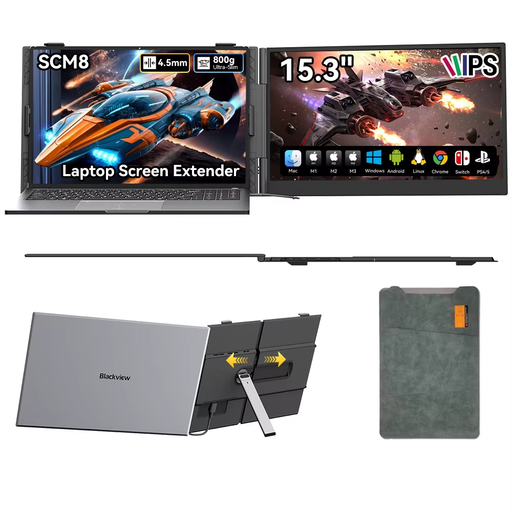
Blackview SCM8 portable monitor, 15.3 inches
Suited to a mobile workspace where you want to use a portable screen with a laptop, smartphone or tablet.
The product title mentions USB-C, a 180° adjustable stand and an included protective case.
Joybuy
 No image available
Philips 27E1N1800AE/00 27-inch 4K UHD monitor
A 27-inch 4K option to compare if you want to display lots of log lines or windows side by side.
The product information lists 3840 × 2160 pixels, an anti-reflective screen and a height-adjustable stand. Check that the text scaling remains comfortable to read for you.
Joybuy
 No image available
MSI Pro MP275Q 27-inch QHD monitor
A 27-inch QHD option to compare if you want to read logs on a matte screen.
The product specifications list 2560 × 1440 pixels, an IPS panel, a matte anti-glare coating and tilt adjustment.
Joybuy
 No image available
INNOCN CB27U1 27-inch 4K UHD monitor
A 27-inch 4K option for those who want to arrange multiple windows and use a laptop.
The product specifications list 3840 × 2160 pixels, a non-glossy screen surface, USB-C with 90 W Power Delivery and a height-adjustable stand. Check that your laptop and cable support the connections you need.
Joybuy
 No image available
INNOCN 2751S PLUS 27-inch QHD monitor
A 27-inch QHD option to compare for text and windows in a workspace where incoming light needs consideration.
The product specifications list 2560 × 1440 pixels, an AG screen surface and a stand with height, swivel and pivot adjustment.
Joybuy
Frequently asked questions
Should my monitor face the window?
No. For screen-based work, Arboportaal recommends looking parallel to the window. Also consider whether moving further from the window or using suitable blinds could reduce reflections and glare. This is workspace guidance, not a guarantee for a specific screen.
Should I choose QHD or 4K for server logs?
Choose based on your preferred text size and how many windows you want to use at once. The 27-inch QHD models mentioned have 2560 × 1440 pixels, while the 27-inch 4K models mentioned have 3840 × 2160 pixels. With 4K, check that the scaling setting keeps text comfortably readable for you.
Can one USB-C cable also charge my laptop?
Only if the monitor, laptop port and cable support the required features and provide enough charging power. BenQ lists 65 W for the GW2790QT, while EIZO lists up to 94 W for the EV2740X; compare these figures with your laptop’s requirements.
What should I consider for a Dutch screen-based workspace?
For relevant screen-based work, Arboportaal outlines considerations such as preventing reflections, adjustability and suitable lighting. Its guidance mentions additional requirements when an employee works at a screen for more than 2 hours a day. Whether they apply depends on the working situation, so they’re not a universal buying requirement for every reader.
What can I do if a monitor bought online isn’t suitable or develops a fault?
According to the Dutch government, in many cases you have 14 days to change your mind when buying remotely. You’re also entitled to a product that is fit for purpose, and you can contact the seller for a solution if there’s a fault. The Netherlands has no fixed statutory warranty period for all products.


