Start by choosing a monitor for server logs that suits the way you work. A taller 3:2 screen gives you a different balance of space from a screen designed for several windows side by side, while a smaller model takes up less desk space. Then check that text is readable at your preferred scaling setting, and that the stand and connections suit your workspace and computer. Screen specifications alone won’t tell you whether a monitor is quiet enough to hear no noise from it.
Who this choice matters to
Log analyst working across multiple windows
You want to keep logs, a terminal and documentation on screen at the same time, so how the screen space is divided matters. RTINGS.com notes that larger, higher-resolution monitors can show more lines at once when programming.
Reader of long text
You spend extended periods reading log lines and want to consider text size, screen position and reflections. Arboportaal lists small text, glare and poor lighting conditions as factors that can make text harder to read.
Laptop user in a quiet study
You want to keep your desk tidy and check whether a single connection can support the display, peripherals and enough power for charging. If a completely quiet setup is important, check separately whether information is available for the exact model.
What to consider when choosing
Taller 3:2 screen
Ideal if: you mainly work with long log sequences or terminal output and want more vertical space. BenQ lists the RD280U as a 28.2-inch 3:2 panel with a resolution of 3840 × 2560 pixels.
Keep in mind: the 3:2 aspect ratio divides the available space differently. It doesn’t give you the same extra width as a screen for side-by-side windows, so also check that the stand will fit on your desk.
27-inch QHD work monitor
Ideal if: you want to pair a log window with a terminal or documentation, for example, without moving up to a larger screen. Dell, ASUS and LG list the models mentioned as 27-inch monitors with 2560 × 1440 pixels.
Keep in mind: USB-C power delivery varies by model. Dell lists 90 W for the P2725DE; ASUS and LG list 65 W for the PA278CV and 27BA65QB-B respectively.
Larger, higher-resolution screen
Ideal if: you want to view more windows or fine text at once and have room for a larger screen. ASUS lists the PA32QCV as a 31.5-inch screen with a resolution of 6016 × 3384 pixels.
Keep in mind: ASUS gives its width as 71.42 cm. A higher resolution doesn’t automatically make small text comfortable to read, so try your preferred scaling setting.
| What to consider |
What to look for when buying |
Who it matters most to |
| Arranging log lines and windows |
View your usual windows side by side at the intended resolution and scaling setting. Also measure the space available on your desk. |
I want to see logs alongside a second work window without constantly switching between them; around 36% of consumers prioritise window layout. |
| Keeping text readable |
Assess actual log lines from your usual viewing distance and at your preferred scaling. Also consider contrast and reflections; Arboportaal identifies these as factors affecting readability. |
I read small text for long periods and want to judge how comfortable it is at my preferred size; around 29% of consumers give readability top priority. |
| Workspace and reflections |
Check the height adjustment and stand dimensions, and consider the monitor’s position in relation to windows and lamps. If you need a very quiet setup, ask for information about the exact model. |
I want to position the screen comfortably and minimise distracting reflections; around 21% of consumers prioritise their workspace setup. |
| Connecting a laptop and peripherals |
Compare your computer’s video output and power requirements with the inputs, Power Delivery and any hub on the exact monitor model. |
I want to connect my laptop and peripherals easily, while making sure everything is compatible; around 14% of consumers give connection convenience top priority. |
Common buying mistakes
-
Assuming a high resolution means text will be easy to read straight away
Usable text size also depends on your scaling setting and viewing distance. Arboportaal lists text that is too small as a possible barrier to readability.
Try viewing log lines at your preferred scaling before treating extra pixels as the deciding advantage.
-
Assuming every USB-C port supplies enough power
The stated Power Delivery output varies between monitors, and your laptop must support video over the connection in question.
Check your laptop’s video output and power requirements, the monitor’s specifications and the cable you plan to use.
Depending on the connection and power requirements, you may need a separate power adapter or a different connection.
-
Treating a product listing or manufacturer’s warranty as the whole picture
The exact model code and specifications must match the version you’re buying. ACM ConsuWijzer also makes clear that your statutory guarantee applies alongside the manufacturer’s warranty.
Before buying, check the model code, current specifications and applicable warranty terms.
Brands and models to consider
BenQ
The RD280U is a 3:2 model worth considering if you mainly work with long lines of text.
- BenQ lists the RD280U as a 28.2-inch monitor with 3840 × 2560 pixels, a matt coating, 110 mm of height adjustment and USB-C with 90 W.
- Its different aspect ratio divides the available space differently from a wider screen designed for side-by-side windows.
Dell
The P2725DE is a 27-inch QHD model to compare if you want to use a USB-C hub.
- Dell lists a resolution of 2560 × 1440 pixels, a 100 Hz refresh rate, 90 W USB-C power delivery and an RJ45 port.
- Check that the hub and connections suit your computer and provide features you’ll actually use.
ASUS
The PA278CV and PA32QCV show the range of screen sizes and resolutions available in the ProArt models.
- ASUS lists height adjustment, pivot and 65 W USB-C for the PA278CV. The PA32QCV is listed as a 31.5-inch monitor with 6016 × 3384 pixels.
- These features belong to different models, so check the connections and dimensions for the specific version you’re considering.
LG
The 27BA65QB-B is a 27-inch QHD model to compare if USB-C and adjustability are important to you.
- LG lists a resolution of 2560 × 1440 pixels, USB-C with up to 65 W, and height, swivel and pivot adjustment for this model.
- Check the full model code and specifications of the version you’re considering.
Philips
The Business Monitor 27B2U3601H/00 is a 27-inch QHD model with a built-in webcam.
- Philips lists a resolution of 2560 × 1440 pixels, USB-C and a pop-up webcam.
- A webcam doesn’t automatically add value if you only use the monitor to inspect logs, so choose this feature only if you’ll use it too.
Joybuy monitors for this use case
This selection from Joybuy ranges from ultrawide screens for using multiple windows to QHD and Full HD models. Focus on the screen layout, connections and desk space you’ll need.
 Image unavailable
Dell Pro P3426WEV 34.1-inch curved WQHD IPS USB-C hub monitor
The 21:9 aspect ratio could suit you if you want to view log lines and other windows side by side.
The product specifications list 3440 × 1440 pixels, a USB-C hub, RJ45, KVM and an adjustable stand.
USB-C video and charging require a compatible laptop with DisplayPort Alt Mode and USB Power Delivery; Dell lists up to 90 W. The stated width is 815.6 mm, so measure your desk.
View at Joybuy
 Image unavailable
Philips 27E1N1800AE/00 27-inch 4K UHD IPS monitor
This 27-inch model is worth comparing if you’re looking for a 4K screen in a desk-friendly size.
The product name lists a resolution of 3840 × 2160 pixels, a 60 Hz refresh rate, 4 ms, HDMI and DisplayPort. The description mentions an anti-glare screen and height-adjustable stand.
View at Joybuy
 Image unavailable
AOC G4 Q27G4ZR 27-inch QHD monitor
This model could suit you if you’re comparing 27-inch QHD screens and want an adjustable viewing position.
The product specifications list 2560 × 1440 pixels, 130 mm of height adjustment, pivot and several video inputs. The description also mentions tilt and swivel adjustment.
View at Joybuy
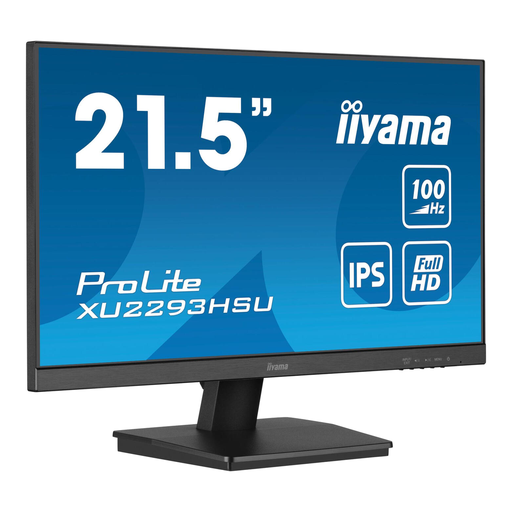 Image unavailable
iiyama ProLite 21.5-inch IPS Full HD monitor with USB hub
This more compact 21.5-inch model could be a good fit when desk space matters more than a large screen layout.
The product specifications list 1920 × 1080 pixels and a matt anti-glare screen. The description mentions HDMI, DisplayPort, a USB hub and a tilt-adjustable stand.
View at Joybuy
 Image unavailable
LG 34WR50QK-B 34-inch 3440 × 1440 monitor
The 21:9 aspect ratio could suit you if you want to arrange several windows side by side.
The product name lists a resolution of 3440 × 1440 pixels; the description mentions a 100 Hz refresh rate, Picture-by-Picture and Reader Mode.
The stated screen width is 809 mm, so measure the space available on your desk.
View at Joybuy
Frequently asked questions
Do you need a 4K or 6K monitor for server logs?
No. A higher resolution isn’t essential for reading logs. Decide how many lines and windows you want to see at once, then try the text at the scaling setting you plan to use.
Can you connect your laptop with a single USB-C cable?
Only if your laptop supports video over that connection and the monitor’s power output is suitable for your laptop. Dell lists 90 W for the P2725DE; ASUS and LG list 65 W for the PA278CV and 27BA65QB-B. Check the exact version and cable.
How can you set up a monitor for comfortable reading over long periods?
Adjust the screen height, text size and lighting to suit your workspace, and reduce glare by positioning the monitor in relation to windows and lamps. Arboportaal lists small text and reflections as factors that can make text harder to read.
How can you tell if a monitor is quiet enough for a peaceful study?
Don’t infer how much noise a monitor makes from its resolution, connections or other general specifications. If you need a very quiet setup, ask for information about the exact model and the conditions it applies to.
What returns period and warranty apply to online purchases in the Netherlands?
According to ACM ConsuWijzer, regular online consumer purchases generally come with a statutory cooling-off period of up to 14 days after delivery, subject to applicable exceptions. ACM ConsuWijzer also states that your statutory guarantee applies alongside the manufacturer’s warranty; check the terms that apply to your purchase.
What should you look for in EU energy information?
The European Commission states that computer monitors are covered by EU ecodesign and energy-labelling rules. Compare the information for the exact model; an energy rating won’t tell you whether a monitor is quiet enough to hear no noise from it.


