What should you look for when buying?
Start by thinking about how you enter and find information. The Cultural Heritage Agency of the Netherlands’ registration guide lists a spreadsheet as an option for a straightforward collection. Then choose storage to suit your own files and back-up method.
Windows laptop with a larger screen
A good fit if: you usually work in one place and want to view lots of catalogue fields or photos at once.
Bear in mind: more workspace can mean less portability. Also check that any catalogue software you use works with the version of Windows you choose.
Compact Windows laptop
A good fit if: you catalogue your collection in different places and are happy with a smaller screen.
Bear in mind: there is less room to view fields and photos at the same time, and you will still need to connect your external back-up drive.
MacBook with Time Machine
A good fit if: your catalogue software works on macOS and you want to use Time Machine with a suitable external drive.
Bear in mind: check that your existing drive or card reader works with the ports on the model you choose, and allow for a separate back-up drive.
| Consideration |
What to look for when buying |
Who is this important to? |
| Restorable local back-up |
Check how your external drive connects, which folders are included and whether you can restore and open files. |
I want to be able to restore my catalogue and photos if my laptop fails; around 33% of consumers prioritise a restorable local back-up. |
| Data entry and visibility |
View your own catalogue layout on the screen size you have in mind, and check that the keyboard is comfortable for entering data. |
If I enter lots of records, I want to view and find fields easily; around 27% of consumers prioritise ease of data entry and visibility. |
| Space for photos |
Check how much space your catalogue and photos currently take up, and allow for growth and a separate back-up. |
I want to store photos alongside my data without forgetting about the back-up; around 20% of consumers prioritise photo storage. |
| Portability |
Compare the size and weight of the exact model with the screen space you need for your catalogue. |
If I catalogue my collection in different locations, I want to take my laptop with me without the screen feeling awkwardly small; around 20% of consumers prioritise working on the go. |
Relevant brands to consider
These examples apply to the product lines and models mentioned; they are not recommendations for every model from a brand.
Dell
The Inspiron 15 3530 with order code cn33027 is a model to compare if you are looking for a larger screen for data entry and a numeric keypad.
- Dell lists a 15.6-inch screen, 16 GB RAM and a 1 TB SSD for this model.
- Dell says that ports can vary by configuration, so check the order code and connection for your back-up drive.
HP
The HP OmniBook 5 16-bm0615ndx is an example to compare if you want a larger screen for catalogue fields or photos.
- HP lists a 16-inch screen, 16 GB RAM and a 512 GB SSD for this model.
- Check the ports and whether an external drive is included with the model you choose.
Apple
A MacBook Air is worth considering if your catalogue software works on macOS and you want to use Time Machine for a local back-up.
- Apple lists 16 GB of memory as standard, a 512 GB SSD and two USB-C Thunderbolt 4 ports for the MacBook Air 13-inch M5. Time Machine can use an external drive.
- Check that your existing accessories are compatible and choose your back-up drive separately. Apple recommends a Time Machine storage device with at least twice the storage capacity of your Mac.
Lenovo
The IdeaPad Slim 5 15ARP10 product line is worth considering when comparing screen space and storage options.
- Lenovo PSREF lists models with a 512 GB or 1 TB SSD and describes a second internal SSD slot.
- Check the full model code and the ports on the model you choose. A second internal SSD is not a separate back-up of your laptop.
Joybuy product picks
These Joybuy picks are Windows laptops suited to catalogue work, with models to help you weigh up screen space and portability. Check the ports on each model to make sure they work with your separate back-up drive.
 Image unavailable
HP OmniBook X Flip NG AI PC 16-as0050nd D75LQEA#ABH
Compare this model if you want to view lots of catalogue fields at once. Check the product page to make sure its ports work with your external back-up drive.
The charger must be purchased separately.
View at Joybuy
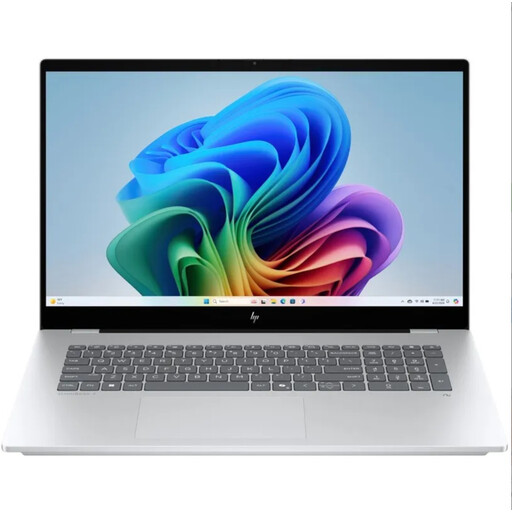 Image unavailable
HP OmniBook 7 NG AI PC 17-dc0070nd, QWERTY Keyboard
A model to compare if you mainly enter catalogue data at a fixed workstation. Check the screen size and ports on this exact model.
Also check that the ports work with the drive you plan to use for local back-ups.
View at Joybuy
 Image unavailable
Auusda T156A, 16 GB DDR4, 512 GB SSD
An option to compare if you enter lots of data and need storage for catalogue files.
The product name lists 16 GB DDR4 memory, a 512 GB SSD, a 3050E processor, fingerprint unlocking and a backlit keyboard.
View at Joybuy
 Image unavailable
HP OmniBook 5 Flip 14-fp0075nd C5VM5EA#ABH
A more compact option to compare if you enter catalogue details in different locations. The 14-inch screen gives you less room to view fields at once than larger laptops.
The charger must be purchased separately.
View at Joybuy
 Image unavailable
HP OmniBook 3 AI PC 14-ht0013nd
A 14-inch model to compare if you enter catalogue details in different places. Bear in mind that it offers less screen space at once than a larger model.
The product name lists an Intel Core 3 304 processor, 8 GB RAM, a 512 GB SSD and Windows 11 Home.
View at Joybuy
Frequently asked questions
Do you need special software to catalogue seeds?
Not always: for a straightforward collection, a spreadsheet with well-chosen columns may be enough. First decide what information and search options you need, then check that any specialist software works with the operating system you choose.
How do you make and check a local back-up?
Windows File History can copy selected files to an external drive or network location; add catalogue folders outside the default libraries if needed. On a Mac, Time Machine can use an external drive. Then test that you can restore and open files. The National Cyber Security Centre recommends checking back-ups by opening files.
How much storage do you need for photos and a seed catalogue?
It depends on the number and size of your files. The Consumers’ Association suggests 512 GB or more as a guide if you have lots of large photo or video files. This is general buying guidance, not a fixed requirement for every seed catalogue. Add up your own catalogue and photo files, and allow space for a separate back-up too.
Is a Windows 10 laptop still an obvious choice in October 2026?
No. First check the update and upgrade options for the exact model. Microsoft ended mainstream support for Windows 10 on 14 October 2025 and lists an Extended Security Updates programme as a temporary option for consumers, with support until 12 October 2027 for eligible devices.
What rights do you have when buying online in the Netherlands?
For a consumer purchase in the Netherlands, the seller must put right, free of charge, a product that does not perform as you could reasonably expect under normal use. ACM ConsuWijzer describes this as the legal guarantee. Online purchases usually come with a 14-day cooling-off period after delivery, although exceptions apply. This cooling-off period is separate from your rights if a product is faulty or does not meet the terms of the contract.


