
Vandaag of morgen in huis

Kwaliteit gegarandeerd

Welkomstaanbiedingen ontgrendelen: GRATIS bezorging | Tot 80% korting | Gratis 30 dagen JoyPlus-proefperiode
Download de app
A security camera can help you keep an eye on your home, shop, baby or pets remotely. However, it is easy to pay too much for features you do not need. For example, a high resolution means little if the Wi-Fi connection is unstable or night-time footage remains unclear.
When comparing cameras, focus particularly on the conditions in which you will use them. An indoor security camera for the living room has different requirements from an outdoor security camera by the front door or driveway.
2K, 3MP and 5MP may sound appealing, but image quality also depends on the lens, lighting conditions, compression and internet connection. A 2K security camera can show more detail than 1080p, but only when footage is transmitted and stored without significant delays.
So also check:
For some models, cloud storage is optional but paid for. This is not always clearly shown alongside the purchase price. If you only want to use local storage, check whether a microSD card is supported and what the maximum capacity is.
Local storage gives you direct control over your files. Cloud storage can be useful if the camera or SD card is damaged, but it may involve recurring costs. Also check whether the card is included. With various models, it is not supplied.
Not every Wi-Fi security camera works with both 2.4GHz and 5GHz. Some models support 2.4GHz only. This frequency often travels through walls more effectively, but it can become congested in flats and residential areas.
Before buying, check:
For outdoor use, a protection rating such as IP66 waterproof is relevant. According to the usage information for certain models, this means that the housing protects against dust and powerful water jets. The camera must not be submerged, and the power connection must also remain dry and safe.
An indoor security camera should not automatically be installed under a canopy or in a damp shed. Check the official product specifications rather than relying solely on terms such as “all-weather”.
A camera with night vision usually uses infrared footage, colour images in low light or a combination of both. Colour footage can provide more recognisable detail when there is still some ambient light. In complete darkness, some cameras switch to infrared.
Pay attention to the stated range. For example, a model may offer night vision up to approximately 9 or 10 metres according to the product description. Walls, rain, glass and backlighting can affect the actual image.
Motion detection alerts you when movement is detected. Person detection attempts to distinguish people from other movement. According to the manufacturer’s own information, some models may also support sound detection, baby-cry detection or vehicle detection. Treat this as a product specification, not a guarantee that every alert will be accurate.
Set up detection zones wherever possible. This helps prevent alerts caused by a busy road, moving trees or pets. Do not point a camera at bedrooms, bathrooms or your neighbours’ homes. Tell household members, employees and visitors when recording is taking place, and take privacy regulations into account.
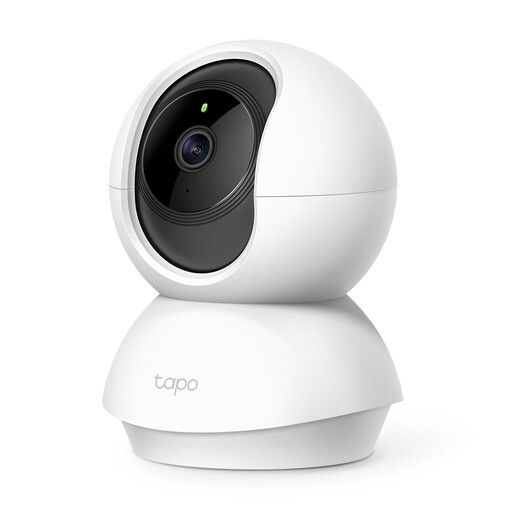
Why it suits this profile: For anyone looking for a compact IP camera for a living room, hallway, home office or pets. Installation is completed through the Tapo app, and the camera is designed for indoor use.
The product specification states that local storage of up to 128GB is supported, so cloud storage is not the only storage option. The camera provides 1080p footage and is not intended for unnecessary outdoor applications.
1080p resolution, 360° horizontal rotation, night vision up to 9 metres, motion alerts and two-way communication.
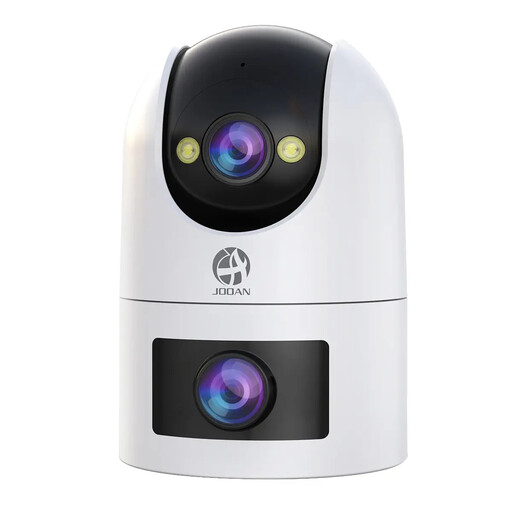
Why it suits this profile: For homeowners who want to monitor a larger area indoors and outdoors, and value support for both 2.4GHz and 5GHz Wi-Fi.
The product specification lists dual-band Wi-Fi, an IP66 housing and support for a microSD card of up to 256GB. However, check that the supplied power supply is suitable for the installation location.
Dual-lens viewing, 360° PTZ control, colour and infrared night vision, two-way communication, and local or paid cloud storage.
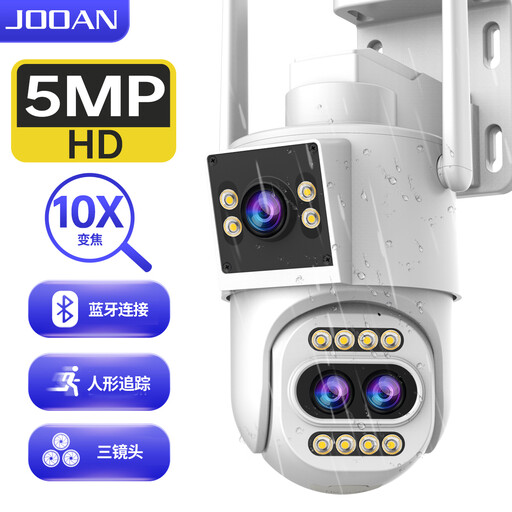
Why it suits this profile: For a driveway, garden, commercial property or other outdoor location where one fixed view and one controllable view are useful at the same time.
The fixed and PTZ lenses can keep different parts of the property in view. Please note: according to the product information, this model uses 2.4GHz Wi-Fi and not 5GHz.
Three lenses with two views, 10× optical zoom according to the product description, IP66 rating, night vision and app alerts.
We have put together a complete, up-to-date list of products that fully meet these strict selection criteria and the applicable European safety regulations.
Position the camera so that the desired area is visible without windows, lamps or reflective surfaces directly in view. Test the Wi-Fi connection at the final installation point before drilling. Use a strong, unique password for the app and install firmware updates whenever they become available.
For a baby monitor with a camera, remember that the camera never replaces supervision by an adult. Position the device securely and out of the child’s reach. A pet camera is best placed in a stable position where the animal cannot reach the cable.
Some models offer a local hotspot mode or can record to a microSD card when the internet connection temporarily drops. Internet access is generally required for remote control and push notifications. Check this for each model, as the available features vary.
Recording time depends on resolution, compression, motion detection and card capacity. According to the product information for one JOOAN model, a 256GB card can provide approximately 20 to 75 days of storage when recording continuously; this is a guideline, not a fixed guarantee. Motion-triggered recording usually uses less space.
A one-off purchase usually covers the camera and basic functionality. Cloud storage may then require a subscription. With local storage, you may only need to pay for a suitable microSD card, but you will need to account for wear and tear, replacement and the risk of damage yourself. Check the total cost before buying.
