
Vandaag of morgen in huis

Kwaliteit gegarandeerd

Welkomstaanbiedingen ontgrendelen: GRATIS bezorging | Tot 80% korting | Gratis 30 dagen JoyPlus-proefperiode
Download de app
A security camera can help you keep an eye on your home, shop, garden or pets from a distance. Yet the range can be difficult to compare. A camera with lots of megapixels isn’t automatically suitable for a dark back garden. And a wireless security camera doesn’t always work without limitations.
The main pitfalls usually fall into three areas:
So always check the product specifications, storage method, power supply and installation requirements before you buy a security camera.
Resolutions such as 1080p, 2K and 5MP give an indication of the number of pixels. A higher resolution can show more detail, but the result also depends on the lens, image compression, lighting and field of view.
For an indoor security camera, 1080p is often sufficient to monitor a room, hallway or pet. For a driveway or garden, 2K or higher can be more practical, especially when the camera is positioned further from the desired view.
Also pay attention to:
A stated night vision distance is a product specification, not a guarantee that faces or number plates will be clearly recognisable at that distance.
A camera with motion detection can send a notification to your phone as soon as movement is detected. Basic models can sometimes also react to shadows, pets, trees or headlights.
Useful features include:
According to some brands’ own information, radar, PIR and AI can together reduce the number of unnecessary notifications. See this as a feature to check, not as a guaranteed error-free recognition system.
A wireless security camera often still needs a power source. “Wireless” usually refers to the Wi-Fi connection, not to being completely cable-free. A battery model needs to be recharged; a solar security camera requires sufficient light and a suitable mounting angle.
Also compare storage options:
Check with a Wi-Fi security camera whether your router supports 2.4GHz, 5GHz or both. An IP camera with a wired network connection can be more stable when Wi-Fi is weak at the mounting location.

Why this fits the profile: This indoor security camera is suitable for a living room, hallway, office or pet. Installation is done via the Tapo app and the camera supports local storage on a microSD card.
Storage can be local up to 128GB via microSD. A cloud subscription is therefore not the only storage option. Do check whether the card needs to be purchased separately.
1080p video, 360° horizontal pan range, 114° vertical tilt, motion notifications, night vision up to 9 metres and two-way audio.
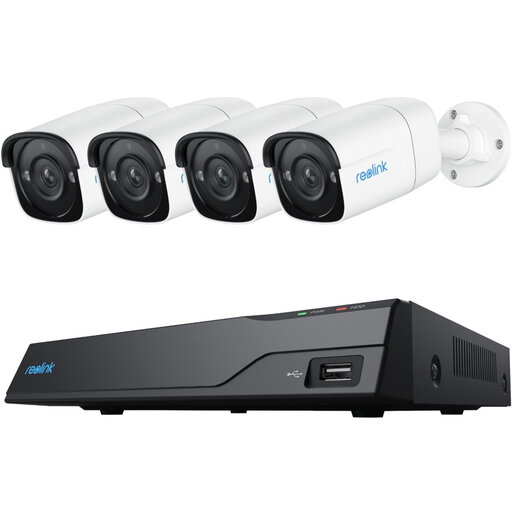
Why this fits the profile: This system suits homeowners or small business owners who want to monitor multiple zones around a house or commercial property with a fixed camera setup.
A complete system prevents you from having to combine individual cameras with different apps and storage solutions later. Check the cabling and mounting location beforehand.
A system with 5MP and 4MP cameras is aimed at higher image resolution and monitoring multiple points. The exact storage and network details are on the product page.
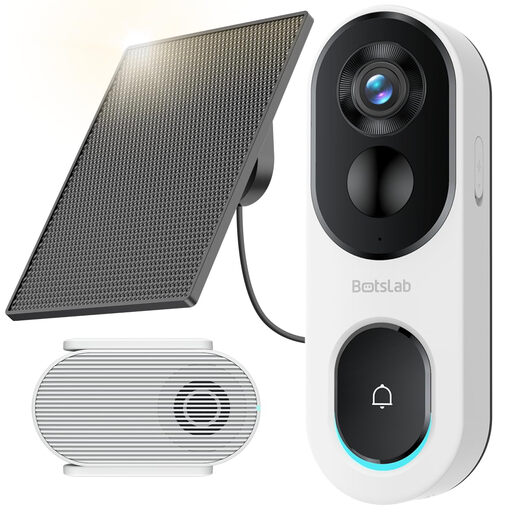
Why this fits the profile: This smart doorbell camera is aimed at front doors where parcel deliveries, visitors and avoiding regular charging are important.
According to the product description, local storage via a base station is possible without a mandatory monthly payment. Check the required microSD card and position the solar panel according to the mounting instructions.
2K image, head-to-toe view, person and parcel detection, two-way audio and a base station supporting 32–256GB storage according to the product information.
We’ve put together a full, up-to-date list of products that fully meet these strict selection criteria and comply with current European safety regulations.
Position a security camera so that you only film the necessary area. Don’t point an outdoor camera unnecessarily at neighbours’ gardens or windows. Use privacy zones where possible and inform visitors when a camera is visibly recording. For businesses, additional obligations may apply, for example regarding information for staff and visitors.
When mounting outdoors, check the IP rating. IP65 or IP66 means protection against dust and water jets under certain test conditions, but not that connections can be submerged. Seal cable connections waterproof and follow the supplied safety instructions.
It can, if the model supports local storage via microSD, internal storage or an NVR. Some extra features, such as cloud backup or longer video history, may still require a paid subscription. So check what is available without a subscription.
Choose a model with an appropriate IP rating, night vision, stable power supply and a Wi-Fi or network connection that works at the mounting location. An outdoor camera with motion zones helps to reduce notifications from passing traffic or moving branches.
The lifespan depends on power supply, weather conditions, storage, firmware and intensity of use. A mains-powered camera doesn’t need regular recharging, while a battery model requires more maintenance with lots of notifications or live viewing. Check connections and update the app and firmware according to the manufacturer’s instructions.
