
Vandaag of morgen in huis

Kwaliteit gegarandeerd

Welkomstaanbiedingen ontgrendelen: GRATIS bezorging | Tot 80% korting | Gratis 30 dagen JoyPlus-proefperiode
Download de app
Buying a security camera may seem straightforward: choose a high resolution, connect the camera to Wi-Fi and you’re done. In practice, most problems only arise after installation. The camera is mounted in the wrong place, notifications arrive too frequently or stored footage turns out to be available only with a subscription.
For Dutch homes, flats, gardens and small businesses, three pitfalls are particularly important:
Below, I explain which specifications you should check and which models suit different situations.
Resolution determines how much image information the camera captures. Full HD 1920 × 1080 pixels is generally sufficient for a room, hallway or small entrance. For a garden, driveway or shop, 2K, 3K or 4K can provide more detail, particularly when you want to zoom in digitally.
Also pay attention to the type of night vision:
A camera with night vision is therefore not automatically suitable for every garden. Check where the camera will be mounted and how much distance it needs to cover to the driveway or back door.
A basic motion-detection camera responds to changes in the image. These may be people, but also a cat, falling leaves or headlights. It is therefore worth setting up motion zones and, where available, choosing a camera with person and vehicle detection.
This classification can filter notifications more effectively, but do not assume the function is flawless. According to the manufacturer’s product information, certain models can distinguish between people and vehicles; in practice, recognition can be affected by backlighting, distance and the viewing angle.
Also look out for:
A Wi-Fi security camera only works reliably if the signal is strong enough at the installation location. Check in advance whether the camera supports 2.4 GHz, 5 GHz or both bands. 2.4 GHz often has a longer range through walls, while 5 GHz is generally less congested but may have a shorter range.
For outdoor use, there are several options:
Also check the storage options. A security camera with an SD card can store footage locally. Pay attention to the maximum capacity, as this varies by model. Cloud storage may involve additional costs. Some products mention a free trial period, after which a paid subscription may apply.
An outdoor camera must be able to withstand rain, dust and temperature fluctuations. A rating such as IP65, IP66 or IP67 indicates the extent to which the housing is protected against dust and water. This does not mean that every mounting location is suitable. Seals, cable entries and positioning beneath the eaves remain important.
An indoor security camera is usually more compact and designed for a stable power connection. For a living room, nursery, office or area where pets spend time, features such as a 360-degree camera, privacy zones and two-way audio are useful. Do not point the camera at other people’s private spaces, and inform household members or staff about the camera’s presence and use.

Why it suits this profile: According to the product information, this indoor camera provides Full HD images, 360° horizontal rotation, motion notifications and local storage via a microSD card. This makes it suitable for a living room, hallway or area where pets spend time.
The specifications state night vision up to 9 metres and a privacy mode. Set up motion zones to limit notifications caused by traffic outside the desired field of view.
1080p video, two-way audio, 360° pan function and microSD storage up to 128 GB according to the stated product specifications.
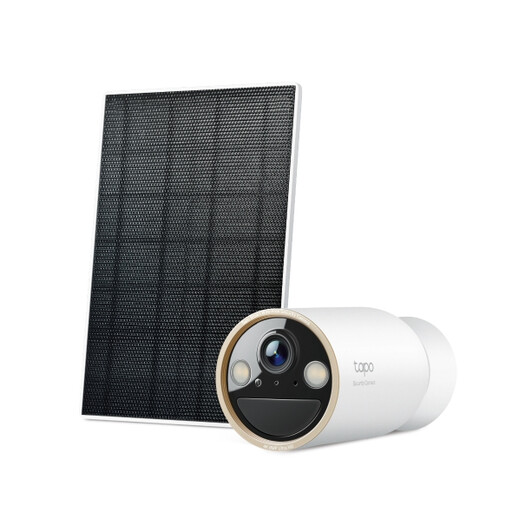
Why it suits this profile: According to the product information, this outdoor system combines 4K resolution, a solar panel, colour night vision and person and vehicle detection. It is suitable for a driveway, garden or business premises where a power socket is difficult to reach.
The IP66 rating and solar power address two common outdoor installation issues: exposure to the elements and cables running to a power socket. However, check how much direct sunlight is available.
3840 × 2160 pixels, 150° viewing angle, microSD storage up to 512 GB and two-way audio according to the product specifications.
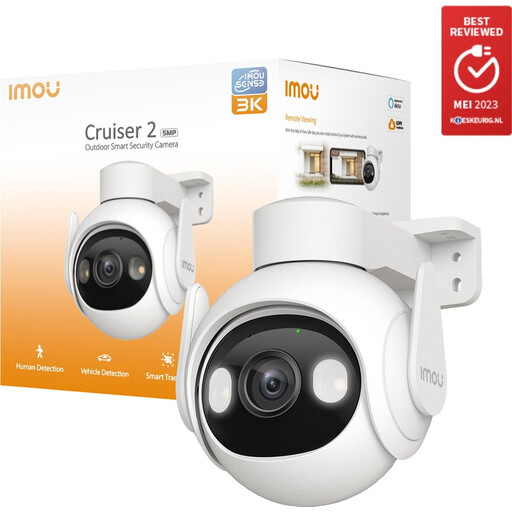
Why it suits this profile: The stated specifications include PTZ control, 340° rotation, 90° tilt, automatic tracking and connection via Wi-Fi or Ethernet. This is suitable for a large garden or a situation where one camera needs to cover several viewing directions.
The choice between Ethernet and Wi-Fi is helpful when the wireless signal outdoors is insufficient. IP66 protection reduces the risk from dust and splashing water, provided the camera is mounted correctly.
2880 × 1620 pixels, night vision up to 30 metres, microSD storage, person and vehicle detection and two-way audio according to the product information.
We have put together a complete, up-to-date list of products that fully meet these strict selection criteria and the applicable European safety regulations.
A camera with two-way audio is useful for communicating with a delivery driver or family member, but consider your surroundings when audio is recorded automatically. Read the manual and product terms before enabling continuous recording.
A Wi-Fi security camera may sometimes continue recording locally to a microSD card when the internet connection temporarily drops. Features such as remote control, cloud storage and push notifications usually require an internet connection. Check this for each model and preferably use a stable network.
This depends on the number of notifications, recording settings, weather and temperature. Frequent live viewing and night-time lighting use more energy. With a solar security camera, positioning is crucial: a panel in the shade provides less charging capacity. Check the battery capacity and plan regular maintenance.
Not always. Various models support local storage via a microSD card. Some cameras also offer cloud storage, sometimes with a trial period or paid subscription. Before making your choice, check the maximum card capacity, recording method and which features are available without a subscription.
