
Vandaag of morgen in huis

Kwaliteit gegarandeerd

Welkomstaanbiedingen ontgrendelen: GRATIS bezorging | Tot 80% korting | Gratis 30 dagen JoyPlus-proefperiode
Download de app
Buying a security camera seems simple until you have to choose between a Wi-Fi security camera, a wireless security camera, an indoor model or a camera with a solar panel. Marketing copy often focuses on high resolution, smart detection and long battery life. But these terms don’t tell you everything about day-to-day use.
Look out for these common pitfalls:
First, decide exactly what you want to monitor. An indoor security camera is suitable for a living room, nursery, office or shop. For a garden, shed, driveway or front door, you’ll need an outdoor security camera with suitable weather resistance.
A wireless model is practical if you don’t want to run a network cable. But make sure you understand the difference between wireless network connectivity and being completely cable-free. A battery-powered camera needs recharging; a solar security camera can reduce the upkeep, but needs enough daylight and careful positioning.
For renters, a compact camera with a magnetic base, adhesive mount or a model placed behind glass can be a good option. If you place a camera behind a window, always check for reflections and glare at night.
Resolutions such as 1920 × 1080, 2560 × 1440 and 2880 × 1616 give you a useful indication of how much detail an image contains. More pixels don’t automatically mean faces or number plates will always be recognisable. The viewing angle, frame rate, lens and lighting also play a part.
A camera with night vision usually uses infrared LEDs. Check the stated range, but bear in mind the effects of walls, rain, backlighting and mounting height. A night-vision camera for a small hallway has different requirements from a model for a long driveway.
A motion-detection camera can send alerts when it detects movement. On models with person or vehicle detection, you can often set alerts more precisely. Also check whether the camera supports activity zones and privacy zones. These help reduce alerts triggered by a public pavement, moving trees or a busy window.
A PIR sensor measures changes in infrared radiation. This is different from software-based image analysis. According to the product specifications, some models combine both technologies. Actual accuracy depends on the surroundings and settings.
For outdoor use, an IP65 or IP66 rating is relevant. IP65 means the casing is protected against dust and water jets; IP66 offers greater protection against powerful water jets. Neither rating means the camera can be submerged.
Also check:
Don’t place a smart IP camera where it unnecessarily records neighbours, passers-by or a private space. Inform anyone concerned where necessary and use privacy zones. For business use, also check the relevant privacy rules.

Why it suits this user: This indoor model offers 1080p video, app alerts and local microSD storage. It’s a good fit if you’re looking for your first camera for a living room, pet or home office.
The product specifications list night vision up to 9 metres, motion zones and local storage up to 128GB. This means you don’t have to rely solely on cloud alerts.
1080p video, 360° horizontal rotation, two-way audio and support for Android and iOS.
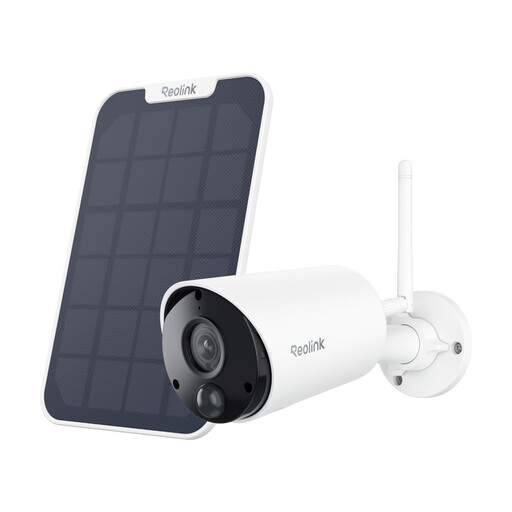
Why it suits this user: This wireless outdoor security camera combines 5MP video with a battery and support for a solar panel. It’s a practical choice for a garden, shed or driveway without a fixed power supply.
The product specifications list PIR, person and vehicle detection, so you can set alerts more precisely than with general motion detection.
5MP resolution, IP65, night vision up to 10 metres, two-way audio and microSD storage up to 128GB.
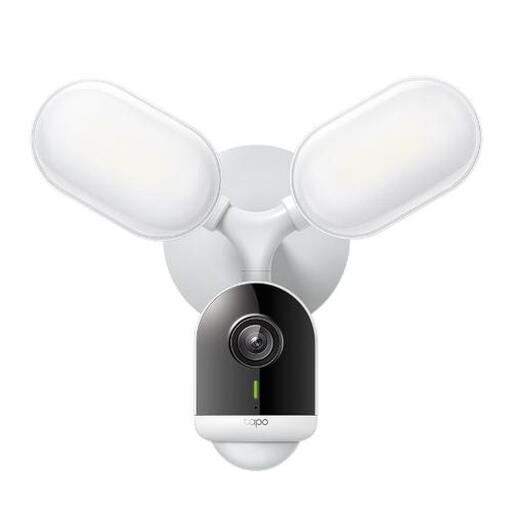
Why it suits this user: This wired model is a good choice if you want a permanent installation on an outside wall and don’t want to rely on a battery.
The camera uses a fixed power supply and, according to the product specifications, has an IP65 rating. That means you don’t need to estimate battery life.
2560 × 1440 resolution, night vision up to 29.9 metres and microSD support up to 512GB.
We’ve put together a complete, up-to-date list of products that meet these strict selection criteria and the applicable European safety regulations.
You’ll usually need Wi-Fi for live viewing, alerts and app controls. Some models can record locally to a microSD card if the internet connection temporarily drops. Check which features remain available offline for each model.
It varies by camera and usage. Frequent live viewing, night lighting, frequent alerts and low temperatures all shorten battery life. A solar security camera can reduce how often you need to recharge it, but performance depends on its position, the season and cloud cover.
A camera with local microSD storage can work without a compulsory cloud subscription. A paid subscription may be required for cloud storage, a longer video history or extra features. So don’t just consider the purchase price: factor in storage, accessories, power consumption and any subscription terms.
