
Vandaag of morgen in huis

Kwaliteit gegarandeerd

Welkomstaanbiedingen ontgrendelen: GRATIS bezorging | Tot 80% korting | Gratis 30 dagen JoyPlus-proefperiode
Download de app
A security camera can help you keep an eye on your home, garden, garage, pets or small business premises from a distance. Yet the difference between a camera that remains useful day after day and a purchase you regret is often about more than just image resolution.
Pay particular attention to these four common pitfalls:
First, decide where you want to place the camera. An indoor security camera is suitable for a living room, hallway, nursery or home office, for example. For a façade, garden or garage, you need a model specifically designed for outdoor use.
A Wi-Fi security camera or IP camera connects to your router and can usually be viewed via an app. Check beforehand whether the camera works on your Wi-Fi band. Some models only support 2.4 GHz, while others also support 5 GHz. 2.4 GHz often has a greater range indoors; 5 GHz can offer higher data speeds when the connection is good.
For tenants, a camera that doesn’t require drilling may be appealing. A plug-in model that sits on a shelf or windowsill is easier to move. For long-term outdoor monitoring, a wireless security camera with a battery or a solar security camera can be more convenient, provided the location gets enough daylight.
Full HD, or 1920 × 1080 pixels, is sufficient for most purposes. A higher resolution, such as 2K or 4K, can show more detail but also requires more storage and bandwidth. Also pay attention to the field of view. A 360-degree camera with pan and tilt can cover a larger area, but a rotating lens doesn’t always see all directions at once.
For night-time use, also check the type of night vision. Infrared night vision usually produces black-and-white images. Some models also use LED lighting for colour images. Look at the stated night vision range, for example 9, 10, 15 or 30 metres. The actual visibility also depends on obstacles, lighting and placement.
A camera with motion detection records movement in a set area. Person detection can make alerts more targeted, but check which detection types are actually listed in the product specifications. Some cameras also support vehicle or pet detection.
Adjustable activity and privacy zones are useful. These allow you to keep a public pavement, window or part of the garden out of view or out of alerts. A security camera with an app must also be compatible with your smartphone, usually Android or iOS. Check whether cloud storage involves additional costs.
With a security camera that uses microSD storage, you save footage locally. Pay attention to the maximum capacity, for example 128, 256 or 512 GB, and check whether the card is included. Cloud storage can be handy for remote access, but according to the product information it is a paid option or subscription on various models.
For outdoor use, an IP65 or IP66 rating is relevant. IP65 means the housing is dust-tight and protected against water jets. IP66 offers a higher level of protection against powerful water jets. This rating does not make a camera suitable for submersion. Also install connections and power adapters according to the safety instructions.

Why this fits the profile: This model is designed for indoor use and works via Wi-Fi. It offers 1080p image quality, 360° pan, night vision up to 9 metres and local storage up to 128 GB.
The specifications make it clear that this is an indoor camera with mains power. This means you won’t accidentally use it outdoors or without a fixed power source.
1080p resolution, two-way audio, motion alerts and microSD storage up to 128 GB.
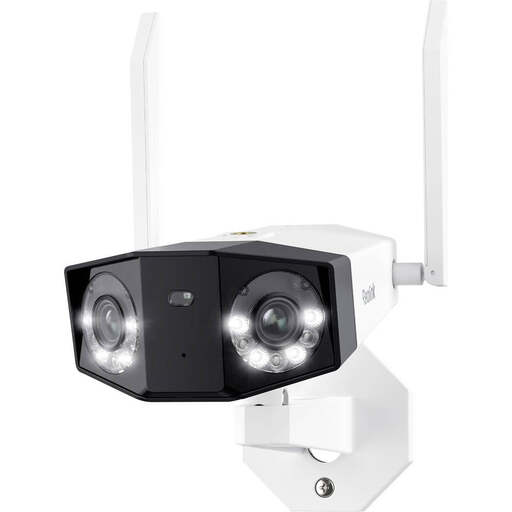
Why this fits the profile: This dual-lens outdoor security camera combines a wide field of view with 8MP resolution, Wi-Fi on 2.4 and 5 GHz and multiple recording options.
The IP66 rating and local storage up to 256 GB are explicitly stated. This means you can check in advance whether the camera suits your outdoor location and storage needs.
180° horizontal field of view, person, vehicle and pet detection, night vision up to 30 metres and two-way audio.
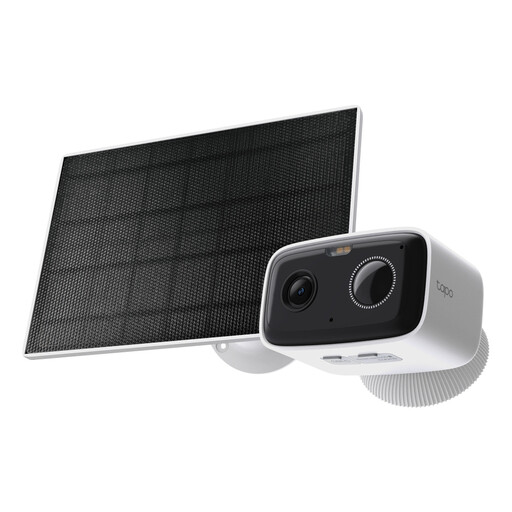
Why this fits the profile: This model is designed for outdoor use and combines a wireless design with battery and solar power according to the product description.
The IP65 rating, battery power and stated Wi-Fi connection make the installation requirements clearer than with a general indoor model.
Full HD image quality, person detection, night vision up to 10 metres, two-way audio and microSD storage.
We have put together a complete, up-to-date list of products that fully meet these strict selection criteria and comply with current European safety regulations.
Only point a surveillance camera at the area you actually want to monitor. Make sure that neighbours’ properties, public spaces and other people’s private areas are kept out of view as much as possible. Check the current rules on CCTV and data protection. In certain situations, you must inform visitors that recording is taking place.
Use a strong Wi-Fi password, change default login details and install firmware updates. Mount the camera securely and, for outdoor installation, use the supplied or suitable fixing materials. A camera with two-way audio is practical, but switch off the microphone and speaker when you don’t need them.
The camera can sometimes continue to record locally on a microSD card if the internet connection drops. For live viewing, alerts and remote control, an internet connection is usually required. Check this per model and app.
The lifespan depends on power supply, weather conditions, firmware and usage. An outdoor camera with an IP rating is better suited to moisture and temperature fluctuations than an indoor model. With battery-powered models, recordings, night vision and Wi-Fi signal strength affect how often recharging is needed.
In addition to the purchase price, a microSD card, additional power accessories or cloud storage may involve costs. Local storage avoids a mandatory cloud subscription on many models, while cloud features are sometimes offered as a paid service according to the product information.
