
Vandaag of morgen in huis

Kwaliteit gegarandeerd

Welkomstaanbiedingen ontgrendelen: GRATIS bezorging | Tot 80% korting | Gratis 30 dagen JoyPlus-proefperiode
Download de app
A security camera provides peace of mind. Whether you want to see who's at the door, keep an eye on your kids or pets, or secure your property when you're away. But the market is flooded with options, technical jargon, and marketing promises. It's easy to buy a camera that doesn't meet your needs or comes with unexpected costs.
As a Joybuy Product Recommendation Officer, I'm here to help you cut through the noise. We'll focus on what really matters, so you can choose a model that fits your specific situation without paying for features you don't need. First, let's discuss a few common pitfalls.
Many cameras look perfect on paper, but fall short in practice. Pay attention to the following points to avoid buyer's remorse:
You don't need to be a tech expert to make the right choice. Focus on these three key specifications that make a difference in daily use.
Resolution determines the sharpness of the image. Full HD (1080p) is the baseline, but for outdoor use or zooming in on details (like a license plate), a higher resolution like 2K or 4K is beneficial.
Even more important is its performance in the dark.
You'll want to be able to review recorded footage. There are three main methods for this:
Many modern cameras offer a combination of SD card and optional cloud storage, which provides the most flexibility.
Where will the camera be installed?
The connection is usually via Wi-Fi. Check whether the camera supports 2.4GHz, 5GHz, or both. 2.4GHz has a longer range, while 5GHz is faster and less prone to interference.
Based on these criteria, we've selected a few models that suit different user profiles.

Why This Fits Their Persona: Ideal for those looking for a reliable and affordable indoor camera to monitor a living room or nursery. The pan/tilt function (360-degree rotation) ensures you can cover the entire room with a single camera.
This camera has a microSD card slot (up to 128 GB). You are not forced into a cloud subscription, allowing you to avoid the pitfall of unexpected monthly fees.
Simple setup via the user-friendly Tapo app. The 1080p resolution is sharp enough for indoor use, and the two-way audio is useful for communication.
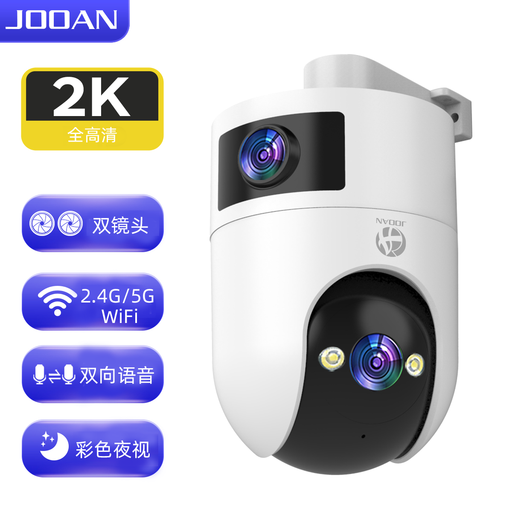
Why This Fits Their Persona: Perfect for those who want a complete overview of their driveway, garden, or front door. The dual-lens offers both a fixed wide-angle view and a controllable PTZ lens to zoom in on details, all in one device.
This camera offers color night vision. This avoids the pitfall of useless, grainy black-and-white footage at night. You can clearly see details like clothing color, which is crucial for identification.
The combination of two lenses in a single app is unique. The IP66 rating guarantees it can withstand the elements. It supports both 2.4GHz and 5GHz Wi-Fi for a stable connection.
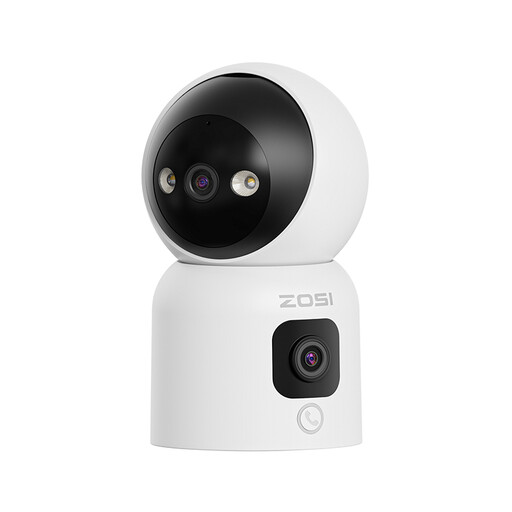
Why This Fits Their Persona: Designed for interaction. Ideal for staying in touch with children or elderly relatives who aren't comfortable using a smartphone. Also highly suitable as an advanced baby monitor or for keeping an eye on pets.
According to the manufacturer, its smart AI detection can distinguish between people, pets, and other movements. This prevents the frustration of constant, irrelevant notifications from things like a blowing curtain.
Unique calling features: initiate a video call to the app with the press of a button or an 'OK' gesture. The dual lens provides both an overview and a detailed view simultaneously.
We've compiled a complete, up-to-date list of products that meet these strict selection criteria and comply with local regulations.
You are allowed to do so on your own property (house, garden). However, you must inform visitors that camera surveillance is in use, for example, with a sticker. According to the guidelines of data protection authorities, it is not permitted to film public spaces (like the sidewalk) or your neighbors' property. Many cameras have a 'privacy mask' feature that allows you to black out parts of the image.
Yes, most modern Wi-Fi cameras are designed for easy DIY installation. Typically, you follow a few steps in an app: connect the camera to power, scan the QR code on the camera with your phone, and connect it to your Wi-Fi network. For an outdoor camera, mounting it on the wall is the biggest part of the job.
This depends heavily on the resolution and whether the camera records continuously or only upon motion detection. A camera recording continuously in 1080p can use several gigabytes per day. If you have a data cap on your internet plan, it's wise to set the camera to record only when motion is detected.
