If you often have the audio timeline and poem text open at the same time, choose a screen on which both windows remain easy to read from your usual viewing distance; 27-inch QHD is one practical option. Measure the space on your desk too, and check that your computer supports the monitor’s video connection. USB-C charging only works if both your computer and the monitor support it, and the power output is sufficient.
Who this is for
Editor working with text alongside the timeline
When editing a recording, you may want to keep the audio timeline alongside the poem text, performance notes or corrections. Adobe describes multitrack editing as a workspace where audio clips are arranged on a timeline.
Anyone who spends long periods at a screen
If you read and edit for long periods, it helps to have a screen that fits your workspace and is easy to read from your chosen viewing distance. Arboportaal highlights reflections and poor readability as factors to consider when working with screens.
Laptop user adding a second screen
If you’re connecting a laptop, check that the port you plan to use supports video and whether the monitor can charge your laptop. Microsoft Support explains how to arrange multiple displays in Windows.
What to look for when buying
Start with the layout you need while editing, then check that the monitor will fit on your desk and connect to your computer.
| What to consider |
What should you look for? |
Who is this most important to? |
| Timeline and text |
Compare screen size and resolution; check that both windows are easy to read from your viewing distance. |
I want to read the audio timeline and the poem text or notes at the same time, without constantly switching between windows. Around 31% of consumers prioritise having this workspace on screen together. |
| Positioning and readability |
Check the height adjustment and tilt; consider viewing distance, text size and reflections where you plan to place the screen. |
I want to position the screen so that the text is easy to read from my seat and reflections don’t get in the way. Around 31% of consumers prioritise positioning and readability. |
| Connection and charging |
Check that your computer and monitor have a suitable video connection; for USB-C, check video support and power output too. |
When I connect my laptop, I want to know in advance whether the port outputs video and whether USB-C provides enough power. Around 23% of consumers prioritise a connection that works. |
| Desk space and features |
Measure the space available; compare features such as a USB-C hub only if you actually need them. |
I want to know in advance whether the screen will fit on my desk, and I’d rather not pay for features I won’t use. Around 15% of consumers prioritise this practical consideration. |
Buying pitfalls
-
Assuming every USB-C port supports video and provides enough power
Having USB-C on both the monitor and laptop doesn’t guarantee that the combination will transmit video or charge the laptop sufficiently. The Dell P2725DE and LG 27BA65QB-B each have their own specified charging power.
Check your computer’s port specifications and the exact monitor model. Also make sure the cable you use supports the functions you need.
-
Choosing a screen size without measuring your workspace
A larger screen won’t necessarily fit on a small desk. The space available and your viewing distance both affect how comfortably you can position the timeline and text side by side.
Measure the space on your desk and check how adjustable the exact model is. Also assess readability and reflections from where you plan to sit.
-
Confusing an extended warranty with your statutory rights
ACM ConsuWijzer distinguishes between the statutory guarantee and any additional retailer or manufacturer guarantee. Extra cover does not replace your statutory rights.
Compare the terms of any additional cover with the rights you already have when dealing with the retailer.
Brands and models to consider
Dell
Dell describes the P2725DE as a 27-inch QHD business monitor with a USB-C hub.
- Dell lists 90 W USB-C power delivery and an RJ45 port for the P2725DE.
- Check that your computer supports the features you want through the connection you plan to use.
LG
LG describes the 27BA65QB-B as a QHD model with USB-C, and the 27BA45QB-B as a QHD alternative.
- LG lists an adjustable stand for both models and 65 W USB-C power delivery for the 27BA65QB-B.
- Don’t assume every LG model has the same USB-C features; check the exact model.
BenQ
BenQ describes the GW2790QT as a 27-inch QHD monitor with a USB-C hub and an adjustable stand.
- BenQ lists 65 W USB-C power delivery for the GW2790QT.
- BenQ’s claims about eye comfort and audio quality are not an established benefit for editing a poetry recording.
Philips
Philips describes the 27E1N5600AE/00 as a 27-inch QHD USB-C monitor for use with a laptop.
- Philips lists video, data and power over a single cable for a compatible device.
- Check the charging power you need and the other connections available on this exact model.
Joybuy products
This selection includes second monitors that give you extra room for the audio timeline and poem text. Check the dimensions, connections and adjustment options for each model to make sure it suits your computer and workspace.
 Image unavailable
Samsung Odyssey G5 G50F, 32-inch IPS, 180Hz, LS32FG502EUXEN
The 32-inch QHD screen could suit anyone who wants to arrange the timeline and poem text side by side; measure your available desk space first.
Specifications: 2560 × 1440 pixels; HDMI 2.0 and DisplayPort 1.2; height, swivel and tilt adjustment.
View at Joybuy
 Image unavailable
MSI MAG 341CQP QD-OLED X28, 34.18-inch, 3440 × 1440, 280Hz, 9S6-3DE39T-001
The ultrawide screen could suit anyone who wants to use several windows side by side; check that it will fit on your desk first.
Specifications: HDMI, DisplayPort and USB-C; 110 mm height adjustment, swivel and tilt functions.
View at Joybuy
 Image unavailable
INNOCN 2751S PLUS, 27-inch Mini LED QHD, 275Hz
This 27-inch QHD model could suit anyone who wants to arrange text and audio windows on a second screen.
Specifications: 2560 × 1440 pixels; HDMI and DisplayPort; height-adjustable stand.
View at Joybuy
 Image unavailable
Dell UltraSharp U2724D, 27-inch, 2560 × 1440
The 27-inch QHD resolution could suit anyone who wants to arrange text and an audio timeline on the same screen.
Specifications: HDMI and DisplayPort; height, swivel and tilt adjustment.
View at Joybuy
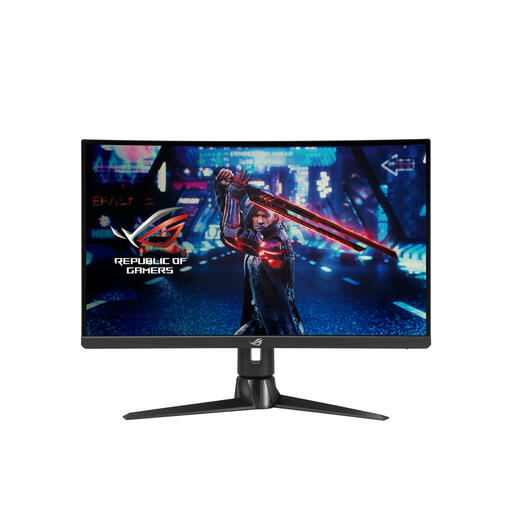 Image unavailable
ASUS ROG Swift XG27AQV, 27-inch, 2560 × 1440
This 27-inch QHD model could suit anyone who wants to work with the poem text and timeline on a second screen.
Specifications: HDMI and DisplayPort; height, tilt and swivel adjustment.
View at Joybuy
Frequently asked questions
How do you set up a second monitor for editing?
First, connect it using a supported video connection. Microsoft Support explains that you can arrange and identify displays in Windows display settings; then you can arrange the audio timeline and poem text as you prefer.
Can you use the monitor’s built-in speakers to assess the recording?
The monitor specifications alone don’t tell you how good the sound is. Assess the recording using the audio output and listening setup you use for editing, and don’t assume the monitor’s built-in speakers are a suitable substitute without checking them first.
Do Dutch workplace rules also apply when you work from home?
Arboportaal sets out employers’ obligations. For employees who work with screens for more than two hours a day, it lists requirements including a separate screen or keyboard when using a laptop, and an adjustable screen. This is not a general requirement for private buyers to choose a particular monitor model.
Does a CE mark prove that a monitor is comfortable to read or sounds good?
No. EUR-Lex describes the CE mark as an indication that a product complies with applicable European rules; it is not an independent test of reading comfort or audio quality. Assess these features separately in relation to your workspace and how you’ll use the monitor.


