
Creator of detailed diagrams
You create figures with small labels, fine lines and multiple windows, and want to review them on a screen that’s easy to adjust. BenQ lists the PD2705U as a 27-inch model with 3840 × 2160 pixels.


Start with clear diagram details and a screen that every colleague can adjust to suit them. According to the manufacturer specifications cited, a 27-inch 4K model offers 3840 × 2160 pixels, but make sure text and lines remain legible at your chosen scaling. Only opt for extra colour management or a USB-C hub if your workflow and laptops will actually use those features.
You create figures with small labels, fine lines and multiple windows, and want to review them on a screen that’s easy to adjust. BenQ lists the PD2705U as a 27-inch model with 3840 × 2160 pixels.
You share a workspace with colleagues and want to adjust the screen and laptop connection to suit each user. Arboportaal offers practical advice on readjusting your workspace.
You deliver figures for a workflow that actively manages colour profiles and calibration. EIZO describes hardware calibration with ColorNavigator for the ColorEdge CS2740.
Compare resolution and text scaling together, then consider adjustability for shared use. Finally, decide whether your colour workflow or laptop connection calls for any additional features.
| What to consider | What to look for | Who should prioritise this? |
|---|---|---|
| Fine lines and small labels | Compare screen size and resolution, and check that text remains legible at the scaling you use. | If I create diagrams with small labels and fine lines, I want to be able to review the details without making text unreadable. Around 40% of consumers prioritise this level of detail and legibility. |
| Adjustability and reflections | Check the height adjustment and consider the screen’s position in relation to windows and light sources. | If several colleagues use the same workspace, I want to adjust the screen to suit my posture each time and minimise distracting reflections. Around 30% of consumers give adjustability and reflection control their top priority. |
| Colour reproduction and management | Check which colour space your workflow requires and whether your team maintains profiles and calibration. | If figures are used in a colour-critical publishing or print workflow, I want to know which colour settings the team actively manages. Around 20% of consumers put this colour workflow ahead of the other considerations. |
| Laptop connection and power | Check video output, cable and charging wattage; USB-C alone doesn’t guarantee that video and power will work. | If colleagues often switch laptops, I want to know whether the monitor works with their devices and preferred peripherals. Around 10% of consumers prioritise the laptop connection. |
A stated colour-space coverage is not the same as a managed calibration workflow or consistent colour reproduction across different workspaces.
First, work out which colour space you need and who will maintain profiles and calibration. Then compare the specifications of the exact models.
Profile management and calibration take time and require an agreed approach within the team.
The laptop must support compatible video output, and the monitor’s charging wattage must meet the laptop’s requirements.
Before buying, check the laptop port, cable, video output and charging requirements. BenQ lists 65 W Power Delivery and DisplayPort Alt Mode for the PD2705U; that doesn’t automatically make it compatible with every laptop.
You may need a different compatible cable or an additional laptop power supply.
A search result and a product detail page may show different information about the availability of a specific version.
Before ordering, check the exact version and its current order status on the product detail page.
BenQ positions the PD2705U as a 27-inch 4K monitor for design work.
Dell describes the UltraSharp U2725QE as a 27-inch 4K monitor with connectivity options for a shared workspace.
The ColorEdge CS2740 is designed for workflows where colour management matters.
LG lists the UltraFine 27UP850K-W as a 27-inch 4K IPS screen with an adjustable stand.
ASUS positions the ProArt PA279CRV for creative work, with a stated wide colour gamut.
This selection of Joybuy products includes 27-inch monitors for working with diagrams in a shared workspace, with 4K, QHD and 2K versions. For each model, check the resolution, adjustability and connections your workspace needs.
 No image available
An option if you’re looking for a 27-inch 4K screen to see diagram details clearly.
The product name lists 3840 × 2160 pixels, 60 Hz, 4 ms, HDMI and DisplayPort. The product description lists a height-adjustable stand and an anti-glare screen.
 No image available
An option to compare if you’re looking for a 27-inch 4K screen for a shared office workspace.
The product name lists 3840 × 2160 pixels, IPS, USB-C with 90 W Power Delivery, HDMI and DisplayPort. Check that your laptop supports the USB-C features you need.
 No image available
A QHD option if 4K isn’t essential for the way you view diagrams.
The product name lists 2560 × 1440 pixels and 200 Hz, with overdrive up to 210 Hz. The product description lists a stand with height, tilt, swivel and pivot adjustment.
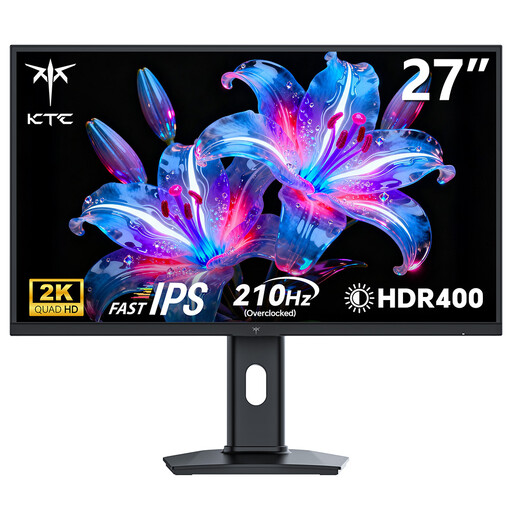 No image available
Compare this version if a 27-inch QHD screen suits your diagram work.
The product name lists 2560 × 1440 pixels and 200 Hz, with overdrive up to 210 Hz. The stated resolution is QHD, not 4K.
 No image available
An option to compare if you’re looking for a monitor described in the product name as suitable for office work and gaming.
The product name lists 2K and a 200 Hz refresh rate. Check that the resolution suits the level of diagram detail you want to see.
Arboportaal recommends height adjustment and a non-reflective screen when setting up display screen workstations. Adjust the setup to suit the user and workspace; this doesn’t mean that a particular screen size or resolution is required.
Readjust the workspace to suit the user, keep symbols legible and avoid reflections and distracting light sources in your field of vision. These are practical recommendations from Arboportaal, not proof that a particular monitor model prevents eye strain.
No, the shape of the connector alone doesn’t guarantee this. Check whether the laptop supports video output through the port, and compare the cable and charging requirements with the monitor. BenQ lists DisplayPort Alt Mode, data and 65 W Power Delivery for the PD2705U.
Not on its own. Check which colour space your workflow uses and whether your team actively manages profiles and calibration; stated colour coverage is not the same as a managed calibration workflow.
No. ACM ConsuWijzer explains that Dutch law doesn’t specify a fixed duration for the statutory guarantee: what matters is what you can reasonably expect from the product under normal use. The seller is your point of contact for the statutory guarantee; assess any fault on a case-by-case basis.