
PC gamer who wants to get started straight away
You want to know first whether your RPG, device and controller will work together. Steam lists controller support and supported device types for each title.


First, check whether your sci-fi RPG supports a controller on your device. Only then should connection, shape and extra features influence your choice. An Xbox controller is a practical option for supported Windows games, while a wired model suits a permanent desk setup. A DualSense is worth considering if the game supports the features you want. None of these options guarantees support for every RPG or feature.
You want to know first whether your RPG, device and controller will work together. Steam lists controller support and supported device types for each title.
You want a controller that feels comfortable in your hands, with a connection suited to the distance from your PC. Grip, controls and included accessories vary by model.
You may want to remap controls or use feedback that depends on the game. Check whether your game and chosen connection mode support these features.
First, check that your game and device are supported. Then compare the connection with your desk setup, and finally consider which grip or extra controls would be useful to you.
| What to consider | What should you check? | Who is this important for? |
|---|---|---|
| Game and device support | Check the operating system and controller information for your specific game and store version. | If I want to make sure my RPG works with my controller, I check both before choosing a model. Around 31% of consumers put game and device compatibility first. |
| Comfort during long sessions | Look at the grip, how easy it is to reach the sticks and buttons, and any extra controls. | For long gaming sessions, I want a controller that feels comfortable in my hands and has buttons I can reach easily. Around 25% of consumers give comfort during extended use top priority. |
| Connection at your desk | Check whether the model works with your PC via cable, Bluetooth or a receiver, and see which accessories are included. | If my PC is close to my chair, a cable may suit me; for more freedom of movement, I look for a wireless mode that my PC actually supports. Around 19% of consumers make the connection their first consideration. |
| Customisable controls and feedback | Check which buttons you can customise for each game, and whether haptic feedback or adaptive triggers work. | If I want to remap buttons or value feedback, I check whether my game supports these features. Around 13% of consumers prioritise customisable controls or game-dependent feedback. |
| Accessories and service | Check what’s included with the exact version, and distinguish your statutory rights from any additional service plans. | If I need extra accessories or want to know what happens if something goes wrong, I check the packaging and my rights separately. Around 12% of consumers consider additional costs and service their main priority. |
Connecting a controller doesn’t automatically mean an RPG will support every button or special feature. For example, Sony says haptic feedback on PC requires support from the game and a USB connection.
Check the information for the specific game, device and feature you want to use.
For the 8BitDo Ultimate 2C Wireless, the manufacturer lists 2.4 GHz or wired use on Windows; Bluetooth is listed for Android.
Check the connection mode for the exact version and whether the required receiver is included.
The Wolverine V3 Pro is a different model from the wired Wolverine V3 Tournament Edition. A similar model name alone doesn’t confirm that the connection or version is the same.
Compare the full model name and connection specifications before making your choice.
An additional service plan isn’t the same as your statutory warranty rights. ACM ConsuWijzer explains statutory guarantees separately from any additional warranties.
First check which statutory rights apply, then consider any extra cover separately.
Xbox Wireless Controller versions for supported Windows games and Xbox. Microsoft lists Bluetooth for Windows 10/11 and, for a wired version, USB-C.
DualSense for players using a supported PC game or PS5 who value features such as haptic feedback.
The Ultimate 2C Wireless offers PC users a choice of a 2.4 GHz receiver or a cable.
The G7 SE is a wired controller for Xbox and Windows, suited to a permanent gaming setup at a desk.
The Wolverine V3 Pro is a wireless Xbox and PC model with extra controls.
The Steam Controller is worth considering if you want to explore Steam Input and alternative control layouts.
These controller picks are aimed at PC gaming; for each version, check game support, connection and any extra controls.
 No image available
An option for a supported Windows game if you’re looking for an Xbox controller with wireless controls; check support for your RPG.
The product information lists Bluetooth for Windows 10/11, textured grips and two AA batteries included.
 No image available
A good fit if you’re considering a DualSense for PC and want to check your game’s features in advance.
Sony says haptic feedback on PC requires game support and a USB connection; adaptive trigger support also varies by game.
 No image available
A PC option if you want to choose between a 2.4 GHz connection and wired use, with extra customisable controls.
The product information lists four remappable buttons and settings via the GameSir Nexus app. Bluetooth 5.3 is listed for Android; for PC, the information specifies 2.4 GHz or a cable.
 No image available
An option if you’re looking for a PC controller with programmable buttons and want to compare its connection modes with your setup.
The product name lists haptic triggers, adjustable joystick resistance and six programmable buttons. The product information lists wired, wireless and Bluetooth connections.
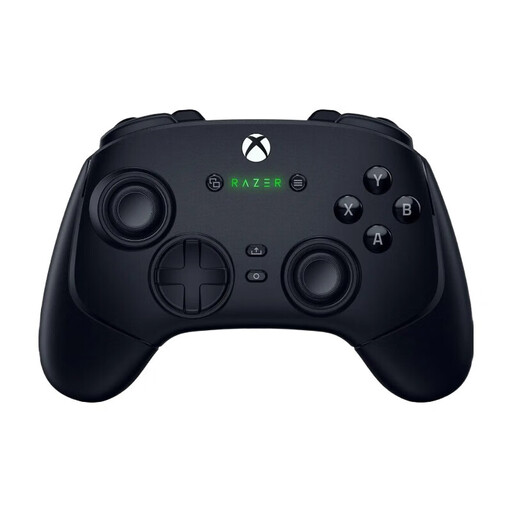 No image available
A PC and Xbox option if you want to customise extra buttons and play both wired and wirelessly.
Razer lists six mappable extra buttons and a 2.4 GHz USB-A dongle for wireless connection.
No. Check support for your game and device. On Steam, the pages for Starfield and Mass Effect Legendary Edition list full controller support and Xbox controllers; this doesn’t automatically apply to other titles.
It varies by model. According to its manual, the GameSir G7 SE connects via USB-C cable; the 8BitDo Ultimate 2C Wireless uses 2.4 GHz or a cable on Windows. Microsoft lists Bluetooth for the Xbox controller on Windows 10/11, and USB-C for the wired version.
No. According to Sony, haptic feedback on PC requires both game support and a USB connection. Adaptive triggers also depend on the game.
Check the settings available in the game and the exact model. According to its manual, the GameSir G7 SE has two lockable rear buttons; Valve also describes gamepad and mouse-and-keyboard emulation through Steam Input. Check that your chosen layout works in your game.
For an online consumer purchase, ACM ConsuWijzer says you generally have a statutory cooling-off period of up to 14 days after delivery, subject to legal exceptions. You also have statutory warranty rights if a product breaks sooner than you could reasonably expect during normal use. Consider any paid service plan separately.