
Creating recipes with photos
You want text and images in colour on your project sheets. Check whether the school expects standard sheets with images or prints on photo paper.


For recipe sheets with images, a colour printer is a good choice. If the assignment only requires text and allows black and white, a monochrome laser printer may be enough. For a one-off project, consider the purchase price and the cost of suitable ink or toner. If you expect to use the printer regularly afterwards, running costs may matter more. Also check the required paper size and whether you want to scan, copy or print double-sided.
You want text and images in colour on your project sheets. Check whether the school expects standard sheets with images or prints on photo paper.
You want to print a few useful sheets without spending a lot on a printer you may not use much in future. Consumentenbond notes that inkjet printers may use ink for cleaning when they are used infrequently.
You’ll keep using the printer after the project, so you want to compare cartridges, refill ink and double-sided printing. Epson, Canon and Brother describe different ink and printing solutions for the models mentioned here.
Start with the assignment: check whether you need colour and what paper size to use. Then compare how often you’ll use the printer and which features you need with the cost of suitable ink or toner.
| What to consider | What to look for when buying | Who is this important for? |
|---|---|---|
| Colour and readability | Check whether the school requires colour images and what paper size you need. Standard recipe sheets and photos printed on photo paper are different types of print job. | If I need images or a colour layout, I want to be sure the printer can print in colour and supports the required paper size. Around 36% of consumers say colour presentation is their main consideration. |
| Buying for occasional use | Compare the purchase price with the cost of suitable cartridges. Consumentenbond points out that inkjet printers may use ink for cleaning when they are used infrequently. | For a one-off school project, I want to consider not just the price of the printer, but also the ink I may need afterwards. Around 29% of consumers prioritise a low purchase price for occasional use. |
| Running costs if you keep using it | Estimate how often you’ll print after the project and compare refills or cartridges on a like-for-like basis. Epson lists yields per set of bottles as manufacturer figures, not as a guaranteed result for every document. | If I’ll also use the printer regularly for schoolwork later on, I want to know which refills it takes and how double-sided printing works. Around 21% of consumers say running costs for continued use are their main consideration. |
| Black and white and other features | Confirm that the assignment allows black and white, and decide whether you also want to scan or copy. Brother states that the HL-L2400DWE prints in black and white and is not an all-in-one printer. | If my recipe only includes text and instructions, black and white may be enough; I’ll also check whether I need a scanner. Around 14% of consumers prioritise text-only printing without colour and without inkjet ink that can dry out. |
The printer’s price doesn’t tell you how much suitable replacement ink or toner will cost. Inkjet printers may also use some ink for cleaning when they are used infrequently, according to Consumentenbond.
Before you buy, compare the printer’s price with the cost of supplies for the exact model, and think about how often you expect to print after the project.
A monochrome laser printer can’t print colour recipe images if the assignment requires them.
First check whether the school expects colour and what paper size the assignment specifies.
Double-sided printing on the Canon PIXMA TS3750i is manual, while the Brother HL-L2400DWE offers automatic double-sided printing.
Check the exact model to see whether you’ll need to turn the paper over yourself.
HP lists dynamic security for the DeskJet 2920, which may block cartridges with circuits from other suppliers.
Check the cartridge terms for the exact model before choosing replacement ink.
The PIXMA TS3750i is an example of an A4 colour printer with scanning and copying functions.
The DeskJet 2920 is a compact colour printer with scanning and copying functions.
The EcoTank ET-2860 is an A4 colour printer with refillable ink tanks, scanning and copying functions.
The HL-L2400DWE is an A4 monochrome laser printer for text-focused printing.
This selection from Joybuy includes colour printers for recipe sheets with images, as well as a portable option for printing documents. For each model, check the paper size you need, the colour requirements and the features you’ll need for the assignment.
 No image available
A colour printer with scanning and copying functions for project sheets where colour is important.
An inkjet printer with A3 printing, Wi-Fi and automatic double-sided printing. The description also mentions a document feeder.
 No image available
A portable option for printing project documents when using the printer on the move is important.
The product description mentions Bluetooth printing via an app and a rechargeable battery. Before you buy, check that the printer is suitable for the required paper size and the colour or black-and-white printing you need.
 No image available
A colour printer with refillable ink tanks for anyone who wants to keep printing regularly after the project.
An A4 model with Wi-Fi, automatic double-sided printing, scanning and copying functions. The description mentions refillable ink bottles.
 No image available
An A4 colour printer for recipe sheets with images, with scanning and copying functions if you need them.
An inkjet model with scanning and copying functions, cartridges and a USB 2.0 connection.
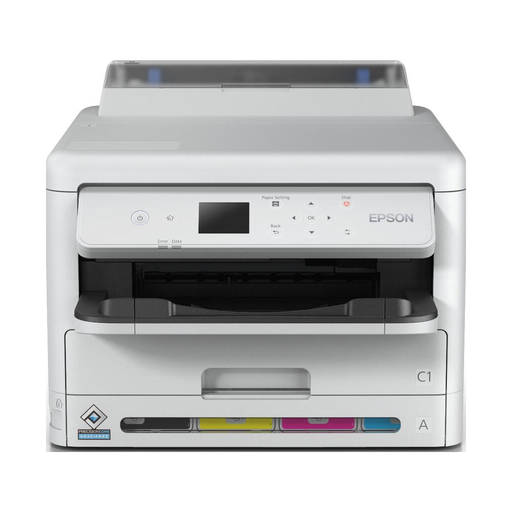 No image available
An A4 colour printer for project sheets with images and wireless printing.
The product name mentions Wi-Fi; the description lists automatic double-sided printing.
Not necessarily. First check whether the assignment calls for standard sheets with a few images or photos printed on photo paper; these are different types of print job. For standard project sheets, compare colour printing and text readability.
Check whether the printer supports a printing method for your phone, then select the paper size specified in the assignment from the print menu. For the PIXMA TS3750i, Canon lists the Canon PRINT app, AirPrint and Mopria, among other options, and specifies A4 support.
That depends on how often you print, the content of the pages and the ink or toner the printer takes. Don’t look only at the purchase price or a stated page yield: Consumentenbond points out that inkjet printers may use ink for cleaning when they are used infrequently.
According to the Dutch Government, the seller must provide a solution if a product is faulty. There is no fixed statutory guarantee period for all products in the Netherlands; a manufacturer’s guarantee is in addition to your statutory rights.