
Student who copies files at school and at home
Wants to open and transfer recordings on both devices. So check which USB ports are available and what file system they use. Apple lists ExFAT as an option for Windows volumes larger than 32 GB.


For a small collection of language recordings, a USB stick is a suitable choice if the files fit on it and it connects to both devices. Choose an external SSD or portable HDD if you regularly transfer larger project files or need more shared storage. Keep important originals separately, and check the ports and file system in advance.
Wants to open and transfer recordings on both devices. So check which USB ports are available and what file system they use. Apple lists ExFAT as an option for Windows volumes larger than 32 GB.
Doesn’t want to rely on a single storage device they carry around, so keeps a separate copy. Microsoft Support describes backups as copies that help protect data from loss or damage.
Carries larger files or several projects as well as language recordings, so compares a USB stick with the capacity of a portable HDD or SSD. Seagate lists capacities from 1 TB to 5 TB for its Portable HDD range.
Start by checking the devices you’ll be copying files between and the total file size. Also plan to keep a separate copy of any recordings you want to keep.
| What to consider | What should you check? | Who should prioritise this? |
|---|---|---|
| Connection and file system | Check for USB-A or USB-C ports on both devices, and find out which file systems the school computer supports. Apple lists ExFAT as an option for Windows volumes larger than 32 GB. | If I copy files at home and at school, I want to make sure the devices support the connection and files. Around 36% of consumers say compatibility is their top priority. |
| Separate copy | Leave enough space for a separate copy, open a file after copying it, and safely eject the storage device. Microsoft Support advises Windows users to safely remove USB storage to help prevent data loss. | If my recordings would be difficult to recreate, I don’t want the original to depend on a single device I carry around. Around 29% of consumers prioritise keeping recordings. |
| Taking it between locations | Consider the size, connector protection and any cable you may need. Don’t keep your only copy on a small device that’s easy to lose. | If I take files between school and home, I want to carry them easily without risking my only copy. Around 21% of consumers prioritise portability. |
| Capacity | Add up your current files and any you might add before choosing a capacity. Then compare whether a USB stick, SSD or HDD suits the amount you want to keep. | If I also save other files or several projects, I want enough space without choosing based only on the project name. Around 14% of consumers say storage space is their top priority. |
A USB specification doesn’t change the physical connector. According to Kingston, the Kingston DataTraveler Exodia M has a USB-A connector, which won’t plug directly into a device with USB-C ports only.
Check the port on both the recording device and the school device. Choose a drive with two connector types only if they suit the devices you actually use.
If your only copy is lost or damaged, you could lose the project too.
Keep the original separately, check that a recording opens after copying it, and safely eject USB storage. Microsoft Support recommends safely removing hardware in Windows to help prevent data loss.
The name of a school project doesn’t tell you how much storage space the recordings and other files will need.
Add up your files and allow for future additions and a separate copy before choosing a capacity.
The DataTraveler Exodia M is a USB-A stick for anyone who wants to carry files on a device with that type of port.
The Ultra Dual Drive Go is designed for transferring files between compatible devices with USB-C and USB-A ports.
The Portable SSD T7 is worth comparing if you regularly transfer larger project files as well as audio recordings.
A portable HDD is worth comparing if you want to keep lots of files or several projects.
This selection includes USB sticks and portable storage for language recordings and other school files. Check that each product’s capacity and connections suit your devices and files.
 No image available
An option for recordings that fit on a 64 GB USB stick and are transferred via USB-A.
64 GB; USB 3.0; designed to connect via USB-A, not directly to a device with USB-C ports only.
 No image available
A USB stick for files that fit within 64 GB and are transferred via USB-A.
64 GB; USB Type-A; USB 3.2 Gen 1; sliding cap and keyring loop. Won’t connect directly to a device with USB-C ports only.
 No image available
A portable hard drive to consider if you want to keep several files that fit within 1 TB.
1 TB; 2.5-inch; Micro-USB B on the drive and USB-A at the computer end.
 No image available
An external SSD to compare if you also transfer larger project files that fit within 1 TB.
1 TB; USB Type-C; the product description lists USB-C-to-C and USB-C-to-A cables.
 No image available
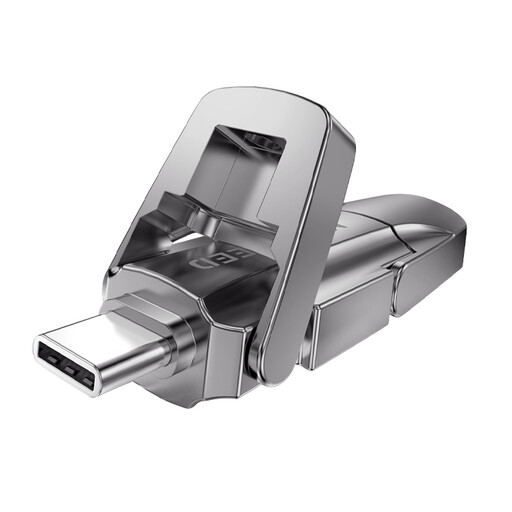
A USB stick to consider if you transfer files between devices with compatible ports and 256 GB is enough.
256 GB; the title lists USB 3.2 Gen 1 and Type-C as a dual interface.
Yes, as long as the connections and file system work on both devices. Apple lists ExFAT as an option for Windows volumes larger than 32 GB. Also check the school computer’s requirements before reformatting a drive.
First, check that copying is complete and that a file opens. Then eject the USB storage using the operating system. Microsoft Support advises Windows users to safely remove hardware to help prevent data loss.
Not automatically. According to the Dutch government, consumer purchases in the Netherlands are covered by a legal guarantee with no fixed statutory guarantee period. If a product is faulty, you should contact the seller. Compare the terms of any additional cover with the rights you already have.
It depends on the recording and how you plan to use it. According to the Dutch Data Protection Authority, a sound recording in which someone is identifiable may be personal data; schools must follow GDPR rules when processing it. The Dutch government describes making a private copy of copyright-protected material for personal use, but not distributing or making it public on that basis. If the material belongs to someone else, check the permissions, rights and school rules: using it for school doesn’t in itself give you general permission to share it.