
School news bulletin with a stationary presenter
If you’re recording one speaker who stays by the phone or recorder, first check that the microphone plug and recording app work with that device.


If the presenter stays by the phone or recorder, start with a wired lapel microphone that has a compatible connector. For a reporter moving around or an interview with two pupils, a wireless set offers more freedom, as long as the receiver and number of transmitters are right. Record a test using your own device, and make separate arrangements for recording and, if applicable, publishing footage of identifiable pupils.
If you’re recording one speaker who stays by the phone or recorder, first check that the microphone plug and recording app work with that device.
If the reporter moves around while recording, consider a wireless set. Also check that the receiver is compatible, that you can charge it and that the connection works where you’ll be recording.
If two pupils will be speaking at the same time, check that the set you choose actually includes two transmitters and a receiver.
Best suited to: a presenter who stays by the phone or recorder, with an input that works with the microphone plug.
The trade-off: you avoid a wireless receiver and the need to manage charging, but the cable limits how far you can move and you may need an adapter.
Best suited to: a pupil reporting while moving around the classroom, without a cable running to the recording device.
The trade-off: you get more freedom to move, but you’ll need to manage and charge the transmitters and receiver, then test them on location. Interference-free use isn’t guaranteed.
Best suited to: a presenter and interviewee who each wear their own microphone.
The trade-off: both speakers need a transmitter, so check what’s included in the set and allow for extra parts to charge and put away.
| What to consider | What should you check? | Which consumers does this matter most to? |
|---|---|---|
| Connection and recording | Check the device input, TRRS or USB-C connection, any adapter you may need, and whether the recording app recognises the microphone. | If I’m recording one presenter on a phone or recorder, I want to know in advance whether the microphone and app will work together. Around 29% of consumers say compatibility is their main concern. |
| Freedom of movement | Decide whether the speaker will move around, and test the wireless connection in the classroom. | When a reporter moves around the classroom, I don’t want to be restricted by a cable running to the recording device. Around 29% of consumers put freedom of movement first. |
| Two voices at once | Check that the set includes two transmitters and a compatible receiver. | For an interview, I want both pupils to be able to wear their own microphone at the same time. Around 21% of consumers say recording two voices at once is their main concern. |
| Managing the set during lessons | Check which clips and components are included and how to charge a wireless set. | If different pupils are recording one after another, I want to be able to set up the kit quickly and put it away complete. Around 21% of consumers prioritise ease of use and organisation. |
A TRRS microphone for a phone won’t automatically work with a TRS microphone input. The connection determines whether you can use the microphone directly.
Compare the microphone and recording device specifications, and test the complete recording setup. Check whether you need a compatible adapter.
The number of speakers who can each wear their own microphone at the same time depends on the components included in the version you choose.
Before buying, check the full variant name, the number of transmitters and the receiver included.
Wireless microphones use radio frequencies that may be shared. The Dutch Authority for Digital Infrastructure states that interference-free use isn’t guaranteed.
Make a test recording where the bulletin will be filmed. If you’re using a fixed setup, consider keeping a wired microphone as an option too.
Separate privacy rules apply when a school records and publishes footage in which people can be identified.
Agree the purpose, recording, any publication, consent and security arrangements with the school in advance.
RØDE offers both the wired smartLav+ for a compatible TRRS phone input and the wireless Wireless Micro, which comes with two transmitters with built-in microphones.
The wired MVL is designed for a suitable 3.5 mm TRRS connection or a compatible CTIA adapter.
The Mic Mini is a wireless option for a speaker on the move. DJI says the receiver can be paired with two transmitters.
The LARK M2S is a wireless clip-on microphone; the connection varies by version.
This selection includes wired and wireless clip-on microphones, including sets for recording one speaker and versions with two transmitters for interviews. For each model, check that the connection and included components suit your recording device and how you plan to use it.
 No image available
A wireless set with two microphones for an interview with two speakers.
The product name lists a camera receiver, a smartphone receiver and a charging case. Check that the receiver works with your recording device.
 No image available
A wired clip-on microphone for recording one speaker when a cable works with your setup.
The product name lists a 6 m cable, a 3.5 mm connection and an omnidirectional microphone. Check that your recording device has a compatible input.
 No image available
A set with two transmitters for an interview where two pupils each wear their own microphone at the same time.
The product name lists 2.4 GHz, two transmitters and one receiver (2TX&1RX), with USB-C for Android phones. Check your recording device’s connection.
 No image available
A wireless set with one microphone transmitter for a speaker who moves around while recording.
The product name lists one transmitter and one receiver (1TX+1RX), USB-C and iPhone 18/17/16. Check that this version works with your device.
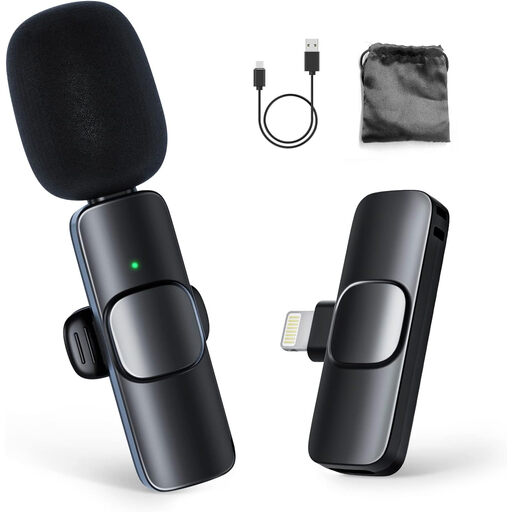 No image available
A set with one transmitter and one receiver for an individual speaker or reporter.
The product name lists a clip-on microphone and a 1TX&1RX version for iPhone. Check the connection and test it with the recording app you plan to use.
Check both the connection on your recording device and the one on the microphone or receiver. For example, the Shure MVL uses 3.5 mm TRRS; Shure recommends a compatible CTIA adapter for some devices. The RØDE Wireless Micro is available with a USB-C or Lightning receiver. Also test the recording app you plan to use.
Check the clip and connection, or the wireless pairing, and listen back to a short test recording. If you’re using a wireless set, also agree how the transmitters and receiver will be charged and put away afterwards.
Yes. You may need a compatible adapter, depending on your recording device. With a wireless set, check how many transmitters and which receiver are included. Check the connection and the full contents of the set before choosing it.
Only if the relevant requirements have been met. For identifiable footage recorded and published by a school, the Dutch Data Protection Authority states that consent is needed from pupils aged 16 and over, and from parents of pupils under 16. The school also has information and security obligations. This specific rule doesn’t automatically give the same answer for audio-only recordings or use solely within the school; the school should assess the purpose and process.
No. According to the Dutch Authority for Digital Infrastructure, wireless microphones usually don’t need a licence. However, their use depends on the permitted frequency bands and the system’s conditions, and available frequencies can vary by location. So check the rules for the specific microphone.