Start with the lighting and the space you have. For occasional photos, your existing smartphone may be enough, as long as you check the focus, colour and crop at the size you’ll publish. Choose a compact camera if its fixed lens can capture both the whole scarf and the stitches you want to show from your working distance. Or choose a system camera with a suitable zoom lens if you want to adjust the framing more often and might add a close-up lens later. A high megapixel count alone won’t fix a colour cast or provide enough magnification.
Who is this camera approach right for?
Scarf seller with a small photography space
You regularly photograph different scarves and want to capture their colours and framing under consistent lighting. Shopify Netherlands describes flat-lay photography for fashion products, while Adobe explains that different light sources can have different colour temperatures.
Maker who wants to show off the stitches
You want to show the whole scarf as well as its stitches, edges or yarn texture. Compare the close-up capabilities of the lens you’ll actually use; Fujifilm and Nikon publish magnification figures for their lenses.
Occasional home photographer
You take the odd photo on a table and want to see whether your phone and a stable set-up will do the job. Shopify Netherlands and MPB highlight a tidy set-up and stable framing as important considerations for product photos.
What to look for when buying a camera for scarf photos
First, decide what you need the photo to show: true-to-life yarn colours, individual stitches, the whole scarf or a simple set-up.
| Priority |
What to look for when buying |
Who should pay particular attention? |
| True-to-life yarn colours |
Take a test shot in the lighting you plan to use and check the white balance and exposure. Adobe explains how different light sources affect colour temperature. |
If I want to photograph different scarves under similar conditions, colour is my main consideration. Around 31% of consumers put accurate colour first. |
| Stitches and yarn texture |
Compare the maximum magnification and focusing distance of the exact lens, including the zoom setting and measuring point. Nikon explains that 0.67× optical reproduction on DX isn’t the same as 1:1 on the DX sensor. |
If I want individual stitches to appear large in the image, I first check whether the lens can capture enough detail. Around 25% of consumers prioritise the visibility of stitches and yarn texture. |
| The whole scarf in the frame |
Measure the available shooting height and check that the lens can frame the entire scarf with room to spare. Leave space for lighting and a stable mount, too. |
When space is limited in my work area, I want to photograph the whole scarf without having to move the set-up each time. Around 25% of consumers put this first. |
| Simplicity and size |
Compare your existing phone, a camera with a fixed lens and a complete system camera kit. Check what’s included in the kit and whether the whole set-up will fit in your workspace. |
If I only take photos occasionally, I want to keep the amount of equipment I need to buy, set up and store to a minimum. Around 19% of consumers prioritise simplicity and the size of the set-up. |
Common buying mistakes
-
Focusing only on megapixels or the camera body
The crop you want also depends on the lens and your working distance. Lighting can cause a colour cast, too.
Check the complete kit and, if possible, take test shots of both the whole scarf and the details in the lighting you use at home.
Camera brands to consider
Canon
Canon offers both a system camera with an interchangeable lens and the fixed-lens compact camera PowerShot G7 X Mark III.
- Canon lists a 24,2 MP APS-C sensor, a tilting screen and an RF-S 18-45mm lens kit for the EOS R50.
- The listed specifications don’t prove that either model will show stitches better. According to Canon, the minimum focusing distance of the PowerShot G7 X Mark III varies between wide angle and telephoto.
Fujifilm
According to Fujifilm, the X-M5 kit pairs the camera with an XC15-45mm zoom lens.
- Fujifilm lists a body weight of 355 g and a maximum reproduction ratio of 0,24× for the kit lens at wide angle. The camera can capture RAW images.
- The magnification figure applies to the lens at wide angle; check for yourself whether it fills the frame enough to show your stitches. Film simulations are creative looks, not proof of colour-accurate scarf photos.
Sony
The ZV-E10 II kit comes with a SELP16502 zoom lens and is also designed with video in mind.
- Sony lists a 26,0 MP APS-C sensor for the camera and a maximum magnification of 0,215× for the kit lens.
- The video-focused features don’t in themselves tell you whether stationary knitting will be captured in enough detail; check the lens at your working distance.
Nikon
The Z50II is available as a zoom kit; Nikon also offers a separate close-up lens for the Z DX system.
- Nikon describes the 16-50mm kit zoom as retractable and equipped with lens stabilisation. The separate NIKKOR Z DX MC 35mm f/1.7 achieves a maximum optical reproduction ratio of 0,67×.
- The 1:1 figure quoted by Nikon is an equivalent for 35mm/FX format, not the optical reproduction ratio on the DX sensor. The macro lens is sold separately.
Cameras on Joybuy for a compact set-up
This selection from Joybuy includes compact digital cameras and a Sony ZV-E10 with a zoom lens. For each model, check whether the lens can capture both the whole scarf and the stitches you want to show from your working distance.
 No image available
KINSI mini vlog camera 4K, 64 MP, Wi-Fi, pink
The product description mentions a compact design and an included mini tripod for a small set-up; assess the colour and stitch detail in test shots.
The product title lists 4K, 64 MP, Wi-Fi, a 330° rotating lens and a 1,72-inch touchscreen. The megapixel count alone doesn’t tell you whether stitches will be clearly visible.
View at Joybuy
 No image available
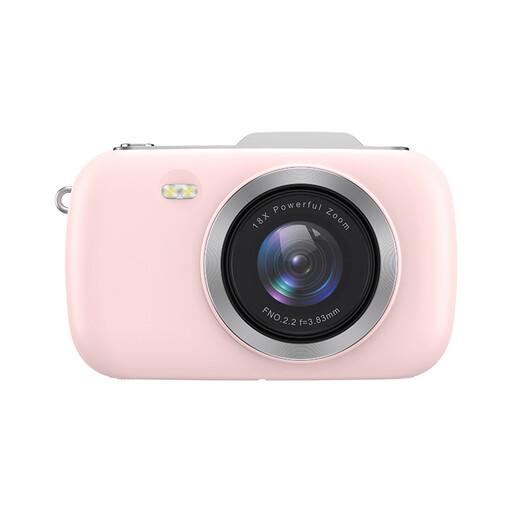
KOMERY G7-A 4K camera, 80 MP, 18× zoom, pink
This portable point-and-shoot camera may suit you if you’re looking for a compact camera; check with test shots whether the lens also captures the stitch details you want.
The product title lists 4K, 80 MP and 18× zoom. The zoom figure alone doesn’t tell you how much magnification you’ll get for knitting details.
View at Joybuy
 No image available
KOMERY G7 5K camera, 80 MP, 18× zoom, white
This portable zoom camera may suit you if you want to vary your framing; check whether the lens fills the frame enough to show the stitches from your working distance.
The product title lists 5K, 80 MP and 18× zoom. The product description mentions optical zoom, but that specification alone doesn’t prove that small knitting details will appear sharply in the image.
View at Joybuy
 No image available
Sony ZV-E10 with 16–50mm zoom lens, black
The included zoom lens lets you adjust the framing; check whether it can also make the stitches you want to show appear large enough from your working distance.
The product title lists a 16–50mm zoom lens. The product description calls this a system camera; check the exact kit contents before choosing.
View at Joybuy
Frequently asked questions
Do you need a macro lens straight away to photograph a knitted scarf?
Not if you only want to photograph the whole scarf. If you want individual stitches to appear large, first assess a test shot and the maximum magnification of the exact lens. A separate macro lens is only an option if the kit lens doesn’t give you enough detail.
How can you make a series of scarf photos look consistent?
Put the camera in the same stable position each time, and keep the background and lighting set-up as consistent as possible. If the lighting changes, check the white balance again: light with a different colour temperature can make yarn look different.
What extra purchases should you check when buying a system camera?
First, check exactly what’s included in the kit and whether it comes with the lens you want to use. Then consider whether you’ll need another lens or a stable mount; a camera body on its own isn’t the same as a complete kit.
What returns and warranty rights apply to a consumer purchase in the Netherlands?
According to the Dutch Government, online purchases from a business often come with a 14-day cooling-off period; buying from a private individual is different. For a consumer purchase, the product must meet what you can reasonably expect. The Netherlands has no fixed general statutory warranty period; if something is wrong, contact the seller.
Can you publish a photo of a recognisable model on your online shop without further checks?
First, consider what legal basis applies to taking and publishing the photo. The Dutch Data Protection Authority considers recognisable people’s images to be personal data and says that the GDPR applies to business photography and publication; consent may be one possible legal basis.


