Who is this for?

Home worker with a small desk

You scan individual signed contracts at a permanent but cramped workstation and want to know how much room the scanner takes up while scanning. Epson Netherlands describes the ES-C320W as using a U-turn path that doesn’t increase its footprint.

Someone processing stacks of contracts

You want to scan several double-sided sheets in succession and be able to find the files later. Input capacity and file-management features are important to you.

Someone handling delicate originals

You sometimes scan folded, thick or otherwise unusual documents and want to check in advance whether they can be fed through the chosen route. For some originals, a flatbed scanner is an alternative to paper feeding.

What should you look for when buying?

Compact desktop scanner with automatic document feeding

Ideal for: Anyone who regularly scans loose A4 sheets and wants to use as little desk space as possible while scanning.

Check: Which feeding route is suitable for unusual or delicate paper, and where scans are stored.

Portable scanner with automatic document feeding

Ideal for: Anyone who scans in different locations or wants to put the device away after use, but also processes stacks of loose sheets.

Check: A portable model still needs space for paper input and output while in use.

A4 flatbed scanner

Ideal for: Anyone who scans occasionally or would rather not feed an original through rollers.

Check: You’ll need to place the pages on the scanner yourself and turn them over by hand. Also check how much workspace you’ll need.

What to consider What should you check? Who is this important for?
Space needed in use Compare the storage dimensions with the space required for paper input and output. Canon Netherlands lists the imageFORMULA R10 as 95 mm deep with the tray closed and 257 mm deep with the tray open. On a cramped desk, I want to use the scanner without having to move things around each time. Around 36% of consumers mainly want to save workspace.
Double-sided stacks Check the capacity of the automatic document feeder and whether double-sided scanning is automatic. When looking at speed figures, note the difference between pages and images per minute. If I regularly process stacks of double-sided contracts, I don’t want to have to load each sheet individually. Around 29% of consumers give stack processing their highest priority.
Storage and retrieval Check whether the required software can create searchable PDFs, review a test scan and decide where confidential files will be stored. OCR makes text searchable, but check the signature in the scan itself. For my contract archive, I want to be able to find documents later and manage access to files carefully. Around 21% of consumers mainly want an archive they can manage easily.
Delicate originals Check the size, thickness and permitted feeding route; don’t force paper through a scanner if it isn’t suitable. If I have a folded or unusual original, I want to know whether the feeder can handle it or whether a flatbed would be more suitable. Around 14% of consumers prioritise handling originals with care.

Common pitfalls

  • Comparing dimensions only with the tray closed

    A scanner may need more depth while in use than when it’s put away. Canon Netherlands lists different depths for the imageFORMULA R10 with the tray closed and open.

    Measure the available space with the paper input and output in use, not just the spot where you store the device.

    If the device doesn’t fit in the available space while scanning, you’ll have to put it somewhere else or move it each time.

  • Assuming every scanner can handle every signed original

    A flatbed and a sheet feeder handle documents differently. As well as a U-turn path, Epson lists a straight-through feed option for the ES-C320W. That doesn’t automatically mean every feeding route is suitable for every original.

    Check which document types and feeding routes are permitted. If in doubt, choose a suitable alternative scanning method rather than forcing the paper through.

    A damaged or incompletely captured original may need to be processed again.

  • Assuming a searchable PDF is a verified archive copy

    OCR makes recognised text searchable, but doesn’t check whether every page, reverse side and signature has been captured properly.

    Open the file after scanning and check the complete scan, including the signature, before archiving it.

  • Treating privacy and paper disposal as scanner features

    The Dutch Data Protection Authority stresses that organisations must protect personal data appropriately. The Dutch Tax and Customs Administration sets out conditions for keeping invoices and receipts digitally; these aren’t general rules for all signed contracts.

    Set up storage and access carefully, and check the retention requirements for the document in question before destroying a paper original.

Brands to compare for this use

Epson

Epson describes the ES-C320W as a document scanner for a permanent, compact workstation, with a U-turn path and Wi-Fi.

  • According to Epson, the U-turn path doesn’t increase the footprint during use; ScanSmart can make scans searchable with OCR.
  • For unusual documents, check which feeding route is suitable and whether a protective sleeve is needed.

Brother

Brother presents the ADS-1300 as a compact scanner powered via USB-C, for loose sheets and small stacks in different locations.

  • Brother specifies a 20-sheet automatic document feeder and automatic double-sided scanning.
  • Check that the connection and workflow described are suitable for your computer and archiving process.

Canon

These Canon models offer two different ways to process documents: automatic feeding with the imageFORMULA R10 and an A4 flatbed with the CanoScan LiDE 400.

  • Canon lists a 20-sheet automatic document feeder for the R10; the LiDE 400 can be stored vertically, according to Canon.
  • The R10 needs more depth with the tray open; with the LiDE 400, you place the pages on the flatbed yourself.

Ricoh ScanSnap

Ricoh describes the iX1300 as having a U-turn path for continuous feeding and a separate return path for items such as folded documents.

  • According to Ricoh, the device takes up roughly the space of an A4 sheet when scanning via the U-turn path.
  • ScanSnap Cloud availability may vary by region; don’t assume it’s available in the Netherlands without checking.

Plustek

According to its product information, Plustek’s SmartOffice PS186 is designed for document processing with automatic feeding, OCR and searchable PDFs.

  • Plustek specifies a 50-sheet automatic document feeder.
  • Plustek lists OCR software for Windows; check which software you need and how much space you have available.

Joybuy products for scanning contracts

These models suit different ways of scanning contracts, from automatic document feeding for stacks to a handheld scanner for use in different locations.

Epson DS-C490 ADF + sheet-fed scanner, 600 x 600 DPI, A4, black and white

Epson DS-C490 ADF + Sheet-Fed Scanner

The combination of automatic feeding and a flatbed gives you options for stacks and originals you’d rather not feed through rollers.

The description lists a 50-sheet ADF, automatic double-sided scanning and a flatbed alternative. The stated resolution is 600 x 600 DPI; the format is A4.

Joybuy

Epson ES-C320W ADF + sheet-fed scanner, 600 x 600 DPI, A4, black

Epson ES-C320W ADF + Sheet-Fed Scanner

According to Epson, the U-turn path is designed to scan suitable documents without increasing the footprint during use.

The description lists automatic double-sided scanning and Wi-Fi. There’s also a straight-through feed option; check that it’s suitable for the document you want to scan. The format is A4 and the stated resolution is 600 x 600 DPI.

Joybuy
Epson WorkForce DS-80W handheld scanner, 600 x 600 DPI, A4, white

Epson WorkForce DS-80W Handheld Scanner

A portable handheld scanner may suit you if you scan in different locations and want to put the device away after use.

The description lists Wi-Fi, battery power and OCR software for searchable PDFs. Don’t use the feed slot for damaged, folded or stapled documents. The format is A4 and the stated resolution is 600 x 600 DPI.

Joybuy

Epson WorkForce DS-530 II sheet-fed scanner, 600 x 600 DPI, A4, black and white

Epson WorkForce DS-530 II Sheet-Fed Scanner

The automatic document feeder may suit you if you want to process several sheets in succession.

The product description lists a 50-sheet ADF and automatic double-sided scanning in a single pass. The format is A4 and the stated resolution is 600 x 600 DPI.

Joybuy
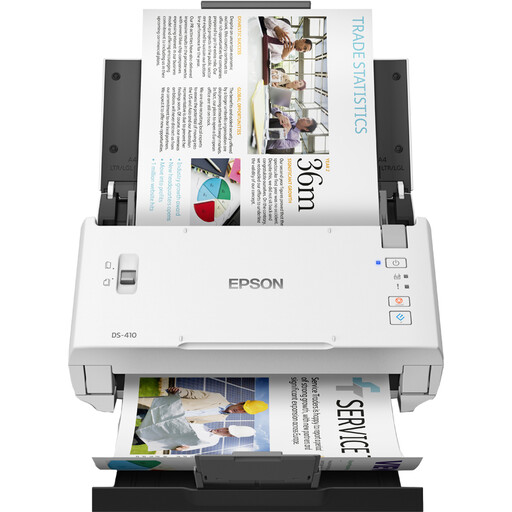
Epson WorkForce DS-410 sheet-fed scanner, 600 x 600 DPI, A4, black and white

Epson WorkForce DS-410 Sheet-Fed Scanner

This model may be worth considering if you scan contract sheets in succession and want to compare its stated dimensions with your available workspace.

The description lists a 50-sheet ADF and automatic double-sided scanning. The stated dimensions are 297 × 152 × 154 mm; the paper weight range is 50–209 g/m². The format is A4 and the stated resolution is 600 x 600 DPI.

Joybuy

Frequently asked questions

Do I need OCR to scan a signed contract?

No, not just to capture the signature. OCR makes recognised text searchable, but it doesn’t replace checking the scan. Review every page, reverse side and signature in the saved file.

How can I prevent paper jams when scanning?

Only use paper sizes and document types that are suitable for the chosen feeding route. For a thick or unusual original, you could consider an approved straight-through feed or a flatbed. Refer to the model’s manual for installation and maintenance.

What should I check about the included accessories and software?

Before buying, check whether the required software, power adapter, output tray and any protective sleeve are included or available separately. For example, Brother shows a separate adapter and optional output tray for the ADS-1300; Epson offers separate extended warranty options for the ES-C320W.

Can I store scans of contracts containing personal data in a cloud folder?

That depends on how the data is secured and processed. The Dutch Data Protection Authority says organisations must protect personal data appropriately, based on the risks. If an external service processes data on behalf of the organisation, a data processing agreement may also be required.

Is a scan of a handwritten signature the same as a qualified electronic signature?

No. The Government of the Netherlands describes a scan of a handwritten signature as an ordinary electronic signature; a qualified electronic signature uses a qualified certificate. Don’t assume that a scan alone meets any requirements for a specific agreement.
