Which approach is right for you?

Looking after fragile back issues

You want to digitise old, bound magazines without forcing them to lie flat. The Dutch National Archives takes the physical condition of documents into account when preparing them; Avas Systemen describes a V-shaped support for the CZUR M3000 Pro V3.

Teacher with large magazine pages

You want to capture wide pages or illustrations clearly, so you compare the actual scan area with the dimensions of your magazines. IRIS, Plustek and Epson describe different formats and scanning methods for their models.

Teacher with limited workspace

You scan small quantities of sturdy pages and need a scanner that can be set up or stored away in a small classroom. Epson says the Perfection V39II has a stand that lets it sit flat or upright.

What should you look for?

Overhead scanner with V-shaped support

Choose this approach when: your magazines cannot safely be opened fully flat.

Bear in mind: you will need a fixed setup and must assess each fragile original carefully.

A3 overhead scanner

Choose this approach when: the magazine can be opened sufficiently and you want to capture a larger page or create a searchable PDF.

Bear in mind: an A3 specification does not prove that a thick or fragile binding is suitable; IRIS lists A3 capture and searchable PDF for the Desk 6 Pro.

Flatbed scanner with book-edge design

Choose this approach when: the binding is sturdy enough to hold individual pages against the glass, and the page fits within A4.

Bear in mind: you will need to position each page correctly; a book edge does not automatically remove the strain on a fragile spine.

Compact A4 flatbed scanner

Choose this approach when: you mainly scan small quantities of loose or sturdy A4 pages and workspace is important.

Bear in mind: a compact setup does not offer the same support as a V-shaped cradle for magazines that are difficult to open.

What to consider What should you check? Who is this important for?
Fragile binding and paper Check the spine, tears and opening angle of a representative magazine, and see what support the scanner offers. If I want to avoid laying a fragile back issue flat, preserving the original comes first. Around 36% of consumers say preserving the original is their main reason for buying.
Size and legibility Measure the largest page or spread and assess test scans of small text, illustrations and the inner margin. If you want to capture a wide page clearly in one go, focus on the scan area. Around 29% of consumers rank page size as their top purchasing priority.
Searchable text Check that the software works on your school computer and test a searchable PDF for text recognition and page order. If I want to find articles by searching for text later, I look at OCR and the output format. Around 21% of consumers prioritise searchability and page processing.
Space and costs Measure the workspace, including room to turn pages, and check what computer and support are needed. For consumers who need to set up a scanner in a small classroom and weigh up the purchase, available space is a major consideration. Around 14% rank space and costs as their top purchasing priority.

Common pitfalls

  • Choosing based only on resolution or quoted capture time

    A camera specification does not tell you whether small text near the fold will be legible or whether the full set of pages will be captured.

    Test a representative spread and check the image, text recognition and page order.

    Allow time for turning pages, checking the results and rescanning if needed.

  • Assuming an A4 book-edge scanner will work for every binding

    The Plustek OpticBook 4800 has an A4 scan area; a book edge does not automatically mean a fragile binding can be held flat safely.

    Measure the page and assess the opening angle before choosing between a book-edge scanner and a V-shaped cradle.

  • Assuming a digitised back issue can be shared freely

    The Dutch Government explains that permission and reprographic rights apply when making and sharing digital copies of copyright-protected publications. The rules for secondary education do not automatically allow a whole magazine to be distributed to pupils.

    Before sharing, check which rights or applicable scheme cover your specific use and type of education.

    You may need to make further arrangements for permission or usage rights, which could involve additional costs.

Brands to consider

CZUR

The CZUR M3000 Pro V3 is worth considering when bound magazines cannot be opened fully. Avas Systemen describes the version sold in the Netherlands.

  • Avas Systemen lists a V-shaped support, A3+ capability and book-curvature correction for this model.
  • These are supplier and product specifications, not independent quality measurements; assess whether the setup suits your classroom and the original.

IRIS

The IRIScan Desk 6 Pro is an overhead scanner for larger pages, with output as a searchable PDF.

  • IRIS lists A3 capture and searchable PDF for this version.
  • The software needs to be installed and camera access configured. A quoted capture time is not the same as the total time needed to turn pages and check the results.

Plustek

The OpticBook 4800 is an A4 flatbed scanner with a book-edge design, intended for pages that can be held against the glass.

  • Plustek lists a 2 mm book edge and searchable PDF; Conrad Electronic Netherlands gives a maximum scan area of 216 × 297 mm.
  • Pages need to be positioned individually against the scan area; the book edge does not automatically make it safe to open a fragile binding flat.

Epson

The Perfection V39II is an A4 flatbed option for small quantities of suitable pages and workspaces where storage matters.

  • Epson lists a built-in stand and USB power for this model.
  • It is a standard flatbed scanner; these features do not include a V-shaped cradle for magazines that are difficult to open.

Joybuy products for scanning documents

This selection includes document scanners for loose or flat pages. They are not an obvious solution for fragile, bound magazines; the product description for the CZUR Shine 800 A3 Pro advises against scanning glossy materials, including magazines.
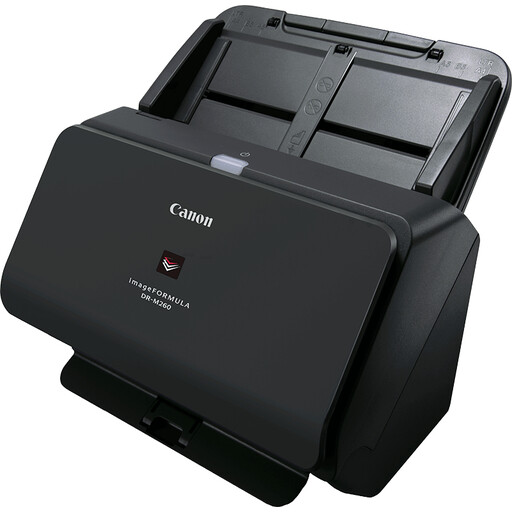
Canon imageFORMULA DR-M260 A4 sheet-fed scanner

Canon imageFORMULA DR-M260 A4

Suitable for processing loose A4 pages; check that the feed method is right for your material.

Sheet-fed scanner; double-sided scanning at 12 pages per minute and a 20-sheet input capacity.

View at Joybuy
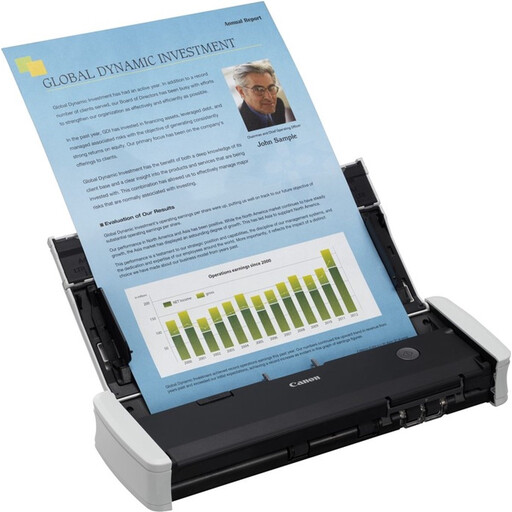
Canon imageFORMULA R10 A4 sheet-fed scanner

Canon imageFORMULA R10 A4

Could suit you if you scan loose A4 pages and want to search the files for text.

Sheet-fed scanner; the product description lists OCR, searchable PDF, USB power and use with a laptop or PC.

View at Joybuy

Epson WorkForce DS-6500 flatbed scanner with ADF

Epson WorkForce DS-6500 Power PDF

Could suit you if you regularly process A4 documents; assess separately whether the flatbed and feed method are right for your magazines.

Flatbed scanner with ADF; the product description lists double-sided scanning and a 100-sheet input capacity.

View at Joybuy

Epson WorkForce DS-70 A4 handheld scanner

Epson WorkForce DS-70 A4

A compact handheld scanner could suit you if you want to capture suitable loose pages; bear in mind that it requires manual operation.

A4 handheld scanner; the product description lists OCR, searchable PDF and USB connectivity.

View at Joybuy

CZUR Shine 800 A3 Pro document scanner

CZUR Shine 800 A3 Pro

The A3 specification may be useful for flat pages within that size, but it does not make this model suitable for every magazine.

The product description lists support for flat A3 and A4 sheets and OCR. It advises against scanning glossy materials, including magazines.

View at Joybuy

Frequently asked questions

How should you get started with old or damaged magazines?

First, assess the binding, tears and folds of each issue. The Dutch National Archives takes the physical condition into account when preparing for digitisation; use this as a starting point, not as a guarantee that any particular scanner can handle every original safely.

Is a PDF automatically searchable?

No. If you want to find articles by searching for text, choose searchable PDF output with OCR and check the recognised text on sample pages. IRIS and Plustek list this output for the models described here.

What should you check when installing on a school computer?

Check that the software is compatible with the exact model and operating system, and find out what access permissions are needed. For the Desk 6 Pro, IRIS describes installation for Windows and macOS and setting up camera access.

Can a school scan an entire old magazine and give the PDF to pupils?

Not just because the magazine is old or the school owns a scanner. The Dutch Government explains that permission and reprographic rights apply when making and sharing digital copies of copyright-protected publications; the rules for secondary education do not automatically allow an entire magazine to be distributed. Check the copyright status, type of education and intended use.

What if the material shows pupils who can be identified?

The Dutch Data Protection Authority explains that consent and security requirements apply when a school takes and publishes identifiable images of pupils. Assess separately whether and how those requirements apply to the historical page and the intended use of the scan.

Which warranty and service terms should you compare?

Compare the seller’s and manufacturer’s terms, software support and any costs beyond the price of the device. The Dutch Government distinguishes statutory guarantees from additional manufacturer or seller warranties; if a school is making the purchase, establish which terms and conditions of sale apply.
