If you regularly scan piles of loose, double-sided service sheets, look for a scanner with an automatic document feeder and duplex scanning. A flatbed is a better choice for bound or delicate originals; for the occasional loose sheet, a compact scanner may be enough, although archiving will involve more manual work. Also check whether the software for your chosen model can create searchable PDFs.
Which type of scanner is right for you?
Collector of loose service sheets
If you regularly archive several loose worksheets or maintenance forms, which may be double-sided, it’s worth looking at the feeder capacity and duplex scanning. Brother Netherlands and Epson Netherlands describe models with automatic feeders for this type of loose document.
Keeper of service booklets
If you want to scan bound or delicate originals without taking them apart, consider a flatbed. Canon Netherlands describes the CanoScan LiDE 400 as an A4 flatbed with a lid that accommodates thicker documents.
Hobbyist with limited workspace
If you only scan loose documents occasionally and want to put the scanner away afterwards, focus on its footprint and how it connects to your computer. Epson Netherlands describes the ES-50 as a USB-powered scanner that connects to a laptop or PC.
What to look for in a scanner for service sheets
| What to consider |
What to look for |
Who is more likely to prioritise this? |
| Loose, double-sided stacks |
Check the feeder capacity, duplex scanning function and supported document sizes for the exact model. |
If I regularly scan stacks of loose service sheets with information on both sides, I want to avoid placing or turning over each sheet individually. Around 33% of consumers prioritise processing stacks of double-sided documents. |
| Delicate or bound documents |
Check that the original fits on the glass and that the lid has enough clearance; only feed delicate documents through if the model specifications allow it. |
When I want to preserve a bound or fragile service booklet, careful scanning matters more than processing a stack quickly. Around 27% of consumers prioritise preserving delicate originals. |
| Searchable files |
Check whether the software for the exact model supports OCR and searchable PDF output; assess how well it recognises text with a test scan. |
If I want to search my digital archive later by date or part, recognised text is more useful than an image of the page alone. Around 20% of consumers prioritise files that are easy to search. |
| Limited space |
Compare how much space the scanner takes up in use and in storage, and check the power supply and whether it connects via USB or Wi-Fi. |
When I only scan occasionally and have little space in my hobby room, I want to be able to connect and store the device easily. Around 20% of consumers prioritise compact storage and occasional use. |
Common buying mistakes
-
Confusing a feed mode with a document tray
The term ‘automatic feed mode’ doesn’t necessarily mean the scanner can process a whole stack at once. You may still have to feed each sheet individually.
Feeding sheets one by one takes extra time when you have a large archive.
Check the stated feeder capacity and whether duplex scanning is supported. Brother lists a 20-sheet feeder for the ADS-1300; compare specifications like these for each model.
-
Assuming every PDF is searchable
A saved scan may be just an image, with no recognised text to search. Finding a part or date later may then involve more manual work.
Without suitable text recognition, searching may mean processing your scans again or checking documents manually.
Check whether the software for the exact model supports OCR and searchable PDF output. Epson lists these functions for ScanSmart; test a scan to see how well it recognises text you’ll want to find later.
-
Treating a delicate service booklet like a loose sheet
Feed scanners have limits on the material and thickness they can handle. A bound or delicate original isn’t automatically suitable for feeding through the paper path.
Using an unsuitable feeding method could mean extra work or damage to the original.
Check the original’s condition, binding and thickness against the specifications for the exact model. Choose a flatbed if the document fits on it and you don’t want to feed it through a scanner.
Scanner brands to consider
Brother
The ADS-1300 is a compact option for loose service sheets, with USB-C power and automatic feeding. This applies to this model, not to all Brother scanners.
- Brother Netherlands lists a 20-sheet feeder and duplex scanning for the ADS-1300.
- Check the connection options for the exact variant if you need Wi-Fi.
Epson
The models described range from the USB-powered ES-50 for loose documents to the ES-C320W, which offers Wi-Fi and different paper paths.
- Epson Netherlands lists OCR and searchable PDFs as ScanSmart features, and names the ES-C320W as a compatible model.
- The ES-50 and ES-C320W meet different feeding and connectivity needs. Check the software and connections for the variant you choose.
Canon
The models described offer different ways to scan originals: the CanoScan LiDE 400 is an A4 flatbed, while the imageFORMULA R10 feeds loose A4 sheets.
- Canon Netherlands lists a 20-sheet feeder and duplex scanning for the R10.
- According to its specifications, the R10 is designed for loose sheets within the stated thickness limits; the LiDE 400 doesn’t have the batch-feeding function found on the R10.
Joybuy scanners for service records
This Joybuy selection focuses mainly on loose service sheets, from models with automatic feeding and duplex scanning to a compact handheld scanner. One model combines a flatbed with automatic feeding for different types of original.
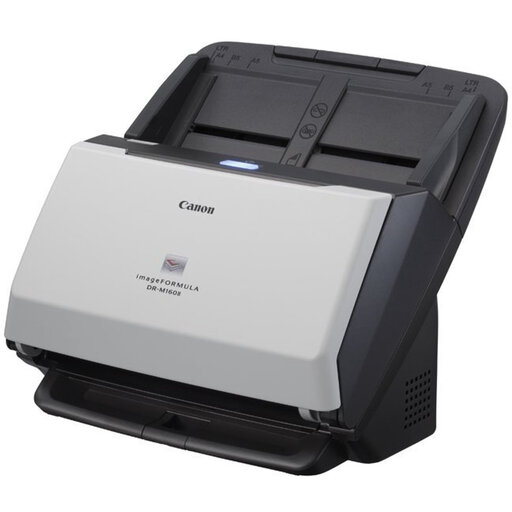 Image unavailable
Canon imageFORMULA DR-M160II ADF scanner
Suitable for processing several loose service sheets, including those with information on both sides.
A4; 60-sheet automatic feeder; automatic duplex scanning; 600 x 600 DPI; USB 2.0.
Make sure you have enough space for the document feeder.
View at Joybuy
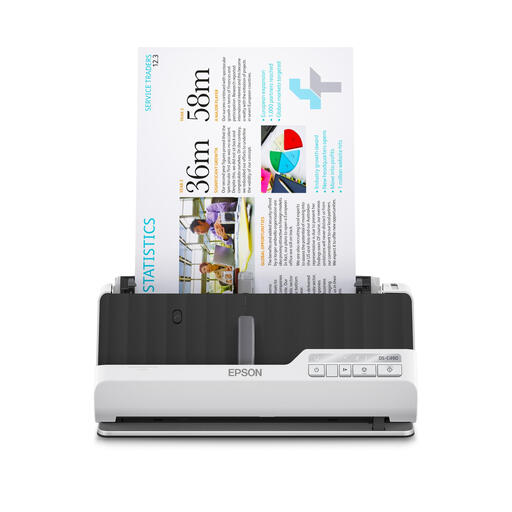 Image unavailable
Epson DS-C490 ADF and sheet-fed scanner
An option for scanning loose service sheets in duplex and, within the stated limits, feeding certain brochures through a straight paper path.
A4; automatic feeder; automatic duplex scanning; U-shaped and straight paper paths; brochures up to 5 mm; compatible with Windows, Mac and Chromebook.
View at Joybuy
 Image unavailable
Epson ES-C320W ADF and sheet-fed scanner
Suitable for loose service sheets if you want automatic feeding and Wi-Fi. For thicker documents, check that they’re supported by the straight paper path and product specifications.
A4; automatic feeder; automatic duplex scanning; Wi-Fi; U-shaped path and straight paper path for booklets.
Don’t scan documents with staples or wet ink.
View at Joybuy
 Image unavailable
Epson WorkForce DS-6500
The combination of a flatbed and automatic feeder may suit you if you have both loose service sheets and originals to scan on the glass.
Flatbed and ADF; 100-sheet feeder; duplex scanning in a single pass; USB 2.0; PDF support.
View at Joybuy
 Image unavailable
Epson WorkForce DS-80W handheld scanner
A compact option if you scan loose documents occasionally and want to search the text in your scans later using OCR.
A4; 600 x 600 DPI; Wi-Fi and USB; 300 g; OCR software for searchable PDFs.
Don’t feed damaged, folded or stapled documents into the scanner.
View at Joybuy
Frequently asked questions
Do I need a flatbed or a scanner with an automatic feeder?
Choose based on the originals you scan most often. Feed scanners are designed for suitable loose sheets; the Canon CanoScan LiDE 400 is a flatbed that lets you place originals on the glass, including thicker documents within the model’s specifications. Check the limits of the exact model if you scan both types.
Does automatic feeding always mean I can scan a stack?
No. Check the stated feeder capacity for the exact model. Brother lists a 20-sheet feeder for the ADS-1300; a description such as ‘automatic feed mode’ alone doesn’t mean there’s a document tray. Also check whether duplex scanning is included.
How can I make service records searchable?
Check whether the software for your chosen model supports OCR and searchable PDF output. Epson lists both features for ScanSmart and names the ES-C320W as compatible; use a test scan to check that important text is recognised accurately.
Can I publish service records containing other people’s names online without permission?
Don’t assume there’s a general exemption. The Dutch Data Protection Authority describes an exception for publication solely for personal or household use, subject to conditions such as limited visibility and no professional or commercial purpose. This exception doesn’t automatically apply to a publicly accessible or business-shared archive.


