What should you consider when choosing?
Overhead scanner or document camera
Choose this option if: you want to capture larger, delicate or bound originals without pressing them down.
Bear in mind: you’ll need clear space beneath and around the camera. Use a test scan to check that small text, stamps and edges are legible.
A4 flatbed scanner
Choose this option if: you mainly want to position individual A4 certificates carefully.
Bear in mind: you’ll need to place each sheet separately, and an A3 original won’t fit in a single A4 scan.
Scanner with automatic document feeder
Choose this option if: you regularly process stacks of loose sheets that are suitable for the feeder.
Bear in mind: bound originals and paper that doesn’t meet the feeder specifications will need a different approach.
The percentages give a broad indication of which considerations may matter most to consumers for this classroom task.
| What to consider |
What should you check? |
Who is this most relevant to? |
| Readability and preservation |
Make a test scan and check small text, stamps and edges. Compare the dimensions of the original with the scanning area. |
If I need to scan a delicate, bound or glossy certificate, I want to check that the scan is clear first. Around 31% of consumers prioritise preserving originals and keeping them legible. |
| Stacks of loose sheets |
Check the feeder capacity and whether the certificates’ size, paper weight and condition are suitable. |
If I regularly process stacks of loose sheets, I want to spend less time placing each document individually. Around 25% of consumers prioritise processing suitable loose certificates. |
| Workspace and storage |
Measure the space the device needs while scanning and check how it can be stored. |
If I share a small workspace, I want to know whether the scanner will fit while in use and can be put away safely afterwards. Around 19% of consumers consider limited workspace and storage the most important factor. |
| Managing pupil data |
Check where scans are stored, who can access them and whether the process involves any external services. |
If certificates contain pupil data, I want to know in advance how scans will be stored and shared. Around 25% of consumers prioritise managing pupil data. |
Joybuy products
This selection of Joybuy products includes flatbed, overhead and feeder scanners for different types of certificates. Choose according to the shape and size of your originals, and the space available while you scan.
 No image available
Epson WorkForce DS-1660W A4 flatbed scanner, 1200 × 1200 dpi
A possible choice if you want to place originals individually on a flatbed, while also processing suitable loose sheets using the automatic feeder.
The product description lists A4, a flatbed, an automatic document feeder and duplex scanning. Check that the size of your certificates and your preferred way of working are compatible with the model.
Joybuy
 No image available
CZUR Shine 800 A3 Pro
Suitable for flat loose certificates up to A3 when you want to capture them from above without placing them under a scanner lid.
The product information lists support for flat sheets up to A3, OCR and a foldable design. Glossy material isn’t recommended; try a test scan first to check small text and stamps. The product title lists compatibility with Windows and macOS.
Joybuy
 No image available
Epson DS-C330 A4 scanner, 600 × 600 dpi
An feeder scanner to consider for suitable loose sheets if workspace is limited.
The product information lists a U-shaped paper path and support for passports and booklets up to 5 mm thick. Check that your certificates are suitable and that the scanning method works for the specific original.
Joybuy
 No image available
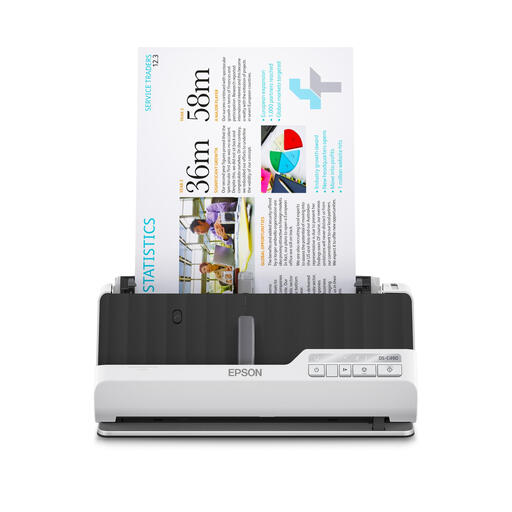
Epson DS-C490 A4 feeder scanner, 600 × 600 dpi
May suit stacks of suitable loose certificates if you need both a U-shaped and a straight paper path.
The product description lists a 10-sheet feeder capacity, duplex scanning and support for brochures up to 5 mm thick. Check the paper size, condition and thickness against the specifications before feeding originals.
Joybuy
 No image available
Epson ES-C320W A4 feeder scanner with Wi-Fi, 600 × 600 dpi
A possible option if you want to feed suitable loose documents and wireless placement would be useful in your workspace.
The product information lists Wi-Fi, U-shaped and straight paper paths, and support for booklets up to 5 mm thick. Feeding documents with staples or wet ink isn’t recommended, so check whether your originals are suitable.
Joybuy
Frequently asked questions
When do I really need a book scanner for certificates?
An overhead or book scanner is worth considering if your originals are bound, larger than the scanning area of an A4 flatbed, or can’t be placed under a lid. A flatbed may suit loose A4 sheets, while automatic feeding may be more practical for stacks of suitable loose sheets.
How can I check that a scan is usable before processing a whole stack?
Start with a test scan of a representative certificate and check names, small text, stamps, edges and any information on the reverse. Then compare the largest document’s dimensions with the scanning area. If you’re using a feeder scanner, check that the paper meets the model specifications.
Can a school simply scan certificates containing pupil data to a cloud service?
First, make sure the storage process is appropriate for the way personal data is handled and protected. The Dutch Data Protection Authority reminds schools of their accountability obligations and the need for appropriate technical and organisational measures. If an external organisation processes personal data on the school’s behalf, the Dutch Data Protection Authority says a data processing agreement is required. The right approach depends on the specific arrangements in place.
How long should digital copies be kept?
The GDPR does not set a general, fixed retention period for personal data. The school must identify the applicable obligations and the purpose of processing. Records management rules may also be relevant; according to the Inspectorate of Government Information and Heritage, whether the Archives Act applies depends in part on the school’s legal structure.
What should I check about the software before choosing a scanner?
Check that the required scanning and OCR software can be installed on the school computer and complies with the school’s IT policies. IRIS describes an online installer for Windows and macOS for the Desk 6 series; this doesn’t determine whether installation is allowed on a particular school computer.


