Which scanner is right for you?

Certificates on a small desk

Do you scan individual school certificates and want to put the scanner away after use? Compare the space it needs while scanning with its dimensions when stored. Canon says the CanoScan LiDE 400 can be stored vertically, but that doesn’t tell you how much desk space you’ll need while using it.

Fragile or bound originals

If you don’t want to feed a certificate through rollers or remove it from a binding, consider an overhead or flatbed scanner. The right choice also depends on the scan size and whether the original can lie flat on the glass.

Larger certificates

If your originals may be larger than A4, measure them and compare their dimensions with the scan area of the exact model. Canon lists a maximum scan area of 216 × 297 mm for the CanoScan LiDE 400.

What should you look for when choosing?

Foldable overhead or book scanner

A good fit if: you want to capture a fragile, bound or larger original from above. CZUR and IRIS list an A3 scan area for certain models.

Bear in mind: folding it away saves storage space, but not necessarily space while you’re using it. Check the exact model and make sure small text, signatures and stamps will be legible.

A4 flatbed scanner

A good fit if: you mainly scan individual, flat A4 certificates and would rather not feed them through a paper feeder. Canon lists a scan area of up to 216 × 297 mm for the CanoScan LiDE 400.

Bear in mind: the document needs to fit on the glass, and you’ll need space to place it there while scanning.

Compact sheet-fed scanner

A good fit if: you scan sturdy, individual sheets and want to put the scanner away afterwards. Epson describes the ES-50 as a USB-powered scanner for use with a laptop or PC; Brother lists an automatic feeder for the ADS-1300.

Bear in mind: paper needs a clear path into and out of the device. Check which media the model supports and leave room for the paper feed.

What to consider What to look for Who this matters most to
Working and storage space Measure the clear desk space and the room needed for your largest certificate, the scanner arm or the paper feeder. Don’t compare these measurements only with the folded dimensions. I want to put the scanner away after use and have limited desk space. Around 36% of consumers prioritise space for both use and storage.
Protecting originals Check whether the document is suitable for feeding through the scanner or can lie flat on the glass. On a test scan, check small text, signatures, stamps and edges. I don’t want to feed a fragile or bound certificate through rollers, and I need to see important details clearly. Around 29% of consumers are most concerned about preserving the original.
Certificate size Measure the width and height of your largest original and compare them with the scan area of the exact model variant. I have a certificate that may not fit on an A4 scan area. Around 21% of consumers prioritise the size of the original.
Number of loose sheets Check whether the sheets are suitable for automatic feeding, whether you need double-sided scanning and whether there’s room for the output. I scan several suitable loose sheets and don’t want to feed them in one at a time. Around 14% of consumers are most concerned about scanning multiple sheets.

Common buying pitfalls

  • Comparing only the folded dimensions

    An overhead scanner needs room for the original and the setup. You’ll also need to be able to reach the device while scanning with a flatbed or sheet-fed scanner.

    Measure the available working space in advance and allow for your largest certificate, not just the spot where you plan to store the scanner.

  • Assuming a clear scan counts as official proof of a qualification

    A scan you make yourself isn’t the same as an official, verifiable digital extract from DUO.

    Ask the receiving organisation what proof it needs. If your qualification is listed in DUO’s Mijn diploma’s, check whether you can use the original digital extract.

  • Choosing automatic feeding for every original

    A sheet-fed scanner is designed for supported loose media. A fragile or bound certificate isn’t necessarily suitable for feeding through a paper path.

    Consider the condition and binding of the document, and check the media supported by the exact model before choosing the convenience of automatic feeding.

  • Confusing optional accessories with warranty terms

    Brother says that an output tray or mains adapter may need to be purchased separately for the ADS-1300. An additional manufacturer’s warranty is also separate from your statutory rights with the seller.

    Check which accessories are included with your chosen version and which you’ll need for your setup. Review warranty terms separately from your statutory rights.

Brands to compare

CZUR

According to CZUR, the Shine Ultra series includes foldable overhead and book scanners for documents, books and more.

  • CZUR lists an A3 scan area for the series; the manufacturer specifies a 24-megapixel camera for the Shine Ultra Pro.
  • The Pro variant’s specification doesn’t automatically apply to the standard Shine Ultra. Also consider your working space, lighting and how legible your document will be.

IRIS

IRIS describes the IRIScan Desk 6 Pro as a document camera and book scanner with an A3 scan area.

  • IRIS lists a 13-megapixel camera, a resolution of 4160 × 3120 pixels and output formats including searchable PDF.
  • The stated scan speed and image quality are manufacturer claims. Check that the result clearly captures the small text and features on your certificate.

Canon

The CanoScan LiDE 400 is an A4 flatbed scanner for individual documents you don’t want to feed through a paper feeder.

  • Canon specifies a scan area of 216 × 297 mm, USB power and the option to store the device vertically.
  • A document that’s larger than the A4 scan area won’t fit in a single scan. Storing it vertically doesn’t reduce the working space needed while scanning.

Epson

According to Epson, the WorkForce ES-50 is a portable, USB-powered scanner for individual documents.

  • Epson lists output formats including PDF and JPEG, and describes the design as space-saving.
  • This isn’t a contactless book scanner and it connects to a laptop or PC. Check that your original is suitable for feeding.

Brother

According to Brother, the ADS-1300 is a compact sheet-fed scanner for suitable loose sheets.

  • Brother lists double-sided scanning, an automatic 20-sheet feeder and USB-C power.
  • An optional output tray or mains adapter may need to be purchased separately. Check which accessories suit your workspace and how you plan to use the scanner.

Joybuy products

These models suit different ways of scanning individual or fragile school certificates in a small workspace.

CZUR Shine 800 A3 Pro document camera

CZUR Shine 800 A3 Pro Document Camera

A foldable overhead scanner to consider if you want to scan a larger loose certificate from above.

The product name lists A3 flat-sheet scanning, OCR and compatibility with Windows and macOS. The stated dimensions are 45 × 16 × 21 cm; also allow for the space the setup takes up while in use.

View at Joybuy

Epson WorkForce DS-1660W A4 flatbed scanner

Epson WorkForce DS-1660W A4 Flatbed Scanner

A flatbed model to consider for fragile, bound or individual flat originals that you don’t want to feed through a paper path.

The product name lists A4 and 1200 × 1200 dpi. Check that your certificate fits within the scan area.

View at Joybuy

Epson WorkForce DS-70 A4 handheld scanner

Epson WorkForce DS-70 Handheld Scanner

A compact option for individual A4 certificates if you want to put the scanner away after use.

The product name lists 600 × 600 dpi and A4; the product information specifies a USB connection to a laptop or PC. Don’t force thick or damaged documents into the feed slot.

View at Joybuy

Epson WorkForce DS-80W A4 handheld scanner

Epson WorkForce DS-80W Handheld Scanner

A compact option for individual A4 sheets if you don’t want to be tied to a fixed scanning spot.

The product name lists 600 × 600 dpi and A4; the product information specifies Wi-Fi, battery power and automatic feeding. Don’t feed damaged, folded or stapled documents into the scanner.

View at Joybuy
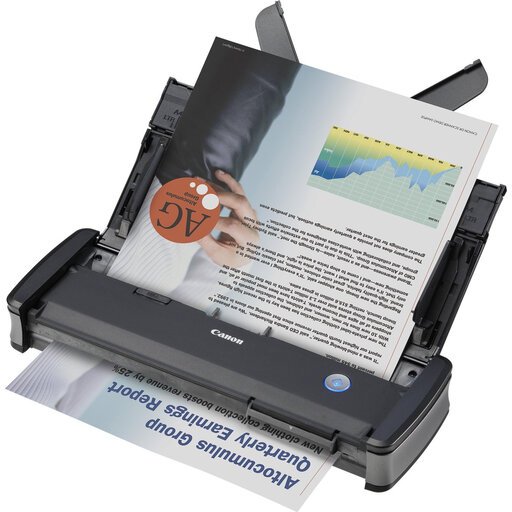
Canon imageFORMULA P-215II A4 sheet-fed scanner

Canon imageFORMULA P-215II Sheet-Fed Scanner

A compact sheet-fed scanner to consider if you need to process several suitable loose sheets.

The product name lists A4 and 600 × 600 dpi. The product information specifies USB power, an automatic 20-sheet feeder and double-sided scanning; leave room for paper to feed in and out.

View at Joybuy

Frequently asked questions

Is a scan of my school certificate the same as an official digital qualification?

No, don’t assume it is. DUO describes the digital extract from Mijn diploma’s as official, verifiable proof of a qualification or certificate. If your qualification is listed in Mijn diploma’s, ask the receiving organisation whether you can use the original digital extract; not every type of qualification is listed in the register.

Do I have to feed my certificate through a sheet-fed scanner?

No. If the original is fragile, bound or larger than the supported feed size, compare an overhead scanner with a flatbed scanner. Only use automatic feeding for media supported by your chosen model.

What should I check about connectivity and maintenance?

Check that the connection and software are compatible with your computer. Epson describes the ES-50 as USB-powered via a laptop or PC; Brother lists USB-C power for the ADS-1300. Follow the instructions for your chosen model when cleaning the paper path or glass, and check first whether you need any optional accessories.

What can I do if a scanner bought in the Netherlands turns out to be faulty?

According to the Dutch government, you should contact the seller. The Netherlands has no fixed statutory guarantee period; your statutory rights are separate from any additional manufacturer’s warranty.

Can a school keep scans containing personal data indefinitely?

No. For organisations that process personal data, the Dutch Data Protection Authority outlines the requirement to protect data appropriately and the principle that it should not be kept for longer than necessary. The measures and retention period depend on the processing and any other applicable rules.
