For flat, loose letters, a foldable document camera can be handy if you want to put it away after use. For delicate or bound items, an overhead scanner is a better choice if you want to handle the original without contact. Bear in mind that you’ll still need space for the whole sheet while scanning. For handwriting, also compare a test scan and check that the scanner works with the computer or software you need to use.
Who is this suitable for?
You scan loose letters on a small desk
You want to be able to put the scanner away after use, but you’ll still need to clear enough space for the whole sheet while scanning. CZUR describes the Shine 800 A3 Pro as foldable and designed for flat, loose pages.
You’re preserving delicate family letters
You want to handle old or fragile originals as little as possible, so contactless scanning matters more to you than compact storage. The National Archives describes digitisation as a way to reduce wear and tear on paper documents.
You also scan bound correspondence
As well as loose letters, you scan bound pages and need a way to capture them without laying them flat on a flatbed scanner. ScanSnap describes the SV600 as a contactless scanner for items including bound materials.
What should you look for when choosing?
Start by considering the condition and format of your letters, then work out how much space you can clear while scanning. Also check that the scan is easy to read and that the way you want to save your files suits your workflow.
| What to consider |
What to look for |
Who is this important for? |
| Space and storage |
Measure the space needed for the whole sheet while scanning, as well as the space available to store the device. |
If I have limited desk space, I want to be able to put the scanner away after use without feeling cramped while scanning. Around 36% of consumers prioritise space and storage. |
| Delicate originals |
Check the condition of the paper and whether you want to capture the original without pressing down on it or moving it across the paper. |
If my family letters are fragile, I want to handle them as little as possible. Around 29% of consumers prioritise preserving delicate originals. |
| Legibility |
Look at a test scan of your own handwriting, including any faint ink and the edges of the letter. |
If my letters contain small writing or faint ink, I want to check that the scan is legible beforehand. Around 21% of consumers prioritise legibility. |
| Workflow and files |
Check whether you can scan without a computer or have the right computer and software, and which file formats you need. |
If I want to scan letters without a computer or save them in my preferred way straight away, I want to know what steps and file types are involved. Around 14% of consumers prioritise their workflow and compatibility. |
Common buying mistakes
-
Assuming foldable means space-saving while scanning
Even a foldable document camera needs to capture the whole original.
Measure the available scanning space using a real letter and envelope, not just the folded dimensions of the device.
You may need to move things before you start scanning.
-
Assuming OCR means handwriting will be recognised accurately
A mention of OCR or text export doesn’t prove that your handwriting will be converted correctly.
Check the scan itself and compare any recognised text with the original image file.
Checking and correcting recognised text takes extra time.
-
Treating a handheld scanner and a contactless scanner as interchangeable
With a handheld scanner, you move the device over the paper; according to the Dutch manufacturer’s page, the ScanSnap SV600 captures items from above without contact.
If the paper is fragile, prioritise a method that doesn’t involve pressure or movement across the original.
-
Assuming very similar model names refer to the same product
CZUR distinguishes between the Shine 800 Pro and the Shine 800 A3 Pro; these model names refer to different versions.
Compare the full model name and specifications for each page format before making your choice.
Brands to compare
CZUR
Offers document cameras for loose sheets, as well as models for thin books and documents; different versions are designed for different types of original.
- According to CZUR, the Shine 800 A3 Pro is foldable and suitable for flat, loose pages up to A3.
- CZUR lists the Shine 800 A3 Pro at 270 dpi for A4 and 205 dpi for A3. These figures alone don’t tell you how legible your handwriting will be.
IRIS
Offers the standalone IRIScan Book 7 and Desk document cameras; the options differ in how you use and store the scanner, among other things.
- According to IRIS, the Book 7 can scan to PDF or JPEG without a computer and has a preview screen.
- You move the Book 7 over the paper. The available Desk versions support different formats, so check the specifications for the exact model.
ScanSnap
The SV600 is an overhead scanner for loose, bound and delicate documents, among other things.
- The Dutch manufacturer’s page describes contactless capture up to A3 and connection to a PC or Mac.
- You need a clear surface beneath the device while scanning. The product information doesn’t provide evidence of OCR accuracy for handwritten letters.
Plustek
The OpticBook 4800 is a flatbed book scanner for those who also scan bound pages and have space for a permanently set-up device.
- For the version described, Plustek lists a 2 mm book-edge design and an optical resolution of 600 dpi.
- These specifications come from Plustek’s US product page. Before buying in the Netherlands, check that the version and software meet your needs.
Scanners at Joybuy
These scanners are designed to digitise loose documents where storage space is limited. Check that the feed method is suitable for the condition of your letters.
 No image available
Epson DS-C330 ADF and sheet-fed scanner
An option to compare if you want to scan loose A4 letters and are looking for a sheet feeder.
A4; 600 × 600 dpi.
View at Joybuy
 No image available
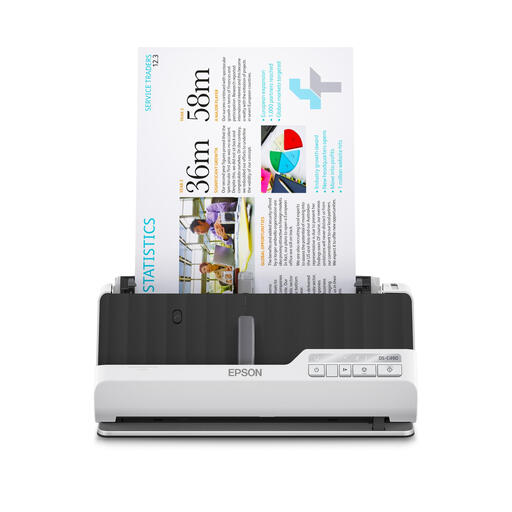
Epson DS-C490 ADF and sheet-fed scanner
An option to compare if you want to scan loose A4 letters and are looking for a document scanner with a feeder.
A4; 600 × 600 dpi.
View at Joybuy
 No image available
Epson WorkForce DS-70 handheld scanner
A portable A4 option to compare if you have limited space to store a scanner.
A4; 600 × 600 dpi.
View at Joybuy
 No image available
Epson WorkForce DS-80W handheld scanner
A portable A4 option to compare if you need a scanner for a space without a permanent wired workstation.
A4; 600 × 600 dpi.
View at Joybuy
 No image available
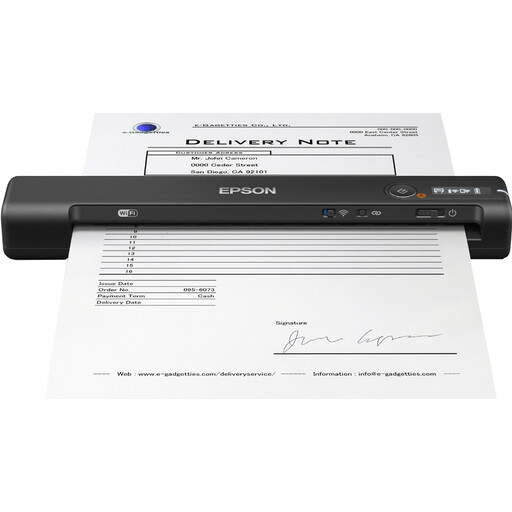
Epson WorkForce ES-60W handheld scanner
A portable A4 option to compare if you’re looking for a scanner for a compact scanning area.
A4; 600 × 600 dpi.
View at Joybuy
Frequently asked questions
Can a scanner reliably convert handwritten letters into text?
An OCR feature doesn’t prove that your handwriting will be recognised correctly. Keep the original image file and check the recognised text against the scan.
How can I make room to scan on a small desk?
Leave enough room for the whole sheet during each scan and check the scan before putting the letter away. A foldable scanner is mainly easier to store after use; with contactless scanning, you’ll still need space beneath the device.
What are my rights when buying online in the Netherlands?
According to the Dutch government, distance purchases are often covered by a 14-day cooling-off period. There is no fixed statutory guarantee period in the Netherlands; if a product is faulty, you should contact the seller.
Can I digitise or share letters containing personal data?
According to the Dutch Data Protection Authority, the GDPR doesn’t apply to processing carried out solely for personal or household purposes. So keep private use separate from sharing personal data publicly.


