For delicate bound albums and registers, an overhead scanner is an obvious choice because it scans without contact. If you mainly want to scan loose photos and A4 documents, a flatbed scanner may be a better fit. Also compare the scan area, the space available, the software for your computer and where scans will be stored. Automatic correction and OCR still need to be checked against the original.
Who is this for?
For anyone looking to preserve delicate family books
If you’re digitising bound albums or registers and want to put as little strain as possible on the spine and pages, compare contact-free capture and check how the fold looks in a test scan. Ricoh describes the ScanSnap SV600 as a contact-free overhead scanner.
For anyone who mainly scans family photos and loose documents
If your collection consists mostly of photos and loose A4 papers, compare a flatbed scanner with a book scanner and check that the scan area suits your materials. Epson Netherlands presents the Perfection V39II as an A4 flatbed scanner for photos and documents.
For anyone sharing a scanner at a worktable
If you need to put equipment away after use and don’t want private files to be visible to other users, compare the set-up and agree where scans will be stored. IRIS highlights a compact workspace as a consideration for the Desk 7 Pro; the Dutch Data Protection Authority provides information about publishing and removing personal data.
What should you look for?
Overhead book scanner
Choose this when: bound or delicate items are your priority and you don’t want to press them flat. Ricoh says the SV600 can scan documents up to 30 mm thick without contact; CZUR positions its ET range for books with curved pages.
The trade-off: you’ll need a clear space for scanning. Check the text around the book fold in a test scan and compare it with the original.
Book-edge flatbed scanner
Choose this when: you’re scanning bound pages that fit on the scan bed and the book can rest safely against the glass. Plustek lists a 2 mm book edge and an 8.5 × 11.69 inch scan area for the OpticBook 4800 (eBookScan).
The trade-off: you’ll still need to position the original on the glass. The listed model specifies Windows support, so don’t assume it’s compatible with another operating system without checking first.
A4 flatbed scanner
Choose this when: loose A4 documents and photos make up most of your collection. Epson presents the Perfection V39II as a compact flatbed scanner with a stand to save space.
The trade-off: an A4 scan bed won’t capture a larger album page or book spread in one go. The stated resolution alone doesn’t tell you how legible text will be around a curved book fold.
Foldable document camera
Choose this when: you mainly want to capture flat loose sheets up to A3 and need to set the scanner up temporarily. CZUR describes the Shine 800 A3 Pro as suitable for flat sheets and lists 8 MP and 205 dpi.
The trade-off: don’t automatically treat this model as a book scanner for thick or heavily curved books; CZUR distinguishes it from its ET book scanners.
When choosing a scanner for family documents in a shared studio, four different priorities come into play: preserving bound items, scanning loose documents and photos, available workspace, and keeping files easy to find and private.
| What to consider |
What should you check? |
Who is this important for? |
| Delicate bound items |
Compare overhead capture with a book-edge scanner; check the book thickness, scan area and a test scan around the fold. |
If I want to digitise albums or registers without putting unnecessary pressure on them, I focus on how the original is captured. Around 33% of consumers say preserving bound items is their main buying concern. |
| Loose documents and photos |
Compare an A4 flatbed scanner with a camera for larger loose sheets; check scans of text and photos at the size you want to view them. |
When my collection is mostly loose photos and papers, I want to know whether the scan area suits my materials and captures detail well. Around 27% of consumers prioritise scans of loose documents and photos. |
| Sharing workspace |
Check the clear space required, cables and storage options; a compact set-up may be less suitable for a large book spread. |
If I share the worktable with others, I want to be able to put equipment away easily after use. Around 20% of consumers say set-up and storage are their main buying concerns. |
| Finding and protecting files |
Check the OCR output, storage location and who has access; compare the recognised text with the original. |
When I want to find family information later without leaving private files on a shared account, I look for search options and access controls. Around 20% of consumers prioritise keeping files easy to find and private. |
Common pitfalls
-
Mistaking a foldable A3 document camera for a book scanner
CZUR positions the Shine 800 A3 Pro for flat loose sheets and its ET range for book scans with curved-page correction. So a large stated paper size doesn’t automatically mean a camera is suitable for bound material.
Choose based on the most challenging original you want to scan, not just the largest stated paper size.
-
Assuming resolution or automatic correction guarantees a good scan
The stated megapixels, dpi and correction features don’t, by themselves, tell you how legible small text will be around your book fold.
Compare a test scan of text, the book fold and a photo with the original. If necessary, keep the unedited capture as well.
-
Leaving scans on a shared account
Files on a shared computer may be accessible to other users if storage and sharing settings aren’t restricted.
Before scanning, agree on a private storage location and a routine for clearing files from the shared computer.
Brands to consider
CZUR
The ET range is designed for bound books; the Shine 800 A3 Pro is intended for flat loose sheets.
- CZUR describes curved-page correction for book scans with its ET range.
- The stated features don’t prove that both ranges deliver comparable scan results; check which model suits your originals.
IRIS
The Desk 6 Pro and Desk 7 Pro are A3 document cameras with book-scanning and OCR features.
- IRIS lists 13 MP for the Desk 6 Pro and 18 MP for the Desk 7 Pro, and highlights a compact workspace for the Desk 7 Pro.
- These stated features aren’t an independent comparison of how legible family archive materials will be.
Ricoh ScanSnap
The SV600 is an overhead scanner for books, photos and larger documents.
- Ricoh lists contact-free scanning, A3 and documents up to 30 mm thick.
- Before buying, check that the software works with your computer and that the model suits the way you want to work.
Plustek
The OpticBook 4800 (eBookScan) is a book-edge flatbed scanner for pages that fit on the scan bed.
- Plustek lists a 2 mm book edge, 600 dpi optical resolution and Windows support.
- You’ll need to position the book against the glass; also check that the stated software support works with your computer.
Epson
The Perfection V39II is an A4 flatbed scanner mainly for loose documents and photos.
- Epson lists 4800 dpi, photo features and a stand that lets you position the scanner upright.
- Its A4 scan bed and flatbed design don’t automatically make it suitable for large or delicate bound items.
Joybuy product picks
The selection below includes flatbed and ADF combinations for books and loose documents, sheet-fed scanners for loose sheets, and a document camera for flat sheets.
 No image available
Canon imageFORMULA DR-F120 Flatbed & ADF Scanner
The flatbed and ADF combination lets you scan bound material on the glass as well as loose documents.
A4; 600 × 600 dpi; 50-sheet ADF; duplex scanning; output to editable PDF.
View at Joybuy
 No image available
Epson WorkForce DS-6500 Power PDF
The flatbed and ADF offer different ways to scan bound material and loose documents.
100-sheet ADF; duplex scanning; output to JPG, PDF and TIFF. A network interface is listed as optional.
View at Joybuy
 No image available
Epson ES-C380W ADF + Sheet-Fed Scanner
The compact U-path may suit a shared workspace with limited room; the straight paper path described supports booklets up to 5 mm thick.
A4; 600 × 600 dpi; Wi-Fi and scanning to network destinations. Automatic duplex scanning isn’t available.
View at Joybuy
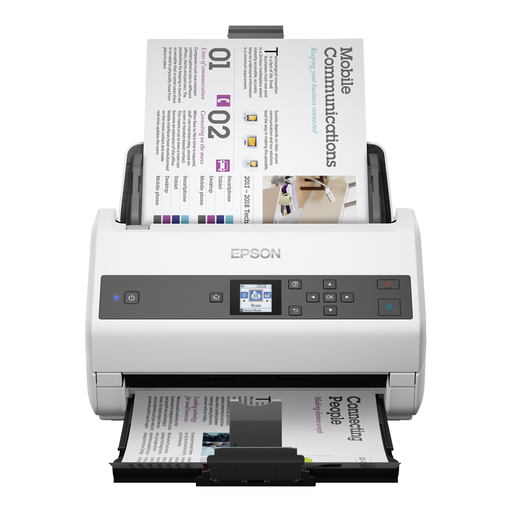 No image available
Epson WorkForce DS-970 Sheet-Fed Scanner
The standard scanning method described is sheet-fed, for loose sheets; a flatbed scanner is listed as an optional accessory for books.
A4; 100-sheet ADF; stated scanning speed of 85 pages per minute. A network interface is listed as an optional accessory.
View at Joybuy
 No image available
CZUR Shine 800 A3 Pro Document Camera
This model is designed for flat loose sheets up to A3, not for scanning bound books. The description advises against scanning highly reflective materials, such as glossy photos.
Foldable design; OCR; USB connection; compatible with Windows and macOS.
View at Joybuy
Frequently asked questions
How can you stop other studio users from seeing your scans?
Don’t save scans to a shared account without checking first. Choose a private storage location and check who can open or share the files; the Dutch Data Protection Authority distinguishes between limited personal or household use and public publication.
How do you scan bound material?
Measure the largest page or open spread and compare it with the scan area. Keep the capture space clear when using an overhead scanner and check the book fold after scanning; with a book-edge scanner, the book needs to rest safely against the glass.
Can you scan a protected book and share the scan with everyone?
According to the Dutch Government, a private copy for personal use must not be distributed or made public. For family albums and other works by third parties, consider separately which rights apply to the content.
Should you buy an extended warranty?
Not automatically. According to the Dutch Government, there is no fixed statutory warranty period in the Netherlands; if a product is faulty, you should contact the seller. Compare extended warranties based on the rights they actually add.


