Who is this choice relevant to?

People looking after a delicate family archive

You handle old letters, albums or bound documents and want to put as little strain on the originals as possible. The US National Archives and Records Administration describes overhead capture as a way to avoid pressure from a flatbed lid; a standard document camera does not automatically provide a book-support setup.

Volunteers creating a searchable archive

You want to find scans by subject or name and check that every page is there. The National Archives of the Netherlands describes checking image quality and completeness as part of the digitisation process.

Scanning teams handling different types of originals

You process photographs, loose documents and possibly larger batches. The right method depends on the condition and size of each type of material, and whether it is suitable for feeding through a scanner.

What should you look for when choosing?

Overhead scanner

Best for: delicate or bound originals, or items that will not lie flat, when you do not want to press them against glass.

Trade-off: check whether the book is supported, the capture size and how much care is needed when positioning and editing images.

Flatbed or flatbed with book edge

Best for: stable, loose photographs and sheets that fit on the scanning area, or a bound book that can rest safely on the glass.

Trade-off: placing items by hand takes time. The size of the scanning area and any pressure on delicate items also limit how you can use it.

Document feeder

Best for: larger quantities of loose, stable sheets that are suitable for feeding through the scanner.

Trade-off: feeding sheets saves you placing them by hand, but it is not a general-purpose method for photographs, brittle pages or bound materials.

What to consider What should you check? Who should give this more weight?
Preserving delicate originals Check whether the exact model captures images from above and whether its setup supports the book. I do not want to press delicate letters or a bound album against a glass plate; around 36% of consumers put preserving delicate originals first.
Finding and checking scans Check whether searchable files are supported and allow time to check readability and look for missing pages. I want volunteers to be able to find scans and check that the set is complete; around 29% of consumers prioritise searchability and checking.
Sizes and photographs Measure the originals and compare them with the stated scan size. Also check whether photographs are suitable for the method you have chosen. I process photographs as well as documents and want to know which items will fit on the scanning area; around 21% of consumers prioritise differences in material and size.
Batch processing Check which loose media can be fed through the scanner and whether any feeder parts or maintenance may be needed. I want to process lots of suitable loose sheets without placing them one by one; around 14% of consumers make batch-processing speed their top priority.

Common pitfalls

  • Assuming a high megapixel count proves archival quality

    A stated sensor resolution and a software-interpolated resolution are not the same thing. A camera’s megapixel count alone also does not tell you whether small text, handwriting and page edges in your materials will be readable.

    Compare the sensor resolution of the exact model and take test scans of different originals. Allow time to check the results and look for missing detail.

    If a test scan is not usable, rescanning could take extra time.

  • Using an automatic feeder for every old item

    A sheet-fed scanner has limits on the types of media it can handle. A feeder is not automatically suitable for brittle pages, photographs or bound items.

    First sort the collection by condition, binding and size. Only use the feeder for loose sheets that are suitable according to the specifications of the exact model.

    Delicate originals could be damaged, and repairs or a new scan could mean extra work.

  • Assuming that scanning means you have permission to share

    Creating a scan does not automatically give a group the right to publish personal data or copyright-protected texts and photographs online.

    Keep internal storage separate from publication and check which personal data and publication rights apply to each item.

Brands to consider

IRIS

The IRIScan Desk range includes models for books and documents. Compare the specifications of the exact version you are considering.

  • IRIS says the Desk 6 Pro has a 13 MP sensor and a maximum capture size of A3; 21 MP is the software-interpolated resolution. According to IRIS, the Desk 7 Pro has an 18 MP sensor.
  • Camera specifications do not prove that your own handwriting or delicate archival material will be readable. Check the results with test scans.

Plustek

The OpticBook 4800 is a flatbed option for books that can rest safely on the scanning area.

  • Plustek lists a 2 mm book edge and output as searchable PDF.
  • These specifications do not prove that a delicate binding can safely be laid flat.

Epson

The Perfection V39II is an A4 flatbed option for loose photographs and documents that fit on the scanning area.

  • Epson lists 4800 dpi and photo and text enhancement features.
  • The A4 scanning area limits the size of items you can scan; these specifications do not indicate an advantage for brittle bound items.

Brother

The ADS-4300N is an option for larger quantities of loose documents suitable for double-sided feeding.

  • Brother lists an 80-sheet automatic feeder and a speed of up to 40 pages per minute for single-sided A4 scans. The manufacturer also lists separate feed rollers.
  • These are stated figures, not a measured speed for your group’s project. The feeder is not a substitute for a method suited to brittle or bound items.

CZUR

The ET24 Pro is a camera option in the ET book-scanner range, designed for open books.

  • CZUR lists a 24 MP sensor, A3 support and software-based page flattening for the ET24 Pro.
  • Check the current software requirements and test how it handles your own handwriting and curved pages. Specifications are not an independent accuracy test.

Joybuy products

These product options are intended for digitising family documents, from loose sheets and thin booklets to larger flat documents and mixed scanning methods. For each product, check that its method suits the condition and size of your originals.

Epson DS-C330 ADF sheet-fed scanner, A4, 600 x 600 DPI

Epson DS-C330 ADF Sheet-Fed Scanner

A sheet-feeding option for documents and thin booklets up to 5 mm thick; check that each original is suitable for feeding through the scanner.

A4 size and 600 x 600 DPI, according to the product name.

The product description mentions a straight paper path, paper protection and output to PDF, JPG and TIFF.

Joybuy

CZUR Shine 800 A3 Pro document camera

CZUR Shine 800 A3 Pro

An overhead capture option for flat documents; check that it can support your originals before using it with delicate books.

The product name and description list A3 support and OCR for more than 180 languages.

The product description advises against scanning highly reflective materials, such as glossy photographs.

Joybuy
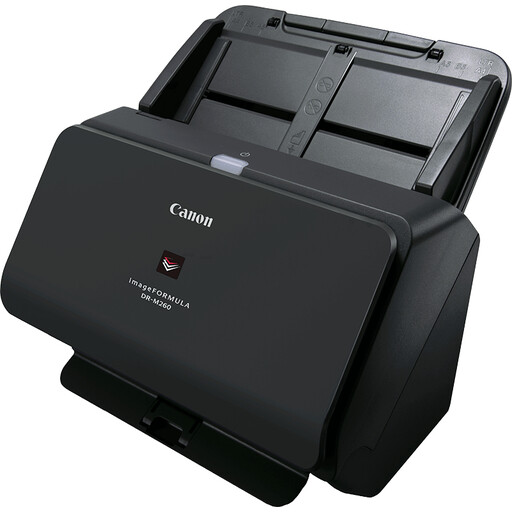
Canon imageFORMULA DR-M260 sheet-fed scanner, 600 x 600 DPI, A4

Canon imageFORMULA DR-M260

A sheet-fed scanner for suitable loose documents; its stated feeding capability is not a substitute for an overhead method for brittle or bound originals.

The product name lists A4 and 600 x 600 DPI.

The product description mentions a 50-sheet automatic document feeder, double-sided scanning and output to editable PDF.

Joybuy

Epson WorkForce DS-6500 Power PDF

Epson WorkForce DS-6500 Power PDF

The product description mentions a flatbed for books and bound documents, as well as a feeder for suitable loose sheets. A flatbed does not capture images from above without putting pressure on the original.

A4 flatbed and 100-sheet automatic document feeder, according to the product description.

The product description lists double-sided scanning and output as searchable PDF.

Joybuy

Epson WorkForce DS-1660W flatbed scanner, 1200 x 1200 DPI, A4

Epson WorkForce DS-1660W

An A4 flatbed option for items that fit on the scanning area. For severely damaged items, the US National Archives and Records Administration describes overhead capture as a way to avoid pressure from a flatbed lid.

The product name lists 1200 x 1200 DPI and wireless connectivity.

The product description lists books, bound documents and delicate items as suitable materials to scan.

Joybuy

Frequently asked questions

How can you make sure no pages are missed or difficult to find later?

Set an order and file-naming system in advance, then check readability and completeness after scanning. The National Archives of the Netherlands describes checking image quality and looking for missing pages as part of digitisation; adding keywords may also take some manual work.

Is a sheet-fed scanner suitable for every old letter or photograph?

No. First assess the condition and size of each original. Check the types of media accepted by the exact model and only use its feeder for suitable loose sheets. The US National Archives and Records Administration describes overhead capture as a way to avoid pressure from a flatbed lid when handling severely damaged items.

What else should the group consider besides the scanner itself?

Allow for software compatibility, time for quality checks and any replaceable feeder parts. Brother lists separate feed rollers for the ADS-4300N. If the purchase falls under Dutch consumer sales law, a legal guarantee applies without a fixed statutory guarantee period, according to the Dutch government.

Can the group put scans containing information about living family members online?

Not automatically. According to the Dutch Data Protection Authority, an organisation needs a lawful basis to process personal data; in most cases, permission is needed to publish someone else’s personal data online. Make sure the files the group handles are secure too.

Can the group publicly share scanned photographs or texts belonging to others?

A scanner does not grant publishing rights. According to the Dutch government, using and publishing copyright-protected photographs and texts generally requires permission from the creator. The private-copy exception for personal use does not allow you to distribute copies; check the rights for individual items before publishing them.
