
Vandaag of morgen in huis

Kwaliteit gegarandeerd

Welkomstaanbiedingen ontgrendelen: GRATIS bezorging | Tot 80% korting | Gratis 30 dagen JoyPlus-proefperiode
Download de app
When you're working with large files, waiting isn't an option. A slow transfer can disrupt your entire workflow, whether you're a video editor, photographer, or gamer. The external storage market is full of promises about staggering speeds, but the reality is often different. Many users overpay for performance they'll never achieve.
Before you decide to buy a Samsung Portable SSD T9 1TB, it's crucial to understand a few common pitfalls. This will help you avoid a bad purchase and choose a high-speed external drive that truly fits your needs.
Pitfall 1: The "up to" speed claim. Manufacturers advertise maximum speeds, like 2000 MB/s, but often forget to mention that your computer or laptop needs a specific port (in this case, USB 3.2 Gen 2x2) to reach it. Without the right port, you're paying for speed you can't use.
Pitfall 2: The wrong storage for the job. A cheap USB stick is fine for documents, but it's unsuitable for daily editing of large video files. A traditional external hard drive (HDD) offers a lot of space for little money but is sensitive to shocks and many times slower than a portable SSD. The choice depends entirely on your use case.
You don't need to understand every single specification to make the right choice. Focus on the factors that truly matter in practice.
The speed of an external SSD is determined by both the drive itself and the connection. The Samsung T9 uses NVMe technology, which is much faster than the older SATA technology. To achieve the advertised 2000 MB/s, the SSD must be connected via a USB 3.2 Gen 2x2 port.
So, always check which USB ports your computer has. A 2000 MB/s portable SSD only makes sense if your equipment supports it. Otherwise, a model with a maximum speed of 1,000 MB/s is often a smarter and more affordable choice.
A good external SSD works seamlessly across different systems. Make sure the drive is suitable for both SSD for Mac and Windows. Most modern SSDs, including the Samsung T9, are pre-formatted (exFAT) to work on both systems right out of the box.
Also, check the included cables. A set with both a USB-C to USB-C cable and a USB-C to USB-A cable is practical. This allows you to connect the drive to almost any device, from a new MacBook Pro to an older desktop PC, without needing to buy a separate adapter.
If you travel with your drive often, a sturdy housing is essential. SSDs are inherently more shock-resistant than HDDs because they have no moving parts. Models like the Samsung T9 go a step further with a housing that the manufacturer claims can withstand a drop of up to 3 meters. For those who often work outdoors or in rugged environments, a model with an IP rating for water and dust resistance can offer extra peace of mind.
Based on these criteria, we have highlighted a few popular choices that suit different user profiles.
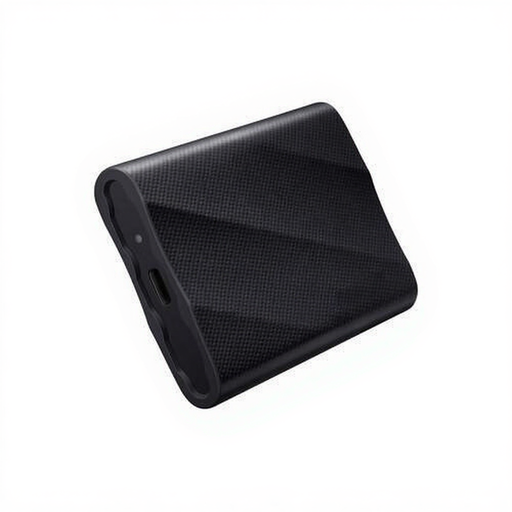
Why This Fits Their Persona: Ideal for video editors, 3D designers, and gamers who work directly from the drive. Its immense speed minimises loading times and accelerates the export of large projects, which is essential for an efficient workflow.
This SSD is designed to deliver on its "up to" speed claim, provided you have the correct USB 3.2 Gen 2x2 port. You pay for top-tier performance and get it, without a bottleneck.
Read and write speeds of up to 2,000 MB/s. Drop-resistant up to 3 meters and comes with both USB-C to C and USB-C to A cables for broad compatibility.

Why This Fits Their Persona: Perfect for photographers and filmmakers who work on location. The rugged, water- and dust-resistant housing provides peace of mind in unpredictable environments, while its speed is more than sufficient for transferring 4K footage.
You're not paying for the 2000 MB/s speed that you often can't utilise on location, but are instead investing in durability. This model focuses on reliability rather than pure, theoretical speed.
IP65 rating for dust and water resistance. Speeds of up to 1,050 MB/s are still very fast and compatible with the widely used USB 3.2 Gen 2 port.
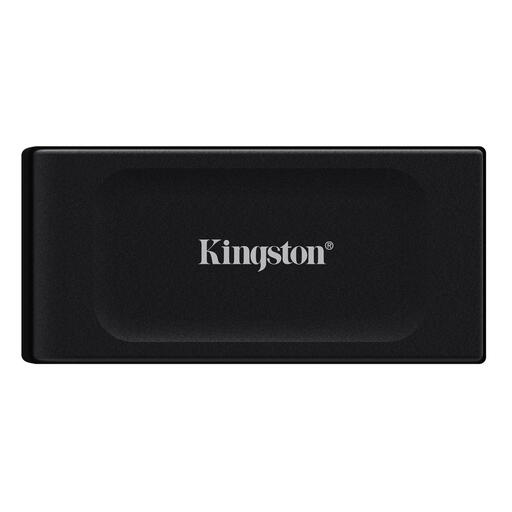
Why This Fits Their Persona: For students, home users, or as a backup drive. This SSD offers enormous storage capacity at a competitive price. It's fast enough for daily tasks, transferring photo libraries, and carrying large files.
You consciously opt for an excellent price-to-storage ratio instead of the absolute highest speed. This prevents you from overpaying for performance you don't need for backups or general use.
Offers 2TB of storage, which is excellent value. Extremely compact and lightweight (only 29 grams), making it easy to fit into any bag or even a pocket.
We have compiled a complete, up-to-date list of products that fully meet these strict selection criteria and local regulations.
Yes. To reach the maximum speed of 2,000 MB/s, your computer or laptop must have a USB 3.2 Gen 2x2 port. With a more common USB 3.2 Gen 2 port, the speed will be limited to about 1,000 MB/s. The drive will also work on older and slower ports, but at a reduced speed.
The main difference is speed and durability. The T9 is geared towards maximum speed (up to 2,000 MB/s) for the most demanding tasks. The T7 Shield focuses on durability with an IP65 rating for water and dust resistance, while its speed (up to 1,050 MB/s) is still excellent for most professional applications.
Absolutely. An external SSD for gaming can significantly reduce game load times compared to a traditional HDD. You can install and play games directly from the SSD. Both the Samsung T9 and T7 are compatible with PC, PlayStation, and Xbox, making them a popular choice for expanding your game library without having to replace the internal drive.
