
Dashboard builder who enters lots of figures
Wants to enter sales figures quickly and is weighing up a separate numeric keypad against a more compact layout.


Start by considering how often you enter figures: a separate numeric keypad is useful if you enter lots of numbers, while a more compact layout can leave more room beside your keyboard. Then compare the key feel of the exact model, the shortcuts you need, the connection and the physical layout. Descriptions such as ‘whisper-quiet’ are not comparable sound measurements.
Wants to enter sales figures quickly and is weighing up a separate numeric keypad against a more compact layout.
Wants to take keyboard noise into account without treating the manufacturer’s description as an objective comparison.
Wants to arrange the keyboard and mouse to suit their workspace and alternate screen work with other tasks.
First, work out how many figures you enter and how much room you need beside the keyboard. Then check the layout, shortcuts and connection. Consider descriptions of the sound only in light of these practical requirements.
| Consideration | What to look for | Who is it most relevant to? |
|---|---|---|
| Keyboard noise | If possible, assess the key feel of the exact model in a quiet room; don’t treat manufacturer claims as comparative measurements. | In a quiet study, I want to take noise into account, but not rely solely on a manufacturer’s description. Around 36% of consumers give keyboard noise top priority. |
| Separate numeric keypad and shortcuts | Consider how often you enter strings of figures and check that the physical layout suits your computer and the commands you use. | If I enter sales figures often, I want quick access to a separate numeric keypad. Around 29% of consumers give entering figures top priority. |
| Hand position and extended use | Try the layout to see whether it suits your hands. Also consider the position of your screen, mouse and chair, and take breaks from screen work. | During long typing sessions, I also want to assess the position of my hands and arms. Around 21% of consumers prioritise their working and hand position. |
| Desk space and connection | Measure the space available and check the connection, any adapter and compatibility for the exact model. | If my desk has limited space, I want to know where the keyboard and mouse will fit and whether the connection is suitable. Around 14% of consumers give their setup and connection top priority. |
Logitech, CHERRY and BakkerElkhuizen describe the sound made by their own models, but these descriptions are not comparable measurements.
First decide which layout you need. Then, if possible, assess the key feel of the exact model in a similarly quiet room.
According to BakkerElkhuizen, the UltraBoard 950 V2 has an integrated numeric section accessed using NumLock, rather than a traditional, separate numeric keypad.
Work out in advance how many figures you enter and check the physical key layout. If it doesn’t suit the way you work, you may need a separate numeric keypad.
Arboportaal recommends considering your workspace setup and taking breaks during screen work; a particular keyboard shape isn’t automatically right for everyone.
Consider the position of your hands alongside that of your screen, mouse and chair, and alternate screen work with other tasks.
Perixx notes that the PERIBOARD-512 has limited compatibility with Mac shortcuts. Keys on a different physical layout may also differ from the key descriptions for a US layout.
Check your operating system, physical layout and the commands you use when working on dashboards.
The MX Keys S is a fully wireless model for anyone looking for a conventional layout and programmable keys.
The STREAM KEYBOARD is a wired, low-profile option with SX scissor mechanism for a conventional workspace.
The wired UltraBoard 950 V2 is compact and has an integrated numeric section accessed using NumLock.
The PERIBOARD-512 is a wired, split membrane keyboard for anyone who wants to try a different hand position.
This Joybuy selection includes keyboards with different layouts and connection options for dashboard work. Choose according to the figures you enter, the desk space available and your computer. A product description alone doesn’t prove that one keyboard is quieter than another.
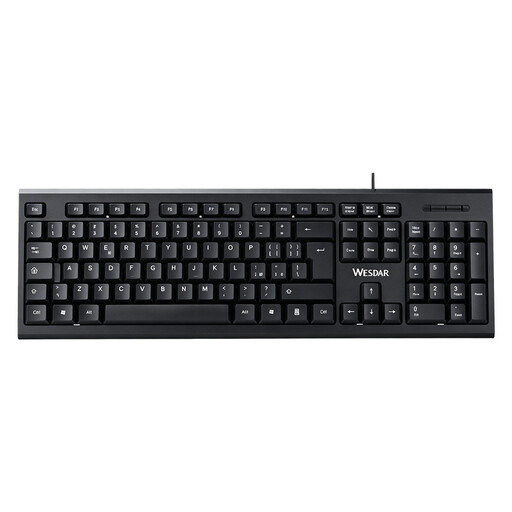 Image unavailable
Suitable for anyone who wants a separate numeric keypad for data entry.
Full-size, QWERTY layout with a wired plug-and-play connection; the description mentions navigation and function keys.
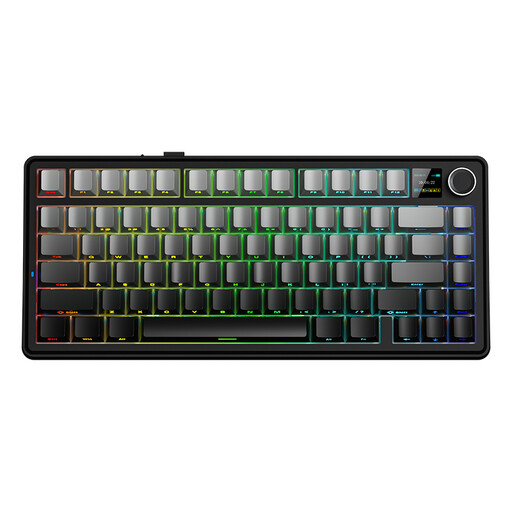 Image unavailable
Suitable for anyone considering a more compact layout to free up desk space.
75% layout and three connection options: wired, Bluetooth and 2.4G. The listed QWERTY US layout may differ from the physical layout you’re used to, so check your shortcuts.
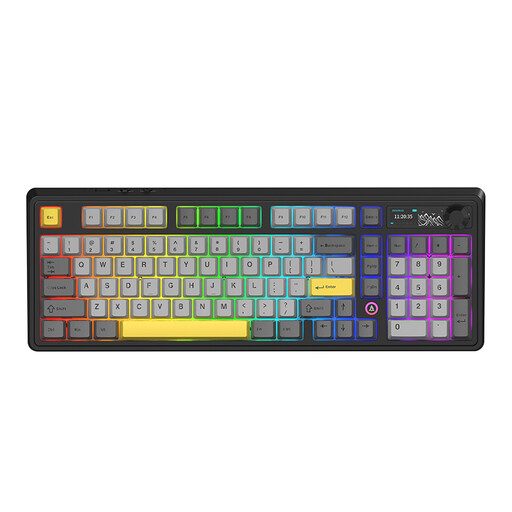 Image unavailable
Suitable for anyone looking for a mechanical keyboard with a 98% layout and several connection options.
The product name lists wired, Bluetooth and 2.4G connections, a 10,000 mAh battery, a volume knob and a TFT display. The product description says the foam layers reduce noise; this isn’t an independent measurement of keyboard noise.
 Image unavailable
Suitable for anyone considering a space-saving layout and wired or wireless connection.
The product name lists 75%, 82 keys, wired, Bluetooth and 2.4G, and compatibility with Windows and Mac. The QWERTY US layout may differ from the layout you’re used to. The listed sound-dampening foam layers are designed to reduce hollow case noise, not to guarantee quieter keystrokes.
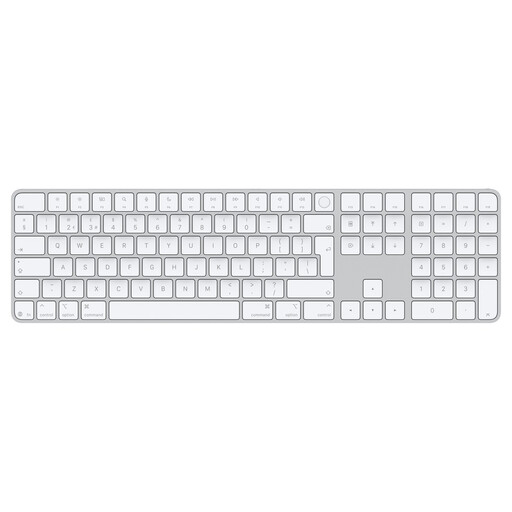 Image unavailable
Suitable for anyone who enters lots of figures in spreadsheets and wants a Dutch keyboard layout for a compatible Mac model.
The product name lists Touch ID and a numeric keypad. This model is designed for Mac models with Apple silicon; check compatibility before choosing.
No, it depends on how you use the dashboard. A separate keypad can be practical if you enter lots of figures; if you mainly analyse data and want more room beside the keyboard, you could consider a more compact layout. An integrated numeric section accessed using NumLock isn’t the same as a separate numeric keypad.
Not necessarily. Microsoft notes that its shortcut descriptions are based on a US keyboard layout and that keys may differ on other layouts. Check the commands you use on your own operating system and keyboard.
First, check that the connection is compatible with your computer. For the PERIBOARD-512, Perixx recommends connecting the keyboard directly rather than through a hub if you have problems, and testing it on another computer if necessary. This advice applies to that model.
According to the Dutch government, in many cases you have 14 days to change your mind when buying online from a business, although exceptions and the circumstances of the purchase apply. You’re also entitled to a product that is fit for purpose. The Netherlands has no fixed, general statutory warranty period; if a product is faulty, contact the seller.
Not for every private buyer. Arboportaal sets out requirements for employees who work at a screen for more than 2 hours a day, including that the screen and keyboard must not be attached to one another; under certain conditions, the employer must make a separate screen or keyboard available. This isn’t a uniform product specification for everyone buying a keyboard.