What should you look for when buying?
For a rugby night, group viewing, motion handling, reception and cost could all be deciding factors. Choose based on what matters most in your living room.
| What to consider |
What should you check? |
Who is this important for? |
| Good viewing for the whole group |
Assess the viewing angle, reflections and screen size from the seats at the sides. |
If guests are spread around the room, you’ll want them to see the pitch clearly too. Around 33% of consumers give group viewing the highest priority. |
| Motion handling |
Compare sports footage on the specific model, looking out for blurred edges and image artefacts. |
If you want to follow fast-paced rugby clearly, compare the picture and image settings rather than relying on the refresh rate alone. Around 27% of consumers give smooth action the highest priority. |
| Match and sound |
Check the match, channel and access required; also assess speech clarity and connections. |
If the match and commentary need to work on the night, check everything in advance. Around 20% of consumers give reliable reception and clear sound the highest priority. |
| Buying and running costs |
Compare screen size, screen type, energy label and any additional audio or reception equipment. |
If you want to keep the TV and everything you need within budget, compare the overall options for your setup. Around 20% of consumers give cost the highest priority. |
Brands to compare
These brand references relate to the product ranges and models mentioned. They are not an assessment of the entire brand or a guarantee of availability.
LG
The Dutch range includes OLED models such as the 65-inch OLED65C69LB, an option to compare for evening viewing and seating spread around the room.
- LG lists OLED contrast and webOS for the C6.
- The stated 165 Hz relates to a gaming feature and doesn’t prove 165 Hz for rugby broadcasts. Compare performance in bright conditions, sound and viewing angle for each model.
Philips
The 65MLED910/12 is a 65-inch QD Mini-LED TV with Ambilight, worth comparing for a living room with the lights on.
- Philips lists Ambilight and VRR 144 Hz for this model.
- These model specifications don’t prove better rugby picture quality. Check the viewing angle and whether lighting behind the TV suits your setup.
Samsung
Samsung Netherlands identifies QE65S85FAEXXN as a 65-inch S85F OLED variant.
- This model code is useful when comparing OLED TVs for evening viewing and seating spread around the room.
- Specifications for the base model name QE65S85F don’t automatically apply to every variant code. Check the details for the exact version.
TCL
The 65Q6C is a 65-inch mini-LED LCD model that you can include when comparing screen size and LCD options.
- Tweakers lists a 120 Hz panel refresh rate and up to 144 Hz for the 65Q6C.
- These figures alone don’t tell you how rugby footage looks from seats at an angle. Compare the picture and viewing angle on the specific model.
TVs on Joybuy
This selection includes OLED and mini-LED TVs for watching rugby together. Compare screen size, visibility from your seats, and the listed connections and picture features with your own setup.
 No image available
OLED77G68LW
The 77-inch size could work well when guests are watching together from different seats; check the viewing distance and visibility from the seats at the sides.
77 inches, 4K OLED, native 120 Hz, Dolby Vision and Dolby Atmos.
Joybuy
 No image available
LG OLED65C68LA
A 65-inch OLED model to compare if evening viewing and visibility from different seats are important to you.
65 inches, 4K OLED, native 120 Hz, four HDMI 2.1 ports and a 40 W audio system.
Joybuy
 No image available
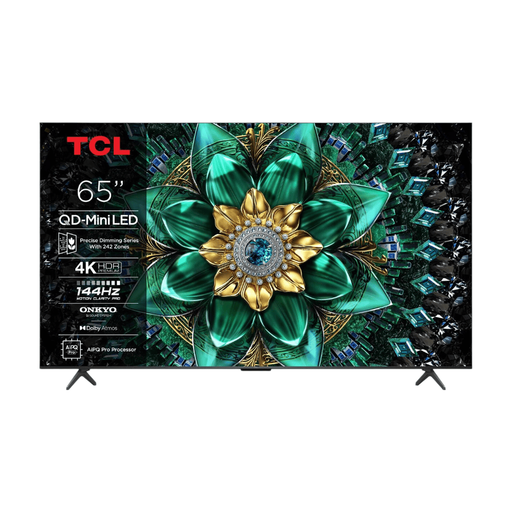
TCL 65T8D
This 65-inch model is worth comparing if you’re considering a mini-LED LCD TV; assess the viewing angle and reflections in your own room.
QLED with QD Mini LED, 4K, 144 Hz VRR, HDMI 2.1 and an Onkyo 2.1-channel audio system.
Joybuy
 No image available
TCL 65Q6C
A 65-inch mini-LED TV to include in your comparison; check visibility from seats at the sides.
4K, 120 Hz and up to 144 Hz VRR; four HDMI inputs.
Joybuy
 No image available
Hisense 75E8Q
The 75-inch size could suit a larger viewing group; measure the viewing distance and check the picture from the furthest seat.
75 inches, 4K Mini-LED and 144 Hz.
Joybuy
Frequently asked questions
How do I choose the right screen size for the seating?
Measure the distance from the sofa to where the screen will go, and assess the size from the furthest seat too. The Consumers’ Association cites around 2.4 times the screen diagonal as a viewing distance people found comfortable in the research mentioned; use this as a starting point, not a fixed rule.
Do I need a 120 or 144 Hz TV for rugby?
Not necessarily. A higher panel refresh rate and image processing can make motion look smoother, but generated intermediate frames can introduce errors during fast, unpredictable action. Compare sports footage on the specific model.
How should I set up the TV for an evening match?
Assess the picture mode and brightness with the lights set as they’ll be during your get-together. The Consumers’ Association recommends using the lighting you’d normally have on when watching TV.
Can I automatically watch a rugby match in 4K?
No, not based on the TV specifications alone: the broadcast and reception also need to support 4K. For the Autumn Internationals 2026, Ziggo lists different Ziggo Sport channels depending on the match; check the details for the match you want to watch in advance.
What should I look for on a TV’s energy label?
Use the EU energy label to compare the energy consumption of suitable models. Compare TVs with an appropriate screen size and also check the separate information on HDR energy consumption; the label doesn’t tell you how good rugby footage will look.


