
Rugby fan watching with the lights on
You watch a match with others and can’t fully darken the room. Before deciding on resolution, compare the stated brightness with the room lighting and your chosen screen size.


Choose a projector based on the light in the room and the distance between the lens and the screen; these will help determine which models suit your setup. Then assess how it handles fast-moving sport and check that your viewing source and sound system are compatible. A gaming input lag figure alone is no proof of a sharp rugby picture.
You watch a match with others and can’t fully darken the room. Before deciding on resolution, compare the stated brightness with the room lighting and your chosen screen size.
You use the same home cinema for sports broadcasts and films. You want to assess motion settings without treating gaming specifications as proof of how sharp sports footage will look.
You want a large screen in a room with limited space between the lens and screen. Check the throw ratio and placement options to find out which models will fit.
Start with the light in your room and the distance to the screen. Then consider motion handling, connections and the maintenance required for the light source you choose.
| Consideration | What should you look for? | Who is this important for? |
|---|---|---|
| Picture with the lights on | Compare the stated light output and unit of measurement with the room lighting and your screen size. | If I’m watching the match with others and can’t fully darken the room, I want to know whether the picture will suit my setup; around 28% of consumers prioritise visibility in ambient light. |
| Fast-moving action | Check whether the exact model has motion processing and assess its effect with sports footage; check the input lag for the specified signal. | When there’s a fast attack, I want to follow the players and the ball without using gaming input lag as a benchmark; around 22% of consumers give motion handling top priority. |
| Projection distance | Measure the screen width and the distance from the lens to the screen, then compare these with the model’s throw ratio and zoom. | If my room has a fixed lens position, the projector needs to produce my desired picture size from there; around 22% of consumers let the available distance guide their choice. |
| Viewing source and sound | Check the projector’s inputs and whether your own receiver or streaming device and sound system can connect to it. | I want to watch the match from my own viewing source and hear the commentary through my sound system; around 17% of consumers start by checking connections for their source and audio. |
| Maintenance and operating life | Check the light source, the conditions attached to any stated lifespan and what your setup requires. | If I want to know in advance which operating mode the stated lamp life applies to and what maintenance my setup requires, that’s my first consideration; around 11% of consumers prioritise maintenance requirements. |
The input lag figures for the BenQ TK710STi apply to specified gaming signals. BenQ Netherlands does not present them as a measure of how sharp sports footage looks.
Assess input lag and motion handling separately, and check the settings with the type of broadcast you want to watch.
The throw ratio determines whether a projector can produce your desired picture size from the available distance.
Measure the screen width and the distance from the lens to the screen before choosing a model. You may need a different placement if the distance is unsuitable.
These are separate models. soundcore Europe specifies a 1080p resolution and a light output of 200 ANSI lumens for the Capsule 3; these specifications don’t automatically apply to the Capsule 3 Laser.
Check the full model name and light source. With a compact model, also bear in mind how dark the viewing room needs to be.
Epson states a lamp life of 5,000 hours for the EH-TW7000 in Eco mode; this lifespan doesn’t necessarily apply in every mode.
Compare lamp life only alongside the operating conditions it applies to, and check which parts and maintenance requirements apply to the exact model.
The EH-TW7000 and EH-TW7100 are models worth comparing for a home cinema where you watch films as well as rugby.
The TH575i offers a Full HD option with a sports mode, while the TK710STi is worth considering when projection space is limited.
The HORIZON 20 Max is a larger laser projector worth looking into if you want to compare optical placement options.
The Capsule 3 is a portable alternative if you want to move the projector around and mainly watch in a darkened room.
This selection includes projectors for limited placement distance, as well as a range of home and portable viewing setups. Check the light output, native resolution and intended picture size for your room for each model.
 No image available
A short-throw model worth considering when space between the projector and screen is limited; check first that the throw ratio suits your screen.
The product description lists native WXGA 1280 × 800, 3,800 ANSI lumens and a throw ratio of 0.52:1. Full HD input is not displayed at native Full HD resolution.
The stated sports mode is not a measure of motion sharpness.
 No image available
A short-throw setup worth comparing if you want to position the projector close to the screen; measure the available distance before choosing.
The product description lists native 1080p, 1,000 ANSI lumens and a throw ratio of 1.1:1.
The description also lists two 8 W speakers and a 60-inch picture at 1.33 m.
 No image available
A portable option worth comparing if you want to use the projector in different places; consider the lighting conditions and your chosen screen size.
The product description lists native 1080p and 700 ANSI lumens.
The description also lists autofocus, automatic keystone correction and obstacle avoidance.
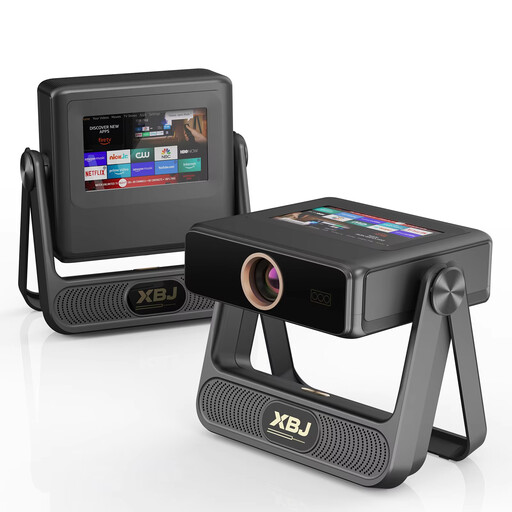 No image available
A model worth comparing if you’re looking for native Full HD and a projector for home entertainment; match the light output to your room and screen size.
The product title lists native 1080p and 900 ANSI lumens.
The description mentions autofocus and automatic keystone correction.
 No image available
A compact alternative worth comparing if you want to connect an external viewing source; check that the projector and your own equipment work together to play the broadcast you want.
The product description lists native 1080p, 220 ANSI lumens and HDMI connections.
With this stated light output, it’s important to take room lighting and screen size into account.
Measure the width of your desired picture and the distance from the lens to the screen, then compare these with the throw ratio and zoom of the exact model. BenQ Netherlands defines throw ratio as the projection distance divided by the picture width.
No. BenQ lists input lag for certain gaming signals on the TK710STi, while Epson separately mentions frame interpolation for fast-moving images on the EH-TW7000. Assess these features separately.
Check whether your receiver or streaming device can connect to the projector through a suitable input, and whether its audio output works with your sound system. Don’t assume you’ll have access to a particular rugby service just because the projector has a smart platform.
Epson states a lamp life of 5,000 hours for the EH-TW7000 in Eco mode, so check the operating mode and exact model. In the Netherlands, the statutory guarantee applies alongside any manufacturer’s warranty: ACM ConsuWijzer states that the seller must offer an appropriate solution for a faulty product.
According to ACM ConsuWijzer, online consumer purchases generally come with a statutory 14-day cooling-off period. Check the conditions for unboxing, trying out and returning the projector in advance; the cooling-off period is separate from a warranty claim for a faulty product.