
Vandaag of morgen in huis

Kwaliteit gegarandeerd

Welkomstaanbiedingen ontgrendelen: GRATIS bezorging | Tot 80% korting | Gratis 30 dagen JoyPlus-proefperiode
Download de app
A new, powerful gaming laptop with an NVIDIA GeForce RTX 5060 is high on your wishlist. It's a smart choice for anyone who wants to play the latest games smoothly. But the laptop market is overwhelming, filled with marketing terms that obscure more than they clarify. Before you make a decision, it's crucial to know what to look for. Many buyers fall into the same traps, ending up with a laptop that looks great on paper but disappoints in practice.
Here are the most common mistakes and how to avoid them:
To avoid a bad purchase, it's crucial to look beyond the standard marketing buzzwords. Focus on the technical specifications that determine the actual performance of your gaming laptop.
The TGP, expressed in watts (W), is arguably the most important specification of an NVIDIA GeForce RTX 5060 laptop. An RTX 5060 with a TGP of 115W can be up to 20% faster than an identical chip in a laptop with a TGP of only 80W. Manufacturers of thinner, lighter laptops often opt for a lower TGP to manage heat output. Always look for the TGP number in the spec sheet to ensure you get the performance you're paying for.
The right screen choice depends on the games you play.
A powerful graphics card needs a solid foundation. For a balanced system that won't bottleneck the RTX 5060, the following combination is a good starting point:
Based on objective specifications, we have selected a few models that suit different user profiles.
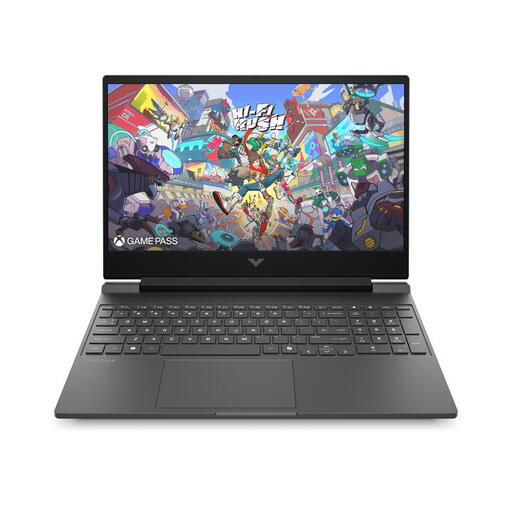
Why This Fits Their Persona: Perfect for those seeking a reliable machine for the latest games after class, without a professional's budget. The HP Victus offers a solid balance between performance and a sleek, more understated design.
This laptop focuses on a smooth 144Hz Full HD experience, where the RTX 5060 can truly shine. You're not paying extra for a QHD resolution that you can't always use at max settings in practice.
It offers a balanced package with a powerful Intel Core i7 processor and a fast 1TB SSD, ideal for both gaming and productivity. The cooling system is designed for stable performance.
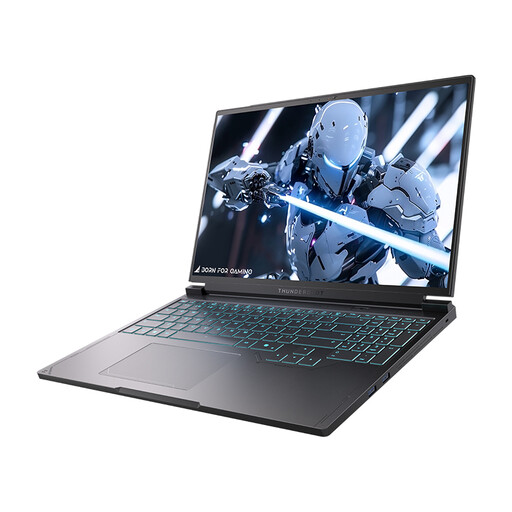
Why This Fits Their Persona: For the player to whom every millisecond counts. High refresh rates and fast response times are the priority here for games like Valorant or Apex Legends. This laptop is built for pure speed.
Although it's a QHD gaming laptop, it pairs this with an extremely high 240Hz refresh rate. The powerful cooling and HX-series processor ensure the RTX 5060's TGP is fully utilized to achieve those high framerates.
The 240Hz QHD+ screen provides an exceptionally fluid picture. The combination with a powerful Intel Core i7-13650HX processor makes it a machine for serious esports performance.
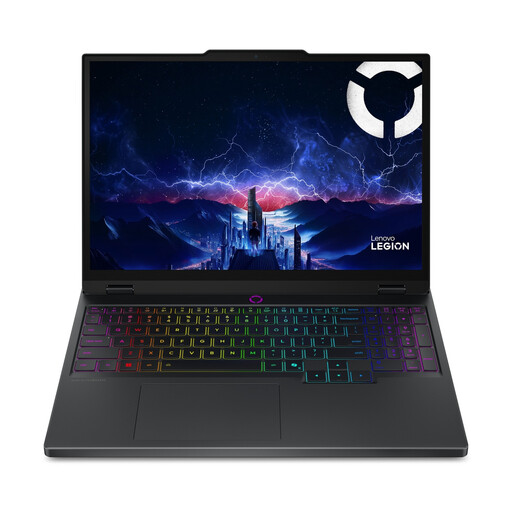
Why This Fits Their Persona: Ideal for those who not only game but also edit videos or create 3D models. Color accuracy and image quality are just as important as raw performance. The Lenovo Legion is a well-known name in this space.
This model bypasses the 'empty QHD' trap by offering a superior OLED panel. The investment isn't just in more pixels, but in color depth and contrast. Its robust cooling system ensures the components perform stably.
The 165Hz WQXGA OLED screen delivers deep blacks and vibrant colors, ideal for content creators. The Intel Core Ultra 7 processor with AI Boost is a plus for creative software.
A high-performance laptop deserves the right peripherals. Complete your setup with a keyboard designed for performance.
We have compiled a complete, up-to-date list of products that fully meet these strict selection criteria and local regulations.
Yes, for most current and upcoming games, 16GB of DDR5 is the gold standard. It provides enough headroom for gaming while other applications run in the background. For heavy multitasking or specific creative software, 32GB can be beneficial, but for pure gaming, 16GB is a solid and future-proof choice.
A high-performance gaming laptop typically lasts 3 to 5 years for playing the latest games at good settings. The hardware itself can function much longer for less demanding tasks. Proper maintenance, such as regularly cleaning the fans, can significantly improve its long-term lifespan and performance.
Look for an NVIDIA GeForce RTX 5060 laptop with a TGP of at least 100W. Models with a TGP around 115W or higher offer noticeably better performance and ensure you're getting the chip's full potential. Manufacturers usually list this figure in the detailed specifications on the product page.
