
Vandaag of morgen in huis

Kwaliteit gegarandeerd

Welkomstaanbiedingen ontgrendelen: GRATIS bezorging | Tot 80% korting | Gratis 30 dagen JoyPlus-proefperiode
Download de app
A gaming laptop or gaming PC with RTX 5060 can be a smart choice for modern games, streaming, video editing and AI-accelerated applications. But the graphics card’s name alone doesn’t tell you enough. A laptop version, for example, operates within a specific power range, while a desktop has more room for cooling and upgrades.
If you look only at “RTX 5060” or “RTX 5060 Ti”, you could end up buying a system that doesn’t suit your screen, games or day-to-day use. Watch out for these common pitfalls.
An NVIDIA GeForce RTX 5060 laptop can have a different maximum graphics power depending on the model. So check the specified TGP or maximum GPU power. Product information, for example, lists laptops with 105W and 115W. Cooling, the processor and power settings also affect performance.
The picture is more straightforward with desktops, but the graphics card’s specific design, the power supply and airflow still matter. A compact case with limited ventilation may behave differently during long sessions than a roomier system.
A 240Hz gaming laptop sounds appealing, but the screen only offers a practical benefit if the hardware can deliver enough frames per second in the games you play. A high refresh rate can matter for competitive games. For demanding single-player games at high resolution, a well-calibrated 165Hz screen may be a more sensible match.
Check the resolution too. A 2560 × 1600 WQXGA or QHD+ screen puts more demands on the GPU than a 1920 × 1080 Full HD screen.
16GB RAM is a useful starting point for gaming and everyday multitasking. Streamers, content creators and users of demanding editing software may benefit more from 32GB. Also check whether the memory can be upgraded and whether there’s a spare memory slot.
A gaming laptop with a 1TB SSD or a gaming PC with 1TB NVMe storage gives you more room for modern games than a model with 480GB or 512GB. Bear in mind that Windows and recovery files use some of the stated capacity.
For 1080p gaming, an RTX 5060 configuration is generally a sensible starting point. For 1440p gaming, settings, ray tracing and upscaling can make a bigger difference. A desktop with RTX 5060 Ti may be worth considering if you’re looking for higher graphics settings or more headroom for future games.
NVIDIA features such as ray tracing and DLSS are supported in compatible games. Actual frame rates depend on the game, settings, drivers and chosen resolution. Treat brand claims as product specifications or supported features, not as a guaranteed level of performance.
A gaming PC with Ryzen 5 can be suitable for 1080p gaming, schoolwork and everyday multitasking. The Ryzen 5 5500 in several entry-level models has 6 cores and 12 threads. For streaming, rendering or running several demanding programmes at once, a Ryzen 7 or Intel Core Ultra 7 may be a more practical choice.
A gaming laptop with Intel Core Ultra combines powerful processor cores with an NPU for supported AI features. Check which software actually uses these features, though. An NPU won’t automatically make a laptop faster in every game or application.
A 16-inch gaming laptop offers a practical balance between screen space and portability. An 18-inch gaming laptop gives you a larger display, but is usually heavier and less suitable for carrying around every day. Check the adapter’s weight too: with powerful laptops, it can add noticeably to the total weight you’ll be carrying.
For colour-sensitive work, specifications such as 100% DCI-P3 or 100% sRGB are useful points to check. A gaming laptop with OLED offers deep blacks and strong contrast, but remember to consider brightness, reflections and how you plan to use it.
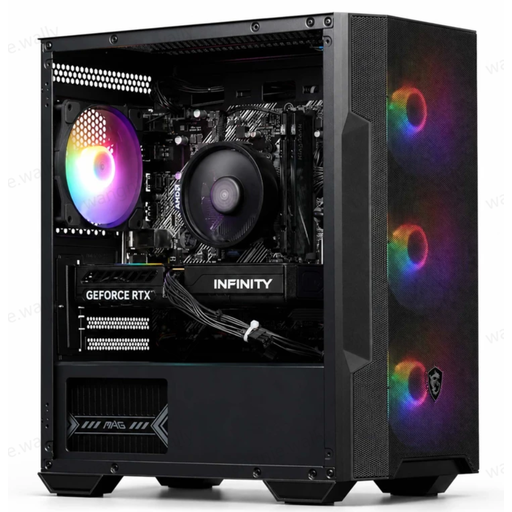
Why it suits this profile: This desktop combines a Ryzen 5 5500, RTX 5060, 16GB DDR4 and a 480GB SSD in a ready-built case. It’s a good fit if you want to get started with 1080p gaming without building a PC yourself.
The key components are clearly listed. Bear in mind, though, that the SSD capacity may be limiting if you have a large game library.
RTX 5060 with 8GB GDDR7, 16GB RAM, four ARGB fans and a Wi-Fi adapter included.
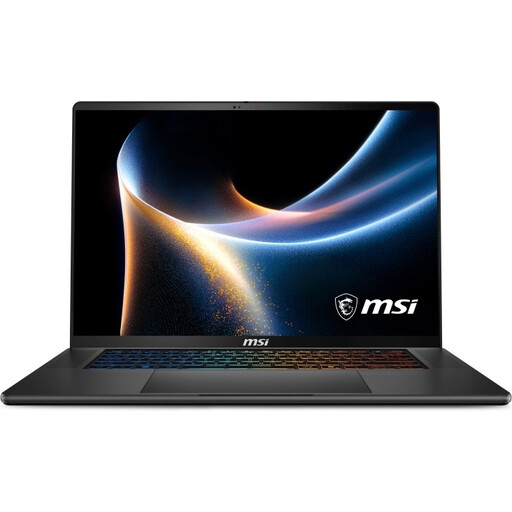
Why it suits this profile: The 16-inch QHD+ OLED screen, 32GB DDR5, 1TB SSD and weight of around 1.99 kg make this a good choice if you want to combine gaming with creative work.
The configuration lists the GPU power alongside the screen type, memory and storage. That helps you look beyond the RTX 5060 name alone.
QHD+ OLED with 240Hz, 100% DCI-P3, 32GB RAM, 1TB SSD, two M.2 slots and Thunderbolt 4.
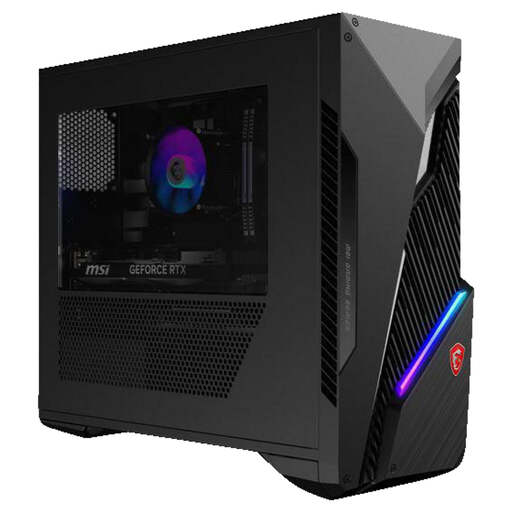
Why it suits this profile: This desktop is designed for users who want to stream, render or run several demanding programmes at once, as well as game.
The desktop has 16GB across two memory modules and two memory slots, with a stated maximum of 64GB. This gives you a clearer upgrade path.
Intel Core i7-14700F, RTX 5060 Ti 8GB, 1TB SSD, Wi-Fi 6E and space for additional 2.5-inch and 3.5-inch drives.
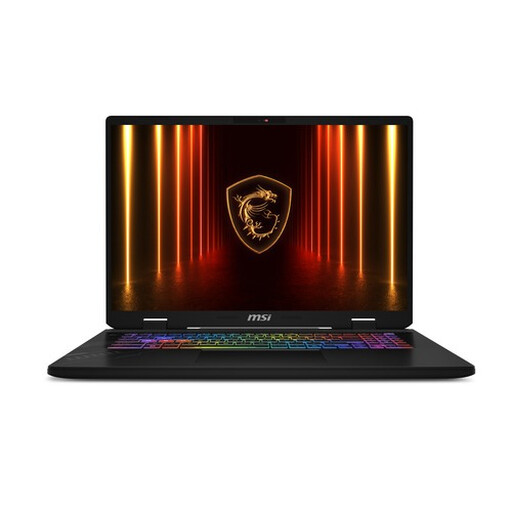
Why it suits this profile: The 17-inch QHD+ screen with 240Hz, 32GB RAM and 1TB SSD is designed for intensive gaming, streaming and multitasking at a fixed workstation.
The specifications list a maximum GPU power of 115W, 32GB memory and Cooler Boost 5. Before buying, check that you have enough space and are comfortable with its 2.8 kg weight.
240Hz, 100% DCI-P3, Intel Core Ultra 7 255HX, Thunderbolt 4 and support for up to 96GB RAM.
We’ve put together a complete, up-to-date list of products that meet these strict selection criteria and comply with current European safety regulations.
It depends on the game, graphics settings and the laptop or desktop configuration you choose. For 1440p gaming, DLSS, ray tracing, the processor, cooling and GPU power all play a part. An RTX 5060 Ti desktop may give you more headroom, but always check the specific specifications.
16GB RAM is a good starting point for gaming, studying and everyday use. For streaming, video editing, virtual machines and demanding multitasking, 32GB is more practical. A model with a spare memory slot can be upgraded more easily later.
Power consumption varies depending on the graphics card, processor, power supply, power profile and how long you use the PC. Check the stated power ratings of the components, and choose a suitable power profile in Windows or the manufacturer’s software. To work out the actual cost, use the energy consumption in kWh and your current electricity tariff.
