What should you look for when choosing?
Start with the lighting you need to identify keys. Then compare macro keys, switch noise, size and connectivity with your gaming setup and in-game settings.
| What to consider |
What to look for when buying |
Who is this important for? |
| Key lighting |
Check whether you can set colours per key or per zone, and adjust the brightness. |
If I want to identify specific RTS keys quickly in a dark room, I look for individual colour settings. Around 29% of consumers prioritise easy-to-identify key lighting. |
| Hotkeys and macros |
Compare dedicated macro keys and the programming method with your game’s bindings. |
If I want to assign custom commands directly to physical keys, I compare macro keys with the options in my game. Around 23% of consumers give extra commands top priority. |
| Key noise |
Check the switch type on the exact model; try the keyboard out for yourself if possible. |
If I play in a shared space in the evening, I factor in how noisy the keys are when typing. Around 18% of consumers prioritise quieter keys. |
| Size |
Compare the keys you use with the keyboard layout and check whether you need a number pad. |
If I want more room for my mouse, I check which keys a more compact layout leaves out. Around 18% of consumers prioritise desk space. |
| Connectivity |
Check the connection on the exact model and distinguish between wired, Bluetooth and receiver connections. |
If I want to rearrange my desk or switch between devices, I compare the connections available on the specific model. Around 12% of consumers prioritise flexible connectivity. |
Joybuy products
These Joybuy picks are worth considering if you’re looking for per-key lighting, programmable keys or extra physical macro keys for gaming.
 No image available
Turtle Beach Vulcan, Linear Titan Switch, TKL, AZERTY
Suitable if you’re looking for per-key lighting and customisable commands in a compact layout.
Wired; RGB; TKL layout; AZERTY; Linear Titan Switch.
View at Joybuy
 No image available
Corsair K70 CORE TKL, BE AZERTY, MLX Red
An option if you want to combine a compact layout with per-key lighting.
Mechanical; TKL; BE AZERTY layout; MLX Red.
View at Joybuy
 No image available
Razer BlackWidow V4 X, Yellow Switch, US QWERTY
Suitable if you want to assign custom commands to dedicated macro keys and light up individual keys.
Mechanical; Yellow Switch; US QWERTY layout.
View at Joybuy
 No image available
Razer Huntsman Mini, Linear Optical Switch, US, Mercury
A compact option if you want individual key lighting and have limited desk space.
60% layout; wired; linear optical switches; US layout.
The 60% layout leaves out keys found on larger keyboards.
View at Joybuy
 No image available
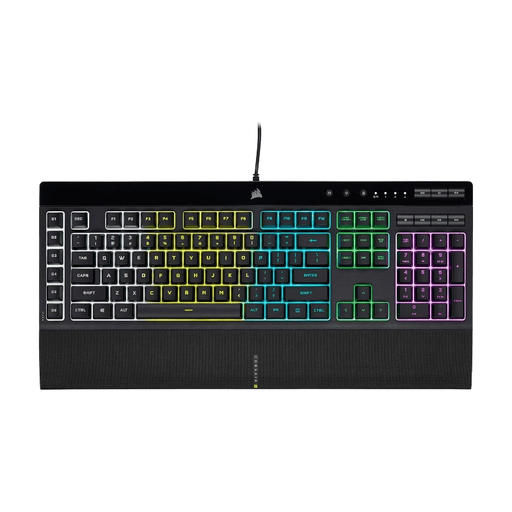
Corsair K55 RGB PRO, US QWERTY
Suitable if dedicated physical macro keys matter to you and zone lighting is enough.
Check that the zone lighting suits the way you want to identify your RTS keys; this version doesn’t offer individual colour settings for each key.
View at Joybuy
Frequently asked questions
Do you need dedicated macro keys for RTS?
Not necessarily: Age of Empires IV supports remapping hotkeys, according to World’s Edge Studio. First, check which bindings your game offers. Dedicated macro keys are an option if you want extra physical controls; if you play competitively, also check your game or competition rules before setting up automated commands.
Can you use the lighting without the software running?
For the K55 RGB PRO, Corsair describes a hardware mode that lets saved lighting effects and macros work without the iCUE software running. For other models, check which settings are saved on the keyboard itself.
What warranty applies to a keyboard you buy online in the Netherlands?
According to the Dutch Government, you’re entitled to a product that works properly, but there is no fixed statutory warranty period in the Netherlands. A manufacturer’s warranty doesn’t replace your statutory rights; contact the retailer if the product is faulty.
Can you return a keyboard bought online if you don’t like the keys?
According to the Dutch Government, online purchases from a business usually come with a 14-day cooling-off period. Check the terms that apply to your purchase; this statutory right is separate from any additional returns policy offered by a shop.


