
RTS player with limited ports
You don’t want to use an extra power socket, so you need to decide whether you can spare a USB port for a cable or receiver.


A spare socket is rarely the deciding factor: you can plug a wired keyboard into a USB port on your computer, while a wireless model has a battery that needs charging. Choose based on the USB ports available to you and how easily you can reach your RTS hotkeys. Then weigh up having a keyboard cable against managing charging and the space on your desk.
You don’t want to use an extra power socket, so you need to decide whether you can spare a USB port for a cable or receiver.
You use lots of key combinations and want to check before buying that the layout and programmable features suit your key setup.
You want to leave room for your mouse, without finding that important keys are only accessible through an extra Fn key press.
Choose this if: your computer has a free, compatible USB port and you don’t want to charge a keyboard battery.
Bear in mind: you’ll have a cable on your desk and use up a USB port.
Choose this if: you don’t want a keyboard cable while gaming and have a USB port available for the receiver.
Bear in mind: the receiver uses a USB port, and the battery needs charging.
Choose this if: your computer supports Bluetooth and you don’t want to use a USB port for a receiver.
Bear in mind: the battery needs charging, and Bluetooth must be available on your computer.
| What to consider | What should you check? | Who is this important to? |
|---|---|---|
| Connecting without an extra power socket | Count your spare USB ports, check whether your computer supports Bluetooth and find out how the keyboard is charged. | If you don’t want to use an extra power socket, focus on the connections already available on your computer. Around 37% of consumers prioritise connecting without an extra power socket. |
| Keeping RTS hotkeys within easy reach | Compare your own key setup with the physical layout and check whether the features you want require software. | If you often use RTS commands, you’ll want to know which keys are within easy reach and which require extra steps. Around 27% of consumers prioritise having RTS hotkeys within easy reach. |
| Room for your mouse | Consider the space on your desk and check whether you use the function and navigation keys. | At a small desk, you’ll want room for your mouse without losing keys you need for RTS gaming. Around 18% of consumers prioritise having room for their mouse. |
| Charging and everyday upkeep | Check the stated battery life and the conditions it’s based on; using a wired connection means there’s no keyboard battery to maintain. | If you don’t want to keep thinking about charging, weigh up a wired connection against the freedom of wireless gaming. Around 18% of consumers prioritise charging and everyday upkeep. |
A wireless USB receiver still uses a USB port. A wireless keyboard also has a battery that needs charging.
Before buying, check the connection modes available on the exact model, how many USB ports you have free and how you can charge the battery.
Some compact models don’t have separate function or navigation keys, or make those functions available through an Fn layer. That can mean extra steps for keys you use during a game.
Compare your RTS key setup with the exact layout. A TKL model could work if you can do without the number pad but want to keep keys within easy reach.
A model name can cover several sizes or switch types. For example, the G915 X and G915 X LIGHTSPEED TKL are different size variants.
Check the full model name, size, switch type and key layout of the exact product listing.
The G915 X LIGHTSPEED TKL is worth considering if you want a choice of connection modes.
The wired Apex 3 TKL is a compact option if you don’t want to manage a keyboard battery.
The wired Huntsman Mini shows just how compact a keyboard can be, but check in advance how easily you can access its functions.
The wired K55 RGB PRO is worth considering if dedicated macro keys matter more to you than a compact layout.
The wireless GXT 873 Acira is a 60% alternative if you’re looking for a small keyboard with several connection options.
This selection consists mainly of wired USB keyboards, plus one compact wireless model. Compare the USB ports you have free, battery management and how easily you can reach your RTS keys.
 No image available
A wired TKL option if you don’t want to charge a keyboard battery and can do without a number pad.
The product description lists USB-A power via your computer, 12-key rollover with anti-ghosting and key customisation through Corsair iCUE.
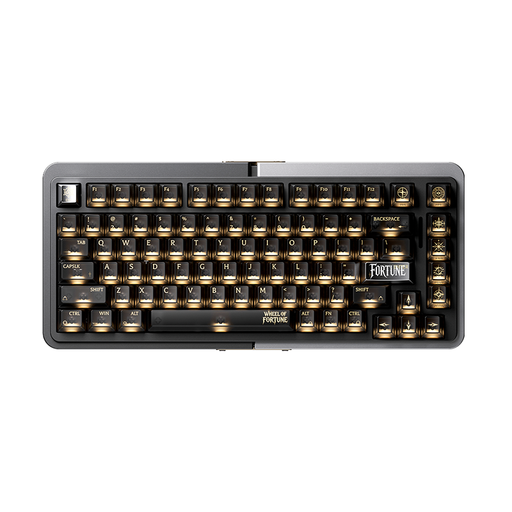 No image available
A wired 75% option if you want a compact size and would like to compare the stated switch features with your own preferences.
The product information lists TTC Magnetic HE Switches, hot-swappable switches and Rapid Trigger. No wireless connection mode is listed.
 No image available
A compact option if you want wireless connectivity alongside separate function and arrow keys.
The product description lists Bluetooth, 2.4GHz and a wired USB-C mode, plus an 82-key layout with a function row and arrow keys. The stated battery capacity is 8000 mAh; according to the description, battery life depends on the lighting and how you use it.
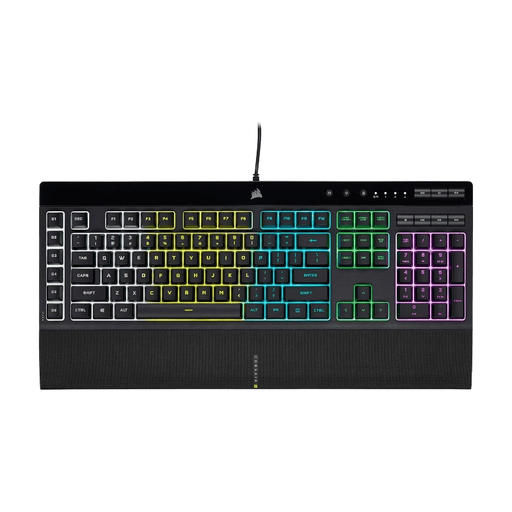 No image available
A wired option if you want six dedicated macro keys and have room for a full-size keyboard.
The product description lists a USB connection, 12-key rollover with anti-ghosting and macro keys you can configure with Corsair iCUE. Its full-size layout takes up more desk space than compact layouts.
 No image available
A compact, wired option if you want to free up desk space and are happy to use functions accessed through an Fn layer.
The product information lists a USB connection, a 60% layout with 61 keys and a membrane design with a mechanical feel. The description says to use Fn hotkeys for lighting functions.
Not for the connection described in the Corsair K55 RGB PRO manual: it plugs into an available USB-A port on your computer. Check that your computer has a free port of this type; this doesn’t tell you anything about your computer’s overall power supply.
Check your own key setup before buying. Razer says the Huntsman Mini has no separate function row or navigation cluster, and that these inputs are available through secondary functions. This could mean extra steps for your hotkeys.
That depends on the model. Trust says you can connect the supplied USB-C-to-USB-A cable to the GXT 873 Acira and carry on playing. The stated battery life of up to 50 hours is based on average use and may vary.
According to ACM ConsuWijzer, a product must meet your reasonable expectations when used normally; if it’s faulty, the seller must offer an appropriate solution. The Dutch government says that a 14-day cooling-off period applies to many distance purchases, with some exceptions. A voluntary manufacturer’s warranty does not replace your statutory rights.
For electrical and radio equipment covered by the relevant European rules, the Dutch authorities describe CE marking as a requirement. Check the marking and product information for the exact listing; a brand name or general product description does not prove that a specific item meets the requirements.