
RTS player who games at night
You play while someone else is sleeping or resting in the same bedroom. The noise you can hear when keys are pressed matters more to you than extra lighting effects.


For RTS gaming in a shared bedroom, a compact TKL model with switches the manufacturer describes as quiet is a sensible place to start, as long as you can use your commands without a numeric keypad. SteelSeries describes the Apex 3 TKL’s switches this way. If you want to customise the feel of the keys, consider a hot-swappable model, but check which switches are included: a claim about sound dampening is not a comparable measurement of the keyboard’s overall noise.
You play while someone else is sleeping or resting in the same bedroom. The noise you can hear when keys are pressed matters more to you than extra lighting effects.
You want to issue your RTS commands straight away. Check the layout before choosing a compact keyboard.
You share a small desk or want to keep space beside your keyboard. A TKL layout leaves out the numeric keypad.
| What to consider | What should you check? | Who should consider this? |
|---|---|---|
| Key noise | Check the exact switch variant and, if possible, assess the keyboard’s noise with a normal typing style. | If you game while a roommate is asleep, you’ll want to know how the whole keyboard sounds, not just how the switch is described. Around 36% of consumers put reducing key noise first. |
| Hotkeys within easy reach | Compare your key bindings with the function row, arrow keys and any extra keys on the layout you’re considering. | If you want to issue commands quickly during a game, check that you can reach them without using an extra key layer. Around 29% of consumers give direct access to RTS keys top priority. |
| Desk space | Check whether you need a numeric keypad; TKL layouts leave it out. | If you share a small desk or want to keep space beside your keyboard, a TKL layout could suit you. Around 21% of consumers put available desk space first. |
| Customisable key feel and features | Check whether the switches are replaceable and what software you need to programme the keys. | If you want to customise the feel of the keys or their functions, check which settings suit the way you play and what software you’ll need. Around 14% of consumers put customisation first when choosing. |
Manufacturers sometimes describe switches as quiet or mention sound-dampening construction, but these claims aren’t comparable measurements of keyboard noise in a shared bedroom.
Check which switch is fitted to the exact version and, if possible, assess the sound using your usual typing style.
A 75% keyboard may retain a function row and arrow keys, while TKL leaves out the numeric keypad. Whether a layout works for you depends on the keys you use in your game.
Before choosing, compare your most-used commands with an image of the exact keyboard layout.
The Dutch government states that there is no fixed statutory warranty period in the Netherlands. An additional warranty package is separate from the rights you have against the seller.
Check what extra cover the package offers and what your existing rights already include.
The Apex 3 TKL and Apex Pro TKL (2023) are separate options with different features.
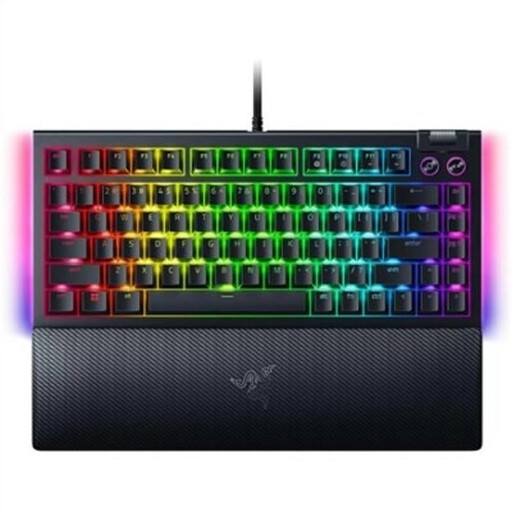
The BlackWidow V4 75% combines a compact layout with replaceable switches, while the larger BlackWidow V4 has dedicated macro keys.
The wired G515 TKL is a low-profile mechanical keyboard with programmable key functions.
The MX 8.2 TKL Wireless is a wireless gaming keyboard; MX Silent Red is a separate switch variant.
These Joybuy picks reflect the trade-offs between a compact layout, a customisable key feel and attention to key noise. Sound-dampening descriptions are not comparable measurements of keyboard noise.
 No image available
The TKL layout suits anyone who wants to keep space beside their keyboard; check that you can use your RTS key bindings without a numeric keypad.
Magnetic-mechanical keyboard with MGX v2 and a US QWERTY layout. The product description mentions two layers of sound-dampening foam and pre-lubricated stabilisers; this doesn’t establish a comparable noise level.
 No image available
This TKL model suits a compact setup and anyone looking for quiet membrane switches; the description isn’t an independent measurement of keyboard noise.
The product information lists quiet membrane switches, 12-key rollover and dedicated media keys.
 No image available
The 75% layout and replaceable switches may suit you if you want a compact keyboard with a customisable key feel; check your preferred key bindings first.
The product name lists wireless use, Star Vektor hot-swappable switches, a TFT screen and a rotary knob. The product description mentions five layers of padding; this isn’t a comparative measurement of keyboard noise.
 No image available
According to the product description, the 75% layout retains the arrow and function keys. Compare these with the commands you use in your RTS games.
The product information lists hot-swappable switches, a volume knob and five layers of noise-reducing material. This isn’t a comparable measurement of how the keyboard sounds in a bedroom.
 No image available
The compact 75% layout may suit you if you want a smaller setup and replaceable switches matter to you. Check which keys your RTS settings require.
The product name describes a mechanical keyboard with hot-swappable switches. The product description lists a wired USB connection; the information doesn’t establish how it sounds in a shared bedroom.
Not necessarily: first compare your own key bindings with the physical keys on the keyboard. Dedicated macro keys are an option if you need them; check your game’s rules before using automated commands.
According to CHERRY, the MX 8.2 TKL Wireless supports Bluetooth, a dedicated 2.4GHz gaming mode and a USB cable. Choose the connection that suits your computer and check which receiver and cable are included with the version you’re buying.
With a hot-swappable model, you can replace compatible switches, but that won’t determine how the finished keyboard sounds. Razer lists sockets for 3- or 5-pin switches on the BlackWidow V4 75%; check mechanical compatibility and the warranty terms before replacing any parts.
For a qualifying distance purchase from a business, you usually have 14 days to change your mind, according to the Dutch government. There are exceptions, and purchases from private sellers aren’t covered in the same way. The Dutch government also states that there is no fixed statutory warranty period in the Netherlands. If a product is faulty, contact the seller.