
RPG player in a dark room
Wants to find the controls without distracting light. PowerA describes adjustable RGB zones, but check that the lighting is on the parts you want to see.


First, choose a controller that works with your console or PC and supports the features you want to use in your RPG. Then decide whether adjustable lighting, tactile feedback or wireless freedom matters most to you. Lighting on the controller body or a light bar doesn’t automatically mean the action buttons are illuminated.
Wants to find the controls without distracting light. PowerA describes adjustable RGB zones, but check that the lighting is on the parts you want to see.
Wants to know whether their system and chosen RPG support the controller’s features. Microsoft, PlayStation, GameSir and Nintendo list support by platform and feature.
Weighs comfort and controls against cable length, wireless freedom and charging. Features vary by model, so check the exact version and make sure it suits your setup.
| What to consider | What to check before buying | Who this matters to |
|---|---|---|
| Platform and game | Check that your console or operating system, as well as your RPG, supports the features you want. | If I want to be sure my platform and game work well together, compatibility comes first; around 33% of consumers prioritise this. |
| Visibility in the dark | Check which parts light up and whether you can adjust the brightness or effects. | In a dark room, I want to see my controller without distracting light; around 27% of consumers prioritise visibility and adjustable lighting. |
| Grip and controls | Compare the grip and button layout, and check whether you can customise any extra buttons. | For long story sessions, I want a comfortable grip and easy-to-use controls; around 20% of consumers prioritise comfort and control. |
| Cable, distance and power | Measure the cable route to where you sit, and check how the controller is powered or charged. | When playing from the sofa, I want enough room to move and don’t want to run out of power mid-session; around 20% of consumers prioritise range and power. |
PowerA describes illuminated zones and PlayStation describes a light bar, but neither feature confirms that the letters or symbols on the action buttons light up.
Check which parts are illuminated on the exact version, and whether you can adjust the brightness.
PlayStation says haptic feedback on PC works only when the game supports it and the controller is connected via USB.
Check that your RPG supports the feature, confirm the connection method and check what’s included in the box before relying on haptics.
According to the manufacturer, the PowerA version reviewed has a 10 ft cable. Whether that’s long enough depends on the route between your console or PC and where you sit.
Measure the cable route in your room to make sure it suits your setup.
You may need to rearrange your setup or use a suitable extension cable if the route is too long.
ACM ConsuWijzer explains that statutory consumer rights don’t have a fixed time limit and can apply alongside a commercial warranty.
Keep your proof of purchase and contact the retailer if a fault develops sooner than you could reasonably expect.
A wireless controller for Xbox consoles, Windows PCs and the listed mobile systems.
DualSense for PS5 and supported PC games where you want haptic feedback or adaptive triggers.
The Advantage Wired with Lumectra is a wired option for supported Xbox and Windows systems, with adjustable RGB zones.
The G7 SE is a wired option for Xbox and Windows, with Hall effect sticks and extra controls.
The Switch 2 Pro Controller is designed for playing on Nintendo Switch 2.
These picks are aimed at Switch, PS5 and PC setups, and include models with lighting. Check that your RPG and the features you want are supported by the specific version.
 Image unavailable
For a Switch setup where you want lighting on your controller. The product name mentions a 7-colour LED, but doesn’t confirm that the action buttons themselves light up.
The description lists Bluetooth, a gyroscope sensor and dual vibration. Battery life is stated as up to 20 hours.
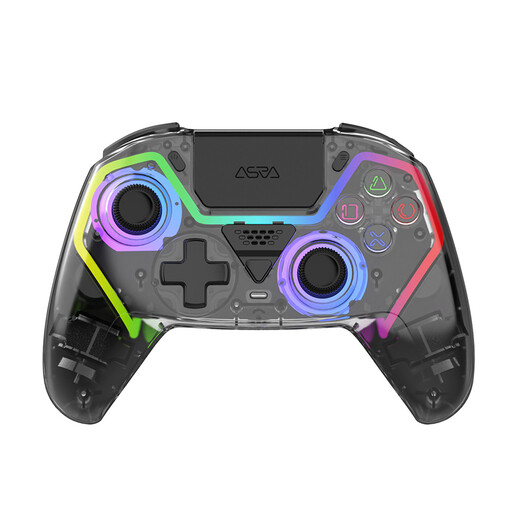 Image unavailable
An option for a PS5 setup if you want to play wirelessly and are looking for RGB lighting.
The description lists 8-colour RGB lighting with 4 effects, Hall effect sticks and programmable rear buttons. Battery life is stated as up to 10 hours.
 Image unavailable
For a PS5 setup or a PC game that supports DualSense features. PlayStation says haptic feedback on PC requires both game support and a USB connection.
The product description lists haptic feedback, adaptive triggers, Bluetooth and a built-in rechargeable battery. How these tactile features work depends on the game.
 Image unavailable
For a Switch or PC setup where you want motion controls and vibration.
The description lists a 6-axis gyroscope sensor, dual vibration, a textured grip and up to 10 hours of play time.
 Image unavailable
For PC gaming if you want to play wirelessly and have extra stick controls. The listed PS5 layout doesn’t by itself confirm PS5 compatibility.
The description lists Hall effect sticks, three programmable rear buttons and 8-colour RGB lighting with 4 effects. It also mentions up to 10 hours of battery life and USB-C charging.
No. PowerA lists RGB zones and adjustable lighting effects, but these specifications don’t confirm that individual action buttons are illuminated or easy to read. Check the exact version.
The game must support haptic feedback, and the controller must be connected via USB. These are the requirements PlayStation gives for haptics on PC; a Bluetooth connection alone doesn’t confirm that the feature will work.
It varies by model. Nintendo says the Switch 2 Pro Controller comes with a USB charging cable; the PowerA version reviewed is wired and, according to the manufacturer, has a 10 ft cable. Check which accessories are included and measure the distance to where you sit.
Yes. Your statutory rights may still apply if a product develops a fault sooner than you could reasonably expect with normal use. According to ACM ConsuWijzer, statutory consumer rights in the Netherlands don’t have a fixed time limit; the retailer is your point of contact.
The Dutch government says you can hand in old electrical appliances at the shop where you buy a new, similar appliance. You can also take used household batteries to shops that sell batteries.