Who is this guide for?

Viewer with weak Wi-Fi in the kitchen

Your cookery class keeps buffering, particularly behind walls or further away from your current router. In that case, coverage where you watch is an important factor when choosing between one router and extra access points.

Housemates using the internet at the same time

While you’re watching the class, other people are online too. You want to know whether the bottleneck is your home Wi-Fi or your internet connection.

Resident who manages the network

You connect equipment to an existing connection and manage the network with your housemates. So the connection and settings need to be compatible with the equipment you choose.

What should you consider when choosing?

Adjust your existing setup

When: if your router is poorly positioned and moving it could improve Wi-Fi in the kitchen.

Trade-off: this could save you from buying anything, but it won’t fix a limitation with your internet connection.

One standalone router

When: if one centrally positioned access point can reach the kitchen, even when your housemates are online at the same time.

Trade-off: Wi-Fi 6 includes features for more efficient shared use, but it doesn’t guarantee coverage through walls. Check your internet connection too.

Mesh with multiple access points

When: if the kitchen remains a Wi-Fi dead spot and there are suitable places for extra access points.

Trade-off: you’ll need more equipment and time to position it. Tweakers says a wired connection between access points is the most stable way to link them.

What to consider What should you check? Who is this most relevant to?
Coverage where you cook Test the Wi-Fi where you watch the class and see whether one centrally positioned access point is enough or you need several access points. If I watch the class behind walls or at a distance, I first want to know whether the Wi-Fi reaches that spot; around 31% of consumers are said to consider coverage their main concern.
Using the connection at the same time At a busy time, compare your Wi-Fi experience with a wired speed test before choosing based on Wi-Fi capacity. If my housemates are online at the same time, I want to know whether it’s the internet connection or the Wi-Fi that’s struggling; around 25% of consumers are said to prioritise simultaneous use.
Connection and management Check whether your existing router will stay in place and whether you can manage the connection settings you need. If I manage the shared network, I want to be sure the new equipment will work with the existing connection; around 19% of consumers are said to consider connectivity their main concern.
Cost of the solution First, try to improve your current setup. Then work out how many access points and any cables you’ll need. If I only have a weak connection in the kitchen, I don’t want to choose a more extensive setup than necessary; around 13% of consumers are said to prioritise the purchase cost.
Security and maintenance Check the security settings and firmware support offered by the exact model, and find out who will install updates. If I’m responsible for a shared network, I want to know how access and maintenance will be managed; around 12% of consumers are said to consider network management their main concern.

Common pitfalls

  • Assuming the highest Wi-Fi speed on the box means the same speed in your kitchen

    Wi-Fi speed where you watch and internet speed measured over a cable are two different things. So a high advertised Wi-Fi speed doesn’t, by itself, tell you how well the class will work in your kitchen.

    Test the Wi-Fi where you cook and compare it with a wired test next to your router before choosing a model.

  • Connecting a mesh system wirelessly when you could use cables

    The connection between mesh points affects how the system performs. Tweakers says wired backhaul is the most stable way to connect them.

    Check in advance whether you can run a cable between suitable locations and which ports the exact system has.

  • Mistaking a router used behind a modem for a replacement modem

    A router without an integrated modem can’t replace every type of physical internet connection on its own. The FRITZ!Box 4060, for example, is designed to be used behind a separate modem.

    Before replacing any equipment, check what role your existing provider’s device plays and which connection settings you need.

Relevant brands

TP-Link

The range includes both standalone routers and Deco mesh systems, making the choice between one access point and several a relevant one.

  • TP-Link lists Wi-Fi 6 and OFDMA for the Archer AX55. For the Deco X50, it specifies three gigabit ports per access point and a choice of different pack sizes.
  • Advertised Wi-Fi speeds and coverage are manufacturer figures, not a measurement of the connection in your kitchen.

ASUS

The RT-AX58U is a standalone Wi-Fi 6 router with several operating modes, including access point and AiMesh modes.

  • ASUS lists four gigabit LAN ports and several operating modes for this model.
  • Specifications vary between V1 and V2. Check the exact version and don’t combine features from both.

FRITZ!

The FRITZ!Box 4060 is designed to work as a router behind a separate modem and can be expanded within FRITZ! Mesh.

  • FRITZ! lists a 2.5-gigabit WAN port and three gigabit LAN ports for the 4060.
  • This model doesn’t have an integrated DSL, cable or fibre-optic modem, so you’ll still need a suitable connection or separate modem.

Products at Joybuy

This selection includes mesh systems for Wi-Fi in several locations and standalone routers for shared use. Check the connection type and CE marking for the specific model. The Dutch Authority for Digital Infrastructure states that radio equipment placed on the European market must meet the applicable requirements and carry a CE marking.

TP-Link Deco BE68 2-pack mesh system

TP-Link Deco BE68 (2-pack)

A good choice if you want to place mesh points in several locations to improve Wi-Fi around your home.

Wi-Fi 7 and Multi-Link Operation. The description lists two points, wired or wireless backhaul and support for more than 200 devices.

Check where you can position the points and whether you can connect them by cable.

View at Joybuy

TP-Link Deco M4 3-pack mesh system

TP-Link Deco M4 (3-pack)

A good choice if you want to connect several rooms with a mesh network.

Dual-band Wi-Fi 5 on 2.4 GHz and 5 GHz. The product description lists three units and two Ethernet ports per unit.

Check that the stated Wi-Fi generation and connections suit your devices and setup.

View at Joybuy

ASUS RT-AX52 Pro AX3000 Wi-Fi router

ASUS RT-AX52 Pro AX3000

A good choice if you’re looking for one standalone router for a shared Wi-Fi environment.

Wi-Fi 6 with OFDMA and MU-MIMO. The product specifications list four gigabit Ethernet ports, while the description mentions expansion with AiMesh-compatible ASUS routers.

Check that the router mode and connection suit your existing network equipment.

View at Joybuy

TP-Link Deco XE75 Pro 3-pack mesh system

TP-Link Deco XE75 Pro (3-pack)

A good choice if you want to use mesh points in several locations and connect wired devices.

Tri-band Wi-Fi 6E on 2.4 GHz, 5 GHz and 6 GHz. The specifications list three Ethernet ports per unit and QoS.

Check whether your devices support the stated Wi-Fi bands and whether the points are practical to position.

View at Joybuy
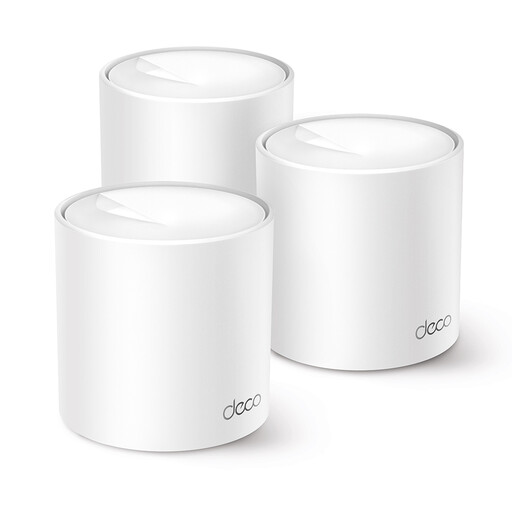
TP-Link Deco X10 dual-band Wi-Fi 6 mesh system

TP-Link Deco X10 dual-band Wi-Fi 6

A good choice if you want to extend Wi-Fi to several rooms with Deco mesh.

Dual-band on 2.4 GHz and 5 GHz. The description lists Wi-Fi 6, OFDMA, MU-MIMO and QoS.

Check how many mesh points and any extra units you’ll need for your setup.

View at Joybuy

Frequently asked questions

Should you buy a new router straight away if your cookery class keeps buffering?

No. First, test your internet speed over a cable and check the Wi-Fi where you watch the class. Simply moving your existing equipment could make a difference. Netflix recommends 3 Mbps for 720p and 5 Mbps for 1080p streams on Netflix; these aren’t universal requirements for every online cookery class.

How do you connect your own equipment to your internet service?

First, decide whether you’ll keep your provider’s router or replace it. According to ACM ConsuWijzer, you’re free to choose your router and your provider must make the necessary connection settings available. Also check that your chosen equipment is compatible with your connection.

What maintenance is needed after installation?

Keep your router up to date, and manage passwords and access to the shared network. ACM ConsuWijzer highlights the importance of updates for security; the settings available vary between devices.

What if the router breaks sooner than expected?

In the Netherlands, your statutory guarantee is separate from any limited manufacturer’s or seller’s warranty. If a product used normally doesn’t meet the expectations you were entitled to have, the seller is responsible for offering an appropriate solution. There isn’t simply a fixed two-year statutory period for every router.

Can any imported Wi-Fi router be sold in the Netherlands?

No. Radio equipment placed on the European market must meet the applicable requirements, including carrying a CE marking. Check the conformity information for the specific model; a statement on a sales page isn’t, by itself, an independent conformity assessment.
