If the study is the main room with poor coverage while the connection works well near your current router, first consider adding a Wi-Fi access point. If you have an Ethernet cable, a wired connection between the points could be a good option. TP-Link and ASUS describe Ethernet backhaul for selected mesh models. A standalone router is mainly worth considering if you also want to replace your router; if you’re keeping your provider’s router, check the operating mode and which features will remain available. None of these options guarantees coverage throughout your home.
Who is this advice for?
Student in a distant study
If the connection is weak where you study, first see whether you can use a cable or place an extra Wi-Fi point somewhere suitable. Consumentenbond, TP-Link and ASUS highlight coverage, placement and the connection between mesh points as important factors.
Teacher making video calls from home
For live lessons, the connection where you’re teaching matters. If practical, check whether you can connect your teaching computer by cable or link your mesh points via Ethernet. TP-Link and ASUS describe Ethernet backhaul for selected models.
Household network manager
If you’re connecting several devices or want to keep or replace your existing provider’s router, check which device will remain the gateway and where settings and updates will be managed. ACM ConsuWijzer provides information about choosing a router; TP-Link explains which gateway features are unavailable in Deco access point mode.
What should you look for when buying?
For language lessons in a study that’s some distance away, your choice mainly depends on the connection there, whether you can link the points by cable and how you want to use your existing router.
| What to consider |
What to check before buying |
Who should pay particular attention? |
| Coverage in the study |
Check where the current signal is still usable and how many points are included in the set. |
If I’m in a room far from the router during a lesson, I want to know where an extra point can still get a connection. Around 33% of consumers prioritise coverage where they study. |
| Connection during live lessons |
Check whether you can run a cable between the points and connect the teaching computer by cable. |
If I’m making a video call during a lesson, I want to be able to choose a suitable connection where I’m working. Around 27% of consumers give the connection during live lessons top priority. |
| Several devices at once |
Check which Wi-Fi versions your lesson devices support, and consider where you’ll place the points. |
If other devices are online during a lesson too, I want to know which features my devices actually support. Around 20% of consumers put use by multiple devices first. |
| Connecting and managing your setup |
Check the router or access point mode, and where the settings and features you need will be available. |
If I want to keep my provider’s router, I want to know in advance which features the new system will manage itself. Around 20% of consumers say connecting and managing their setup is their main concern. |
Common buying mistakes
-
Assuming advertised speed or coverage guarantees a connection in your study
Specifications and maximum coverage claims don’t automatically predict the connection where you study. The Wi-Fi version alone doesn’t determine performance either.
Check where your current signal is usable and where you could place an extra point. You may need another point or a cable.
-
Setting up a mesh system without choosing an operating mode
With Deco, gateway features disappear from the app when the system is in access point mode. As a result, managing it may work differently from what you expect.
Decide which router will remain the gateway and, before buying, check where the features you need, such as parental controls, will be available.
-
Confusing the standard Deco X50 with the X50-PoE
The Dutch product specifications vary by version. The standard X50 lists three gigabit ports per unit and optional Ethernet backhaul; the X50-PoE V2 lists two 2.5-gigabit ports and PoE. These specifications aren’t interchangeable. TP-Link describes the models separately.
Check the full model name, what’s included in the set and the power supply required. PoE may require compatible network or power infrastructure.
-
Assuming rented points from your provider will keep working if you switch
KPN says that rented SuperWifi points can only be used with KPN Internet.
Compare the rental terms with those of a system you buy yourself if you might switch provider. You may need different Wi-Fi points if you change.
Brands to consider
TP-Link
The Deco X50 is a mesh system with two or three points; the X50-PoE is a separate version with different connection options.
- According to TP-Link, the standard X50 has three gigabit ports per unit and optional Ethernet backhaul.
- The X50-PoE V2 lists two 2.5-gigabit ports and PoE. Its stated maximum coverage is a manufacturer’s claim, not a measurement taken in your home.
ASUS
According to ASUS, the ZenWiFi XD5 can connect to other points wirelessly or via Ethernet backhaul.
- ASUS describes Ethernet backhaul for setups with network connections available.
- ASUS notes that 160 MHz on 5 GHz may be restricted by law in some regions, and that compatible devices are required for Wi-Fi 6 features.
FRITZ!
The FRITZ!Box 4060 is a standalone router option for anyone who wants to manage or replace their router.
- FRITZ! lists a 2.5-gigabit WAN port, three gigabit LAN ports and the option to use it behind a modem.
- The FRITZ!Box 4060 isn’t, by itself, a set with a second point for a distant study; you may need to add one for that room.
KPN
SuperWifi is a provider option for existing KPN customers who want to add points to their home network.
- KPN offers installation help and management through MijnKPN.
- KPN says rented SuperWifi points can only be used with KPN Internet; check this condition if you might switch provider.
Products for a mesh setup
These Joybuy products are mesh options for a home network with points in different locations. Check the contents of each set and the connection options available on each model to see which suits your study.
 No image available
TP-Link Deco BE68 2-Pack
A mesh set with two points could suit a setup with an extra point closer to the study. Check what kind of connection between the points is possible in your home.
View at Joybuy
 No image available
TP-Link AX1800 Whole Home Mesh Wi-Fi 6 System, 2-Pack
The set of two mesh points could be an option if you want to place a point closer to the study. Check that the distance and connection between the points are suitable for your home.
The product name specifies Wi-Fi 6; check whether your lesson devices support these Wi-Fi features.
View at Joybuy
 No image available
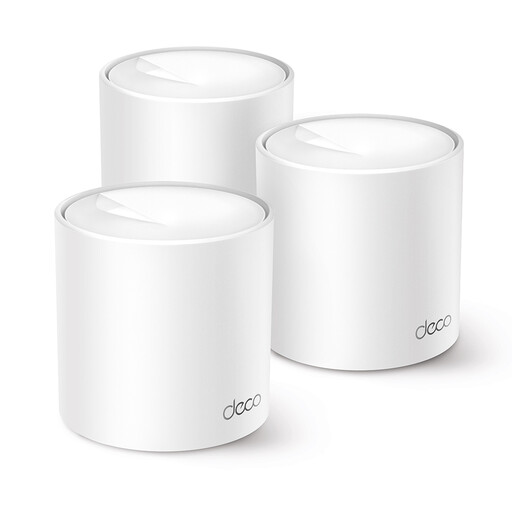
TP-Link Deco X50 3-pack
The set of three Deco X50 points could suit a setup where you want to place points in several locations. For the standard X50, TP-Link lists three gigabit ports per unit and optional Ethernet backhaul; check the cable route and connections in your home.
The product name specifies Wi-Fi 6; compatible devices are needed to use Wi-Fi 6 features.
View at Joybuy
 No image available
TP-Link Deco X50 2-pack
The set of two Deco X50 points could suit a setup with an extra point closer to the study. For the standard X50, TP-Link lists optional Ethernet backhaul and three gigabit ports per unit; check whether a wired connection is practical where you plan to place it.
The product name specifies Wi-Fi 6; compatible devices are needed to use Wi-Fi 6 features.
View at Joybuy
 No image available
TP-Link Deco X10 Dual-Band Wi-Fi 6
This mesh model is worth considering for a network with points in different locations. Check how many units are included in the version you choose, and what placement and connection options are available.
The product name specifies Wi-Fi 6; compatible devices are needed to use Wi-Fi 6 features.
View at Joybuy
Frequently asked questions
Do I need to replace my provider’s modem to get Wi-Fi in a distant study?
No, not necessarily. TP-Link explains how Deco can work as an access point behind an existing router. If you want to connect your own router, ACM ConsuWijzer says you have the right to choose your router, but check the applicable requirements and ask your provider which settings you’ll need.
What should I check when placing an extra Wi-Fi point?
Check that the point will still have a usable connection to the network in the location you’ve chosen, or connect the points via Ethernet where possible. KPN lists too great a distance between wirelessly connected points as a possible cause of connection problems.
Will parental controls and other router features still work if I set Deco to access point mode?
Not all gateway features will remain available through Deco: TP-Link says gateway features disappear from the Deco app in access point mode. So check which features your existing router provides and where the features you need will be managed.
What do the manufacturer’s guarantee and statutory guarantee mean if a router develops a fault?
A manufacturer’s or seller’s guarantee is in addition to your statutory rights. According to ACM ConsuWijzer, the provider’s own guarantee is subject to its terms and duration; the product must also work properly for a reasonable time. There is no single fixed statutory guarantee period for every router.
Do I need a licence for home Wi-Fi in the Netherlands, and what should I check on the device?
According to the Rijksinspectie Digitale Infrastructuur, you don’t need a licence for home Wi-Fi if you use the designated frequencies and comply with the terms of use. The RDI also says the router must have the correct CE marking; check this for the version you’re buying.


