
Vandaag of morgen in huis

Kwaliteit gegarandeerd

Welkomstaanbiedingen ontgrendelen: GRATIS bezorging | Tot 80% korting | Gratis 30 dagen JoyPlus-proefperiode
Download de app
As a Joybuy Product Recommendation Officer, I see a lot of products come and go. My job is to filter out the marketing jargon and provide practical advice. The market for portable gaming consoles has exploded in recent years, and with it, the risk of making a bad purchase. Especially with a powerful device like the Asus ROG Ally, it's crucial to know what to look for.
Many gamers are tempted by the promise of a full PC experience in their hands, only to run into a few common pitfalls:
Before you consider buying an ROG Ally, it's crucial to understand a few key specifications that make the difference between a great purchase and an expensive disappointment.
A handheld gaming PC is a complex device. To avoid making a poor choice, these are the three most important technical aspects to check.
The processor determines how smoothly your games run. For a Windows handheld capable of handling modern PC games, a specialised chip is essential. The Asus ROG Ally uses an AMD Ryzen Z-series processor. It's specifically designed for this type of device, offering a good balance between performance and power consumption. Combined with 16GB of RAM, you have a solid foundation for playing most PC games on the go without constantly having to sacrifice graphics quality.
You can have the best hardware in the world, but it means little if the screen is subpar. Pay attention to two things: resolution and refresh rate. The ROG Ally features a 1920x1080 (Full HD) resolution on a 7-inch screen, which ensures a sharp image. Even more important is the 120Hz refresh rate. This means the screen updates 120 times per second, resulting in noticeably smoother motion in games compared to the standard 60Hz screens of many competitors.
This is a crucial point in the ROG Ally vs. Steam Deck debate. The Steam Deck runs on the user-friendly, console-like SteamOS but is primarily focused on the Steam library. The ROG Ally runs on Windows 11. This gives you the freedom to install virtually any PC game launcher: Steam, Epic Games, GOG, and especially the Xbox app for access to PC Game Pass. This flexibility is a major advantage for gamers who have their games spread across multiple platforms.
Not everyone has the same needs. Below are a few choices tailored to different types of users.
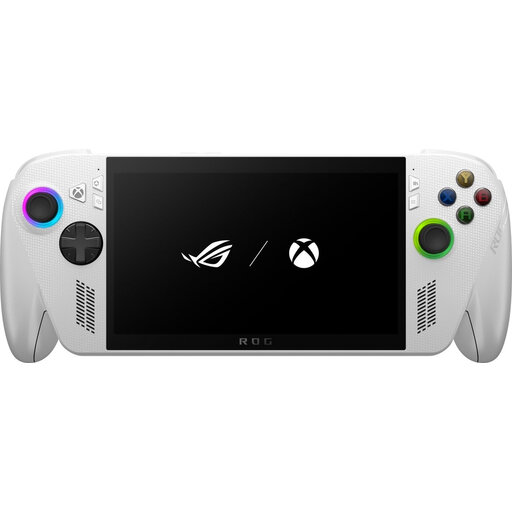
Why This Fits Their Persona: This user already has an extensive PC game library and wants to play it on the go without compromise. The ROG Ally offers the raw power and software freedom to do just that.
The Windows operating system completely avoids the ecosystem pitfall. The Ryzen Z processor and 120Hz screen directly address performance and screen quality concerns.
Native support for all PC launchers, including Xbox Game Pass. The Full HD 120Hz screen provides a visibly smoother gaming experience than many alternatives.
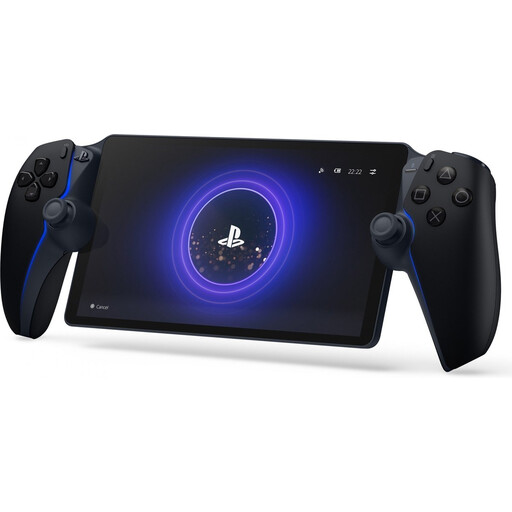
Why This Fits Their Persona: This PS5 owner simply wants to play their console games in another room or in the garden, without any hassle. The Portal is not a standalone console but a perfect extension of the PS5.
It doesn't pretend to be a PC. It's a specialised streaming device. This avoids the pitfall of software issues and subpar performance, as the PS5 does all the heavy lifting.
Seamless integration with the PlayStation 5. The device offers the full DualSense controller experience, including haptic feedback and adaptive triggers, which other handhelds cannot.
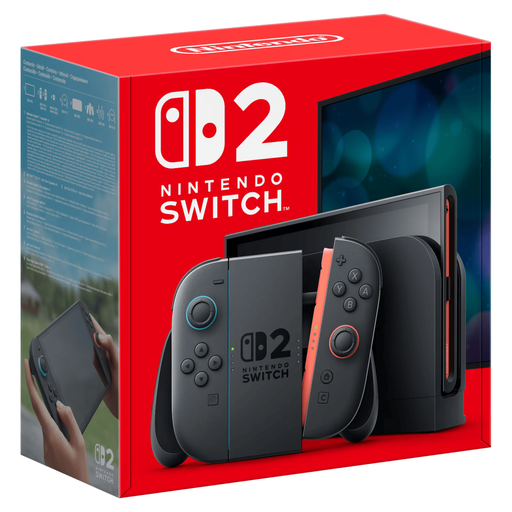
Why This Fits Their Persona: This gamer is looking for an upgrade from the original Switch or a `portable game console` with a strong focus on unique games and a smooth, family-friendly experience.
Nintendo's closed ecosystem is an advantage here: games are perfectly optimised for the hardware. This prevents the performance trap and the hassle with settings that you can encounter on an open PC system.
Access to Nintendo's exclusive first-party games. According to its specifications, the console offers a larger 1080p screen and 4K output to the TV, a significant upgrade in visual quality.
We have compiled a complete, up-to-date list of products that fully meet these strict selection criteria.
Yes, the hardware is capable enough to run many modern AAA titles. However, the experience depends on the game and your chosen settings. For the most demanding games, you may need to lower the graphics settings from 'Ultra' to 'High' or 'Medium' to maintain a stable framerate, especially if you want to extend battery life.
Battery life is the Achilles' heel of any powerful handheld. When playing a graphically intensive game at high performance, you can expect about 1 to 2 hours of playtime. For lighter indie games, watching videos, or browsing, this can extend to several hours. It's wise to keep the charger or a powerful power bank handy for longer sessions.
This depends entirely on your preference. The ROG Ally objectively has a superior screen (higher resolution and refresh rate) and, thanks to Windows, offers more flexibility for game launchers like the Xbox app. The Steam Deck, on the other hand, provides a more streamlined, console-like software experience with SteamOS and is often considered an excellent choice for gamers who live primarily within the Steam ecosystem. So the choice is: do you go for the raw power and openness of Windows, or for the simplicity and optimisation of SteamOS?
