
Vandaag of morgen in huis

Kwaliteit gegarandeerd

Welkomstaanbiedingen ontgrendelen: GRATIS bezorging | Tot 80% korting | Gratis 30 dagen JoyPlus-proefperiode
Download de app
Over time, your robot vacuum cleaner may become less effective, get stuck more often or leave streaks behind. Often, the problem isn’t the motor but worn parts: the main brush, side brushes, filters, mop pads or dust bags. However, ordering a robot vacuum cleaner accessory kit without checking first can lead to a few common problems.
The main pitfalls are:
So a practical purchase starts not with the colour or the discount, but with your appliance’s model number.
Make a note of the full model name, including terms such as “Ultra”, “Pro”, “Dual” or “FlexReach”. Then look for three things in the product information:
Compatible models
An accessory for a Dreame L10s Ultra won’t necessarily fit an H12 Pro. The same applies to MOVA models such as the E20 Plus, E30 Ultra and M1.
Number of parts
Check what you’ll actually receive. A kit might include one main brush, two side brushes, two filters, two dust bags and several mop pads. Make sure the quantities suit your needs.
Shape and fitting
Check the brush length, the side brush fitting and the filter shape. For a rotating brush, the position of the ends must also match the holder inside the robot.
With original parts, the brand name is usually clearly stated. For compatible robot vacuum cleaner parts, the published model list is particularly important. Only use a part if your exact model is included.
The main brush on a robot vacuum cleaner directs dirt into the suction channel and often has to deal with hair, crumbs and dust. Rubber can be useful for everyday cleaning, while some rotating brushes use nylon bristles for different floor types.
Look out for:
For example, a MOVA main brush for the E30 and P50 Ultra is described as a durable rubber version. The MOVA ACC-BRUSH-MA-1 is designed for the MOVA E30 and P50 Ultra. That’s a more specific indication than simply calling it “universal”.
Robot vacuum cleaner filters trap dust particles before air leaves the appliance. Their properties vary by model. If a filter is washable, follow the instructions in the user manual. Wash it only as directed, and don’t put it back until it’s completely dry. A non-washable filter should be replaced rather than rinsed.
When checking robot vacuum cleaner dust bags, look at:
A poorly fitting bag can leak dust or stop the station from working as effectively.
Robot vacuum cleaner mop pads need to fit the mop plate properly. Check the fastening system, dimensions and number of pads. A set with several pads is useful if you mop regularly and want to wash or replace them between uses.
For example, the product information for the Eureka J12 Ultra set lists four side brushes and four mop pads. According to the description, you can fit them without any extra tools. The suggested replacement interval of around three to four months is a guideline from the product information; how long they actually last depends on your floor area, pets and maintenance routine.
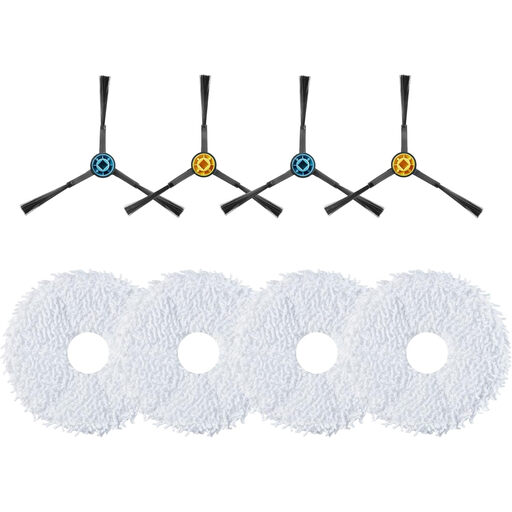
Why it suits this profile: This set combines two commonly used parts: side brushes and mop pads. It’s a convenient choice if you want to carry out regular maintenance without ordering several separate products.
Compatibility is listed specifically for the Eureka J12 Ultra. That means you don’t have to rely on a general claim about universal robot vacuum cleaner accessories.
Four side brushes and four mop pads; according to the description, no extra tools are needed for installation.
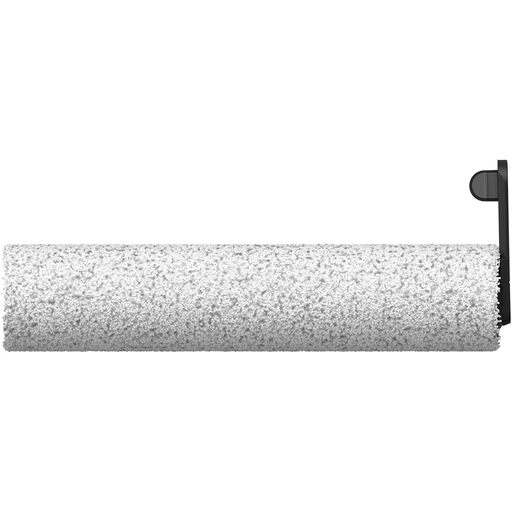
Why it suits this profile: If you want to replace one specific worn part, this is a standalone rotating brush for a clearly defined combination of Dreame models.
The product information lists H12Pro and H12Dual separately. Check your version before ordering.
Rotating brush; washable according to the specifications; one part for a targeted replacement.
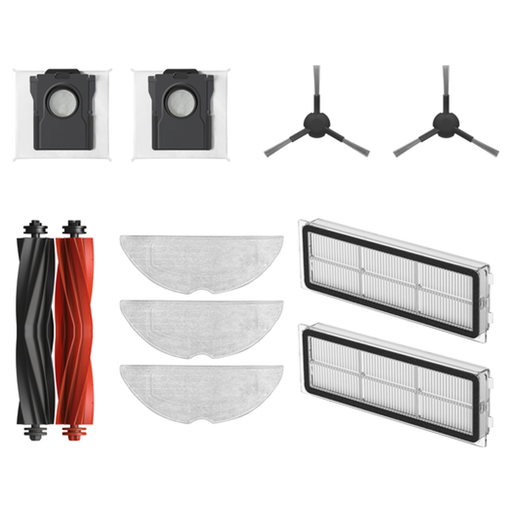
Why it suits this profile: This robot vacuum cleaner accessory kit is designed for owners of a MOVA E30 Ultra who want to replace several maintenance parts at once.
The kit lists the E30 Ultra as a compatible model and specifies what’s included, so you can compare the number of parts with your maintenance plan.
One main brush, two side brushes, three mop pads, two filters and two dust bags.
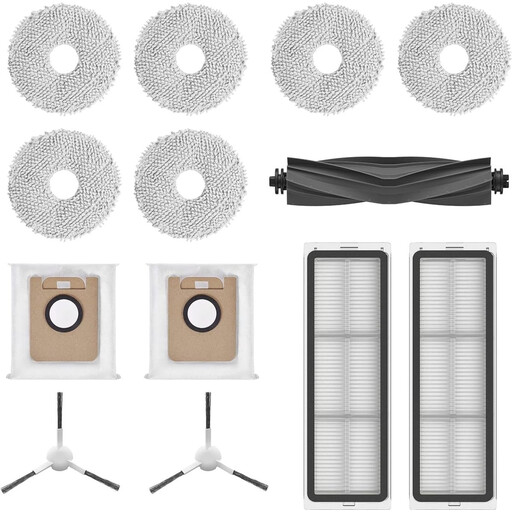
Why it suits this profile: Ideal for households looking to top up their brushes, mop parts, filters and dust bags in one maintenance session.
The stated compatibility is limited to the Dreame L10s Ultra and L10 Ultra. Other Dreame models aren’t automatically covered.
Includes one main brush, two side brushes, two filters, two dust bags and six mop parts.
Regularly remove hair and threads from the brushes. Check the side brushes for bent bristles and make sure the main brush still turns freely. Replace a filter if it’s blocked, damaged or can no longer be cleaned as instructed in the manual. You can wash mop pads if the product information allows it; replace them when they lose their shape or no longer absorb enough moisture.
Switch off the robot and remove it from the charging station before replacing any parts. Keep small parts such as filters and side brushes out of reach of young children. Use a long-handled cleaning brush only for the areas it’s designed for, and keep moisture away from electronic parts.
We’ve put together a complete, up-to-date list of products that meet these strict selection criteria and the applicable European safety requirements.
Check the full model number on the robot, charging station or original packaging. Compare it with the compatibility list on the product page. Look out for versions such as Ultra, Pro, Dual and Plus.
It depends on how often you use the robot and which part you’re looking at. Brushes may wear out faster if you have pets or carpets. Filters can become clogged sooner in a dusty home. Use the timeframe in the manual as a guide, and replace parts sooner if they’re visibly damaged, blocked or not working as well.
Not always. A kit is convenient if you need several parts, but check that you’ll use everything it includes. If you only need to replace a worn main brush, buying that part separately may be better value and more convenient.
