
Vandaag of morgen in huis

Kwaliteit gegarandeerd

Welkomstaanbiedingen ontgrendelen: GRATIS bezorging | Tot 80% korting | Gratis 30 dagen JoyPlus-proefperiode
Download de app
A robot vacuum cleaner with a mopping function can remove dust, crumbs and hair every day without you having to keep vacuuming yourself. Even so, not every model suits every home. A flat with hard floors needs something different to a house with multiple storeys, carpets and pets.
The main pitfalls are often not in how it looks, but in the details. So pay close attention to these three points before you buy.
A figure like 4,000 Pa, 8,000 Pa or 20,000 Pa sounds clear, but it doesn’t tell the whole story about day‑to‑day results. The design of the main brush, the filter, airflow and how the robot recognises carpet also play a role. What’s more, Pa values aren’t always directly comparable between brands.
For a robot vacuum for dog and cat hair, a brush that doesn’t trap hair so quickly is at least as important as the quoted suction power. Also check whether parts such as the main brush and filters are available as spares.
On most models it’s about damp wiping, not lifting every dried‑on stain. A robot vacuum with a mop fills the water tank, moistens the pad and drives a route across the floor. On hard floors that’s handy for daily upkeep, but stubborn marks may still need manual effort.
Use clean water only, unless the manufacturer permits a specific solution. According to the user manuals for various models, the wrong cleaning agents can affect the water feed or internal components. Carpet should also be excluded or handled appropriately when the mop is attached.
A robot vacuum with a self‑emptying base reduces the workload, but it doesn’t remove maintenance altogether. A dust bag needs replacing, a dirty‑water tank needs emptying and mop cloths need washing. With models that wash and dry the mop, also check how large the water tanks are and how much space the station takes up.
A station needs clear space to dock properly. Several models recommend at least 0.5 metres on both sides and 1.5 metres in front. Measure that space in advance.
A robot vacuum with laser navigation uses LiDAR to create a floor plan of your home. That helps with systematic routes, room selection and virtual no‑go zones. Check whether the model stores multiple maps if you have a multi‑storey home.
The Lubluelu L15 Max lists support for up to five saved maps and app control. According to the product information, the robot can select rooms, set cleaning times and define no‑go zones. Let the first map build fully before you set fixed schedules.
Laser navigation doesn’t prevent every problem. Loose cables, socks, toys and low‑hanging curtains can still cause it to get stuck. Dark floors or mirrors at floor level can also affect the sensors on some models.
For a robot vacuum for carpet and hard floors three things matter:
According to the product information, the Roborock Q7 L5+ has suction power of 8,000 Pa, LiDAR navigation, a mopping function and a dual anti‑tangle system. The ECOVACS Deebot T30C OMNI Gen2 lists 20,000 Pa, automatic carpet detection and multiple carpet cleaning modes. Treat these figures as product specifications, not a guarantee of a particular cleaning result.
A smart robot vacuum with an app is especially handy if you want to clean by room, set schedules or temporarily skip a zone. Check that the app works with your Wi‑Fi network. The Lubluelu models in this selection list 2.4 GHz Wi‑Fi; that matters if your router uses multiple bands.
Also consider the stated battery life. Actual runtime depends on the suction mode, floor area, obstacles and whether you’re mopping. A model that automatically returns to the dock and then continues is more practical in larger homes than one that stops after a single charge.
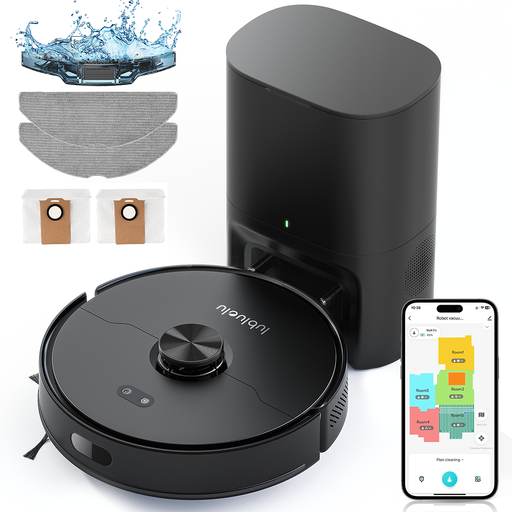
Why this fits the profile: An accessible choice for households that want automatic vacuuming and the occasional damp mop, without immediately needing a full all‑in‑one station.
The product information lists laser navigation, app control and five saved maps. That lets you set routes and zones instead of relying on random movement.
4,000 Pa according to the product spec, a stated noise level of 55 dB and support for carpet and hard floors.
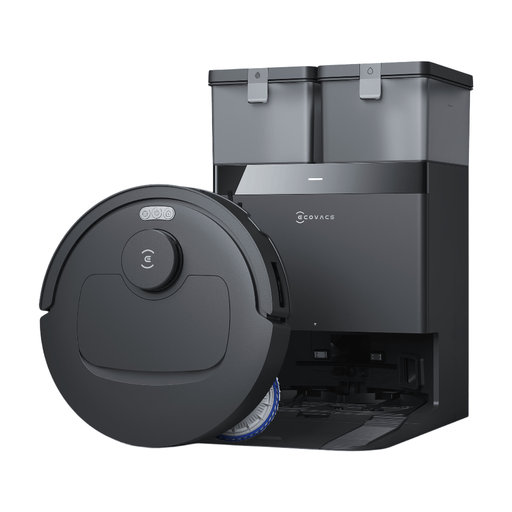
Why this fits the profile: Aimed at households that want a high level of automation for a mix of pets, carpet and hard floors.
According to the product information, the OMNI station focuses on automatic emptying, washing the mop with 75°C water, drying with hot air and self‑cleaning. Do check the space required and maintenance costs.
20,000 Pa according to the product spec, automatic carpet detection, TrueMapping 2.0 and the ECOVACS Home app.
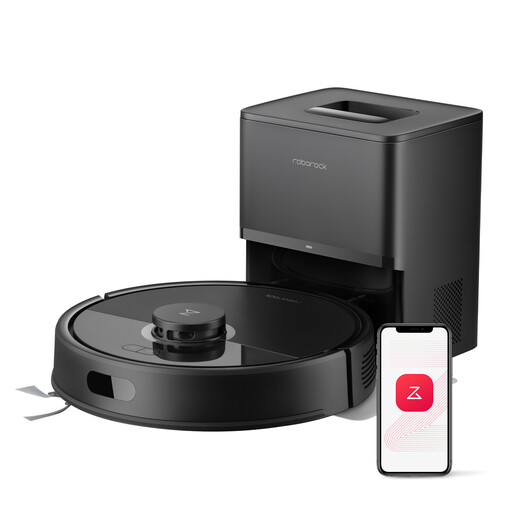
Why this fits the profile: A logical option if you regularly want to tackle hair and fine debris on multiple floor types and value app control.
The product name and listed specs mention an auto‑empty station and a dual anti‑tangle system. That suits frequent use in pet households, though brush maintenance is still required.
8,000 Pa according to the product listing, LiDAR navigation, automatic dust disposal and app control.
We’ve compiled a complete, up‑to‑date list of products that fully meet these strict selection criteria and current European safety regulations.
For automatic vacuuming and mopping, a steady routine still helps:
With a model that has a built‑in lithium battery, you must not remove the battery yourself. Stop using it if you notice smoke, unusual smells, damage or excessive heat.
Yes, provided the model supports carpet and you manage the mopping module correctly. Ideally choose a device with carpet detection, a suitable suction mode and adjustable no‑go zones. A wet mop should not run over carpet.
That depends on your home. In a household with dogs or cats, daily vacuuming can help limit hair build‑up. Mopping usually needs to be done less often. Check the mop and the water tank after every mopping session.
Beyond the purchase price, you may need dust bags, filters, brushes, mop cloths and possibly cleaning solution. So compare not only the features, but also the availability and price of replacement parts.
