
Vandaag of morgen in huis

Kwaliteit gegarandeerd

Welkomstaanbiedingen ontgrendelen: GRATIS bezorging | Tot 80% korting | Gratis 30 dagen JoyPlus-proefperiode
Download de app
A robot vacuum with a mopping function can remove dust, crumbs and hair every day, without you having to vacuum and mop the house yourself. However, not every model is right for every home. High suction power or a smart app may sound appealing, but they don’t tell you everything about how easy a robot is to use.
For UK households, three things are particularly important: the mix of floor types, how much maintenance is involved, and how well the robot recognises obstacles and rooms. Read on to find out what to look for and which models suit different needs.
Manufacturers often quote a high figure in Pa, or pascals. This indicates the maximum suction pressure, but it isn’t the only factor that determines how well a robot cleans. The main brush, airflow, filter, floor covering and cleaning route all play a part too.
A model with 4,000 Pa may be enough for a flat with hard floors, while a home with deep-pile carpets and lots of pet hair may need more capacity and a suitable brush design. So look at the product as a whole, rather than focusing only on the biggest number in the product title.
Most affordable models use a damp cloth that moves along behind the robot. This is suitable for light, everyday cleaning, but it won’t necessarily remove dried-on stains. Models with rotating or continuously dampened mop rollers take a different approach.
Also consider which floor you’re using the function on. Don’t use the mopping mode on carpets, and follow the instructions for wooden floors. Product information for various models also warns that they shouldn’t be used to vacuum up puddles or spilled liquids.
A robot vacuum with a self-cleaning station can empty the dustbin, wash the mop pads or use warm air to dry components. However, you’ll still need to check the water tanks, filters, brushes and sensors. Some stations require you to replace dust bags; others use a bagless container that needs emptying.
Before you buy, check how much clear space you’ll need around the charging station. Many models require around 50 centimetres on either side and 1.5 metres in front. A large station may not fit conveniently in a narrow hallway or beneath a low piece of furniture.
A robot vacuum with LiDAR navigation uses lasers to map rooms and furniture. This helps it follow systematic routes, clean multiple rooms and avoid virtual no-go zones. Models such as the Lubluelu SL60D and L15 Max state that they support up to five maps.
LiDAR won’t ensure that every cable, sock or toy car is recognised. So clear loose items away before creating the first map. A camera or AI system may provide extra information about obstacles, but check what the product description actually says is supported.
For a robot vacuum for carpets and hard floors, useful features include automatic carpet detection, adjustable suction settings and a brush that’s less likely to tangle with hair. If you have pets, cleaning every day or every other day is often more practical than waiting for hair to build up.
Check whether the mop module lifts when the robot reaches a carpet, or whether you need to remove it by hand. A robot vacuum for pets isn’t automatically suitable for every type of pet hair or deep-pile carpet. Look at the brush and filter, and check that replacement parts are available.
A robot vacuum with automatic emptying cuts down on daily chores. Check the capacity of the dust bag or container, as well as the cost of consumables. An app may let you select rooms, set cleaning schedules, adjust suction power and create no-go zones. Check whether the robot only supports 2.4GHz Wi-Fi, as this may matter for your home network.
A powerful robot vacuum with lots of features may come with a larger station, make more noise or cost more to maintain. Choose one to suit your home and routine, rather than basing your decision on the number of features alone.
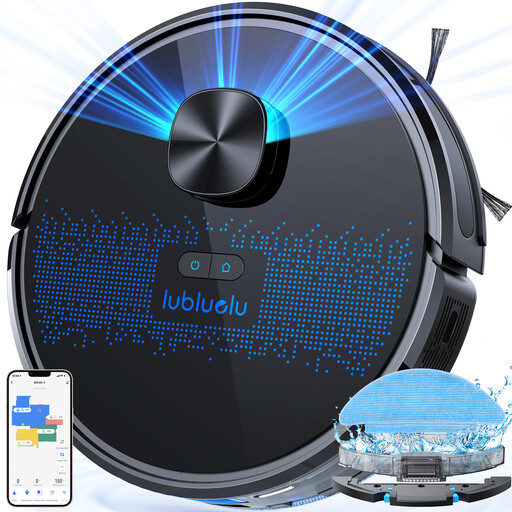
Why it suits this type of user: This model combines vacuuming and damp mopping with app control, laser navigation and a noise level of 55 dB, according to the product specifications. It’s a good fit for first-time buyers who want to set rooms and cleaning times.
The specifications list 4,000 Pa, five maps and adjustable zones. So you can look beyond suction power to route planning and controls too.
LiDAR navigation, app control, support for carpets and hard floors, and an adjustable cleaning schedule.
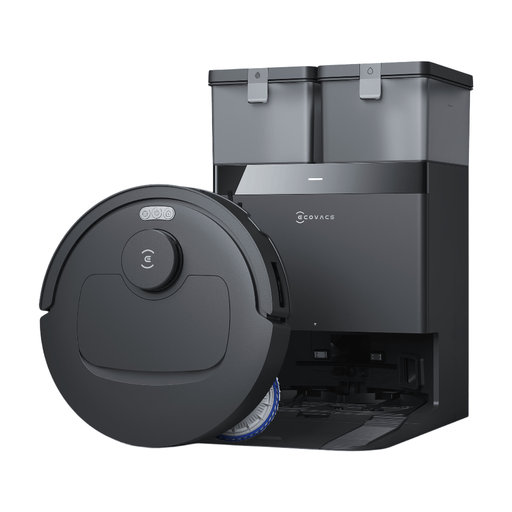
Why it suits this type of user: According to the product description, this model comes with an OMNI station that automatically empties the robot, washes the mop pads at 75°C, dries them with warm air and refills the water. It’s a good fit for households looking to minimise the tasks between cleaning sessions.
The station automates several maintenance tasks. Before ordering, check its dimensions and water capacity, as well as the cost of any cleaning products you may need.
20,000 Pa according to the product specifications, dual rotating mops, carpet detection and control via the ECOVACS Home App.
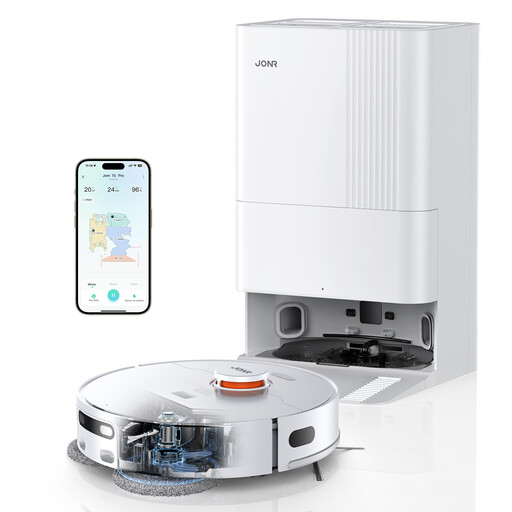
Why it suits this type of user: The product information lists 8,150 Pa, LiDAR navigation, obstacle avoidance, an anti-tangle side brush and an all-in-one station with hot-air drying. These features are relevant for larger homes and households dealing with regular dirt or pet hair.
The combination of navigation, brush design and app zones addresses several practical challenges. You’ll still need to empty dirty water from the station regularly.
8,150 Pa, LiDAR, app-based no-go zones, an anti-tangle side brush and warm air to dry the mopping components.
A robot vacuum and mop works best when you set up clear zones in advance: for example, no mopping on carpets, no access to a pet’s food bowl, and a separate cleaning order for the kitchen and living room.
We’ve put together a complete, up-to-date list of products that meet these strict selection criteria and current European safety regulations.
Yes, many models can vacuum carpets. For mopping, you’ll need to remove the cloth or mop module, unless the robot can lift the mop automatically. Check the product description for details of this feature.
Even a model with automatic emptying and a self-cleaning station needs maintenance. Empty the water tanks, clean the filters and brushes, and rinse the mop pads regularly. How often you need to do this depends on how much you use it, your floor area and the amount of hair or dirt.
As well as the purchase price, you may need to pay for electricity, filters, brushes, mop pads, dust bags and cleaning products. A bagless station can help reduce ongoing costs for dust bags, while a more advanced station may use other consumables. Check the accessories and maintenance instructions before making your choice.
