
Vandaag of morgen in huis

Kwaliteit gegarandeerd

Welkomstaanbiedingen ontgrendelen: GRATIS bezorging | Tot 80% korting | Gratis 30 dagen JoyPlus-proefperiode
Download de app
A robot vacuum with a mopping function can remove dust, crumbs and pet hair every day, without you having to vacuum yourself all the time. However, there are big differences between models. A high suction power figure on the packaging, for example, doesn’t automatically mean a robot can handle carpets, hair or thresholds well.
The mopping module also deserves attention. Some robots drag a damp cloth across every surface, while others lift the mop when they detect carpet. If convenience is your priority, look for a robot vacuum with an automatic emptying station, self-cleaning mops and a straightforward app.
A figure such as 10,000 or 20,000 Pa sounds impressive, but it doesn’t tell you everything about everyday cleaning. Brush design, airflow, filter maintenance and how the robot moves over carpets also affect the results. So check whether the product information says it’s suitable for hard floors and carpets, and whether it has an anti-tangle brush.
A robot vacuum with a mop can be handy on tiles, PVC and sealed wooden floors. But a wet mop may not be suitable for carpets. That’s why an automatic mop-lifting mechanism or a separate carpet zone in the app is important. Also check the water tank, the type of mop and whether the mop is washed and dried after use.
An automatic emptying station means you don’t have to empty the dust container as often, but it doesn’t eliminate maintenance altogether. Dust bags, filters, brushes, dirty water tanks and mop pads still need checking. With a self-cleaning robot vacuum, self-cleaning usually means certain tasks are carried out automatically; check which parts you’ll still need to clean yourself.
For a robot vacuum for pet owners, a rotating main brush, a good edge brush and a design that prevents hair from building up are more important than the Pa figure alone. Higher stated suction power can help with larger debris, but actual performance depends on several components.
According to the product information, the Lubluelu S1000 offers suction power of up to 10,000 Pa and automatic carpet detection with mop lifting. The Eureka E20 Plus is also listed at 10,000 Pa, alongside an anti-tangle system. These are manufacturer specifications and don’t guarantee the same results in every home.
A robot vacuum with LiDAR navigation uses lasers to map the room and plan systematic routes. This is useful in homes with several rooms. Also check whether the robot can recognise cables, toys, shoes and pet bowls. LiDAR alone won’t prevent every situation where the robot gets stuck.
Look for:
A smart robot vacuum with an app usually lets you set cleaning times, rooms and suction levels. Check in advance whether the app requires a 2.4GHz Wi-Fi connection and which features are only available after you register an account.
A more advanced station can empty the dust, wash the mop, dry it with warm air and refill the clean water tank. This saves you a few tasks, but takes up more floor space and needs regular maintenance. Measure the available space and allow for clearance at the front and sides.
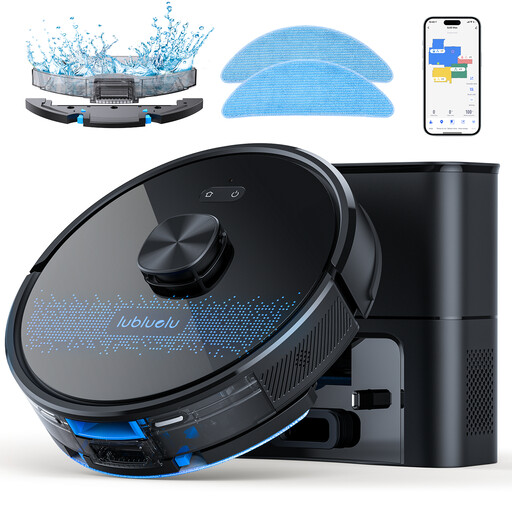
Why it suits this profile: This model combines vacuuming, sweeping and mopping with LiDAR navigation, app control and an automatic emptying station. It’s a practical entry-level choice for households that want to empty the dust container less often.
The product information lists adjustable water flow, no-go zones and automatic suction boost on carpets. Be sure to check the mop and brush regularly.
LiDAR 9.0, up to 4,000 Pa according to the product information, app control and a dust bag in the station with a stated capacity of 3 to 4 litres.
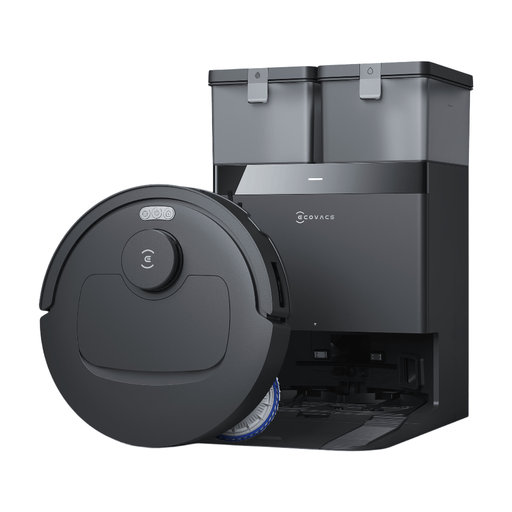
Why it suits this profile: This model is designed for people who want extensive automation for hard floors, carpets and pet hair.
The OMNI station information lists automatic emptying, mop washing with 75°C water and warm-air drying. However, the station does take up extra space.
According to the product description: 20,000 Pa, dual rotating mops, carpet detection, TrueMapping 2.0 and control via the ECOVACS Home app.

Why it suits this profile: Its high stated suction power, anti-tangle technology and automatic station functions make it a good fit for larger households and homes with lots of pet hair.
The product information lists a mop lift, anti-tangle technology and a station that washes and dries the mops. Check that the necessary maintenance and replacement items are available.
According to the manufacturer: 16,200 Pa, liquid detection, brush lift and mop cleaning with hot water up to 75°C.
We’ve put together a complete, up-to-date list of products that meet these strict selection criteria and the applicable European safety regulations.
Start by letting your new robot create a complete map. Tidy away cables, toys and loose clothing, and leave the doors open while it maps your home for the first time. Place the station on a flat surface against a wall, with enough clear space around it.
To help your robot last longer:
Don’t use a robot vacuum to clean up burning objects, sharp pieces, large amounts of liquid or wet dirt. The main unit and station must not be immersed in water.
It depends on the model. If you have carpets, choose a robot with automatic carpet detection and a mop that lifts up. You can also set no-mop zones for rugs that shouldn’t get wet.
If you use it heavily, check the brushes and sensors every week. Mop pads often need rinsing after every mopping session. You won’t need to empty a station as often, but the dust bag, dirty water tank and filters still need regular attention.
As well as electricity, dust bags, filters, brushes and mop pads can be ongoing expenses. A model with a bagless station can help keep these costs down, while a station with disposable bags may be cleaner to empty. So check the prices and availability of genuine replacement parts before you buy.
