
Vandaag of morgen in huis

Kwaliteit gegarandeerd

Welkomstaanbiedingen ontgrendelen: GRATIS bezorging | Tot 80% korting | Gratis 30 dagen JoyPlus-proefperiode
Download de app
A robot vacuum and mop can make everyday floor care easier, but not every model is right for every home. A flat with hard floors has different needs from a house with deep-pile carpets, pets and multiple floors. Marketing claims about suction power, automatic cleaning and smart navigation can also make it difficult to compare models fairly.
So don’t focus only on the price or the number of pascals. Check how the robot handles carpets, how much maintenance the station needs and whether the app has features you’ll actually use.
A powerful robot vacuum with, for example, 4000 Pa or more sounds appealing. But this figure doesn’t tell you everything about its everyday performance. The brush design, how well it picks up hair and whether it automatically detects carpets all play a part. What’s more, brands use different testing methods.
Treat the Pa rating as one point of comparison, not the whole picture. Also check whether the manufacturer mentions automatic suction adjustment on carpets, an anti-tangle brush or a suitable main brush.
Most models use a damp mop pad or rotating mop pads. They’re designed for light, everyday cleaning, not for picking up spills or dried-on stains. Some robots let you adjust the water flow in the app, which is useful for wooden floors or laminate, but always check the manufacturer’s instructions.
A robot vacuum and mop with automatic emptying still needs maintenance. After use, the mop pad must be removed or washed and, according to the product information, often left to air-dry.
A robot vacuum with a self-emptying station usually empties the robot’s dustbin into a dust bag or larger container. This means you need to empty it manually less often, but the bag, filters, brushes, sensors and mop parts still need attention.
Models with a more advanced all-in-one station may also have clean- and dirty-water tanks. So check how much space the station needs. Some models require around 0.5 metres of clearance on both sides and 1.5 metres in front.
A robot vacuum with LiDAR navigation uses laser sensing to map rooms. This can help it follow systematic cleaning routes, select rooms and set virtual walls or no-go zones. Check whether the robot supports multiple maps if you want to clean more than one floor.
LiDAR doesn’t guarantee that every obstacle will be recognised. Cables, toys, dark surfaces and mirrors at floor level can cause problems. So pick up loose items before creating the first map.
When choosing a robot vacuum for carpets and hard floors, consider the following:
For example, some product pages state a maximum threshold height of 2 cm. Measure your doorways and transition strips, as the actual clearance also depends on the angle and shape of the threshold.
A smart robot vacuum with an app often offers scheduling, room selection, suction settings and virtual boundaries. Check in advance whether the model only supports 2.4GHz Wi-Fi, as is the case with some models. This can help prevent connection problems during setup.
Also check what “automatic emptying” actually means. Some stations only empty dust. Other systems wash and dry the mop, refill the clean-water tank or drain away dirty water. These extra features make things easier, but also increase the station’s size and maintenance needs.
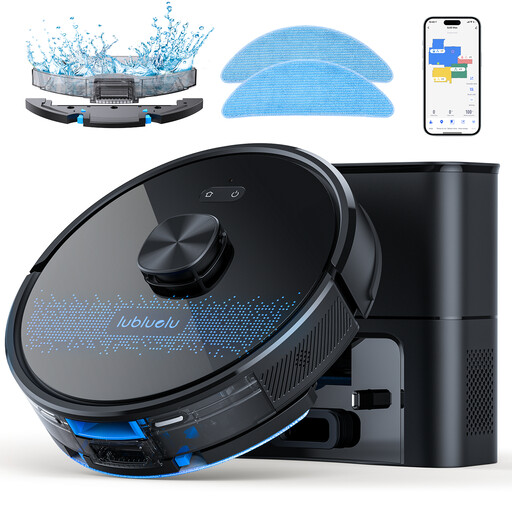
Why it suits this household: This model combines vacuuming, sweeping and mopping with LiDAR 9.0 navigation, app control and a station that automatically empties the dustbin. The product specifications state a suction power of 4000 Pa and support for Alexa and Google Assistant.
The specifications cover more than suction power: they also include map navigation, app-controlled water flow and automatic emptying. Make sure you check how much clearance the station needs.
4000 Pa, LiDAR mapping, adjustable water flow, app control and a dust bag with a stated capacity of 3 to 4 litres.
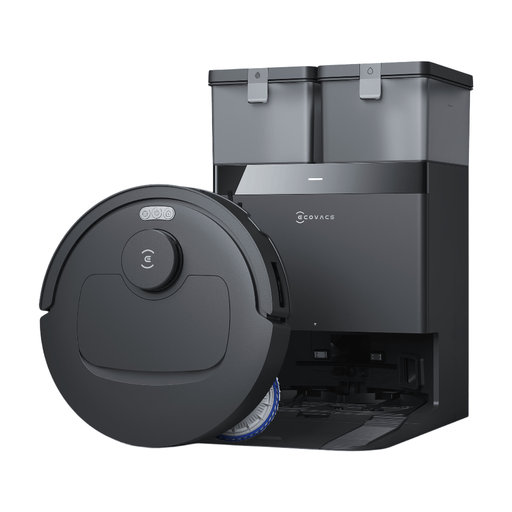
Why it suits this household: The product description lists an OMNI station with automatic emptying, mop washing with 75°C water, warm-air drying and clean-water refilling.
The mopping and station features are described in clear terms. Before buying, check that you have enough room for the station and factor in the cost of consumables.
20,000 Pa according to the product information, rotating mop technology, TrueMapping 2.0, carpet detection and anti-tangle components.
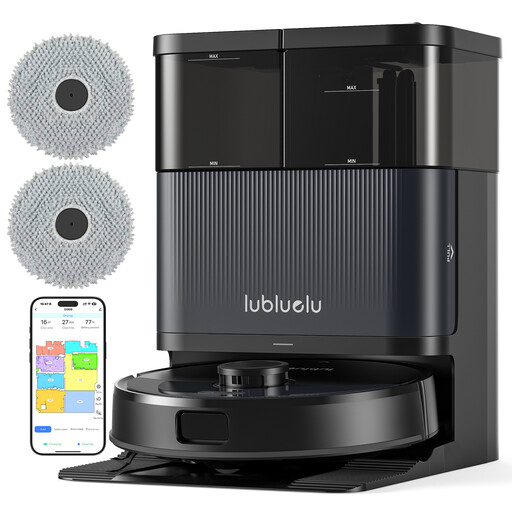
Why it suits this household: The product page lists up to 10,000 Pa, LiDAR mapping, app control, carpet detection and automatic mop lifting. These features suit homes with pets, carpets and hard floors.
The listed features go beyond a high Pa rating. They also cover carpets, mopping and automatically returning to the station.
Up to 10,000 Pa according to the product information, a stated noise level of 55 dB, LiDAR navigation and automatic mop lifting on carpets.
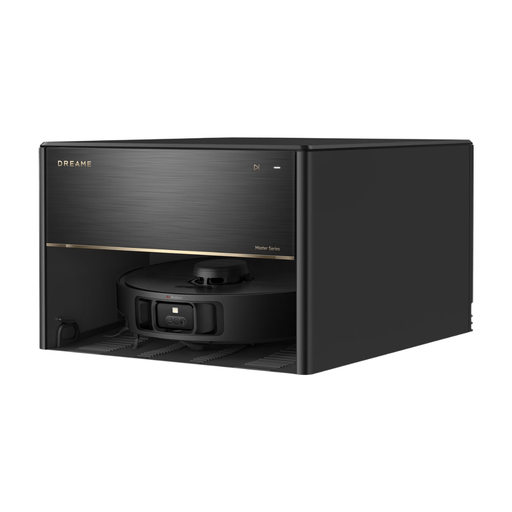
Why it suits this household: The description mentions automatic water refilling and drainage, an 8-in-1 base station, app control and up to 100 days of automatic emptying, according to the brand and product information.
The maintenance features are clearly separated: dust emptying, water management and mop care. Bear in mind, though, that the station takes up more space.
12,000 Pa according to the product specifications, automatic water connection and a base station with several maintenance features.
We’ve put together a complete, up-to-date list of products that meet these strict selection criteria and current European safety regulations.
Yes, many models can vacuum carpets. If you want to mop and vacuum at the same time, carpet detection, a mop lift or a carpet-avoidance setting is important. Also check the maximum pile height stated in the manual. A robot isn’t automatically suitable for every deep-pile carpet.
You’ll usually need to replace or empty the station’s dust bag or container, clean the filters and remove hair from the brushes. With a mop model, you’ll also need to wash and dry the mop pad. A station reduces the daily workload, but doesn’t eliminate maintenance.
Some models let you start basic functions using buttons on the device. You’ll often need the app to select rooms, set schedules, create no-go zones, adjust water flow and manage maps. Also check that your Wi-Fi network is compatible and whether you need an account.
