What should you look for when choosing?
First, decide how much space the complete charging setup can take up. Then compare your cleaning needs, how often you’ll need to empty the bin by hand, and the obstacles in the rooms where the robot will run.
| What to consider |
What to look for when buying |
Who is this important for? |
| Space for the charging setup |
Measure the space for the robot, dock, cable and access to the dust bin. Compare the complete setup: the dimensions of the robot or dock on its own don’t tell you how much space it will take up when parked. The Dutch Consumers’ Association says an auto-emptying dock takes up more room than a standard charging dock. |
If space for the dock is limited, I want to fit both the robot and dock without blocking a walkway. Around 36% of consumers say space for the charging setup is their top priority. |
| Everyday dust on the floor |
Look at reviews of dust pick-up on your type of flooring and check whether the robot can reach under furniture. The Dutch Consumers’ Association assesses dust pick-up on different surfaces; a quoted suction power on its own isn’t an independent cleaning test. |
If I mainly want to keep accessible floor areas clean every day, I’m looking for a model that suits my floors and furnishings. Around 29% of consumers prioritise daily floor cleaning. |
| How often you’ll need to empty the bin |
Check whether the exact version empties automatically, which dust bags it uses, and how to maintain the dust bin, brushes and filters. |
If I’d rather not empty the robot myself as often, I’ll weigh up the convenience against the extra space and maintenance the dock requires. Around 21% of consumers say emptying the bin by hand less often is their top priority. |
| Navigation and obstacles |
Look at independent navigation tests and check the intended route for furniture, loose cables and objects that could block the way. |
If furniture or items on the floor get in the way of my cleaning route, I want to know whether the robot can reach the rooms I have in mind. Around 14% of consumers prioritise a usable route around obstacles. |
Robot vacuums at Joybuy
These products are suited to keeping accessible floors clear of everyday dust. The selection includes versions with a standard charging dock and models with automatic emptying. Check the space needed for the dock and the maintenance requirements of the exact version.
 No image available
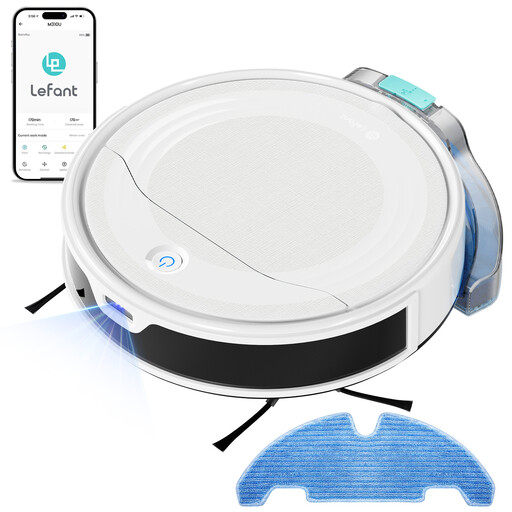
Lefant M310 Ultra
An option for keeping hard floors free of everyday dust, especially if you want to check whether a robot will fit under low furniture.
The product information lists a height of 7,9 cm and a 500 ml dust bin. The description mentions ToF navigation and obstacle avoidance.
View at Joybuy
 No image available
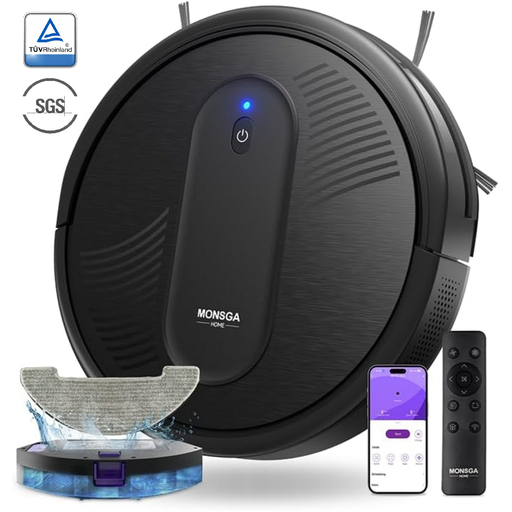
MONSGA MR1
An option if you want to schedule daily cleaning on hard floors and explore control via the app, remote control or voice commands.
The product title lists a slim 3,2-inch profile and scheduled cleaning via the app.
View at Joybuy
 No image available
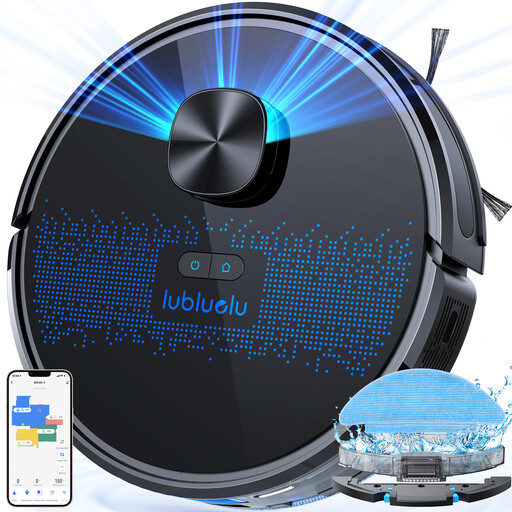
Lubluelu SL60D
An option for hard floors if you’re happy to empty the dust bin yourself after each cleaning session.
The product information mentions laser navigation and app control. The instructions say to empty the dust bin after every cleaning cycle.
View at Joybuy
 No image available
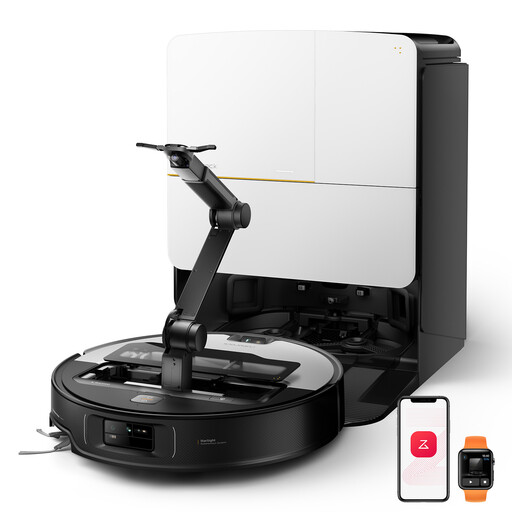
Roborock Saros Z70 (Silver)
An option to compare if a low-profile robot is important to you and you’d like to empty it by hand less often. Remember to measure the space for the dock too.
The product title lists a robot height of 7,98 cm and an auto-emptying charging setup. The Dutch Consumers’ Association says an auto-emptying dock takes up more room than a standard charging dock.
View at Joybuy
 No image available
Eureka E20 Plus
An option if emptying the dust bin less often matters more to you than having the smallest possible charging setup.
The product information lists an auto-emptying dock with a 2-litre dust container. Bear in mind that an auto-emptying dock needs extra space.
View at Joybuy
Frequently asked questions
Can a robot vacuum replace my regular vacuum cleaner?
Not completely. According to the Dutch Consumers’ Association, a robot keeps accessible floor areas free of dirt, but it can’t clean every spot, such as stairs and crevices. You’ll still need to clean hard-to-reach places by hand.
What should I do before setting up daily cleaning sessions?
Make sure the intended route is clear, and watch out for cables and loose items. Also plan to maintain the dust bin, brushes, wheels, filters and sensors; a self-emptying robot needs maintenance too.
What should I look for with dust bags and maintenance?
Check whether the exact version uses dust bags and whether maintenance parts are available for that model. An auto-emptying dock can mean emptying the robot less often, but the Dutch Consumers’ Association says it takes up more room than a standard charging dock.
How do I dispose of an old robot vacuum?
Recycle old electrical appliances separately. According to Milieu Centraal, when you buy a new appliance, you can have an old, similar appliance taken away free of charge under the take-back scheme, including when you buy online.


