
Vandaag of morgen in huis

Kwaliteit gegarandeerd

Welkomstaanbiedingen ontgrendelen: GRATIS bezorging | Tot 80% korting | Gratis 30 dagen JoyPlus-proefperiode
Download de app
A robot vacuum cleaner can last for years, but only if worn parts are replaced in good time. Anyone searching for robot vacuum cleaner accessories will soon see dozens of brushes, filters, mop pads and complete kits. The product photos often look identical, yet a small difference in the connector or dimensions can mean that a part does not fit.
The main pitfalls are:
So first check the exact model number on the robot, in the app or on the original packaging. Only then compare the price, material and number of parts.
Compatible robot vacuum cleaner parts are not universal. Check that the product is explicitly suitable for your model, such as MOVA E30 Ultra, Dreame L10s Pro Ultra, Eureka J12 Ultra or Eufy X9 Pro.
Also look out for model variants. A part for the MOVA E30 Ultra may differ from one for the E30 or E30 Pro. The same applies to Dreame models with additions such as “Gen 2” or “Ultra”. If your model is not clearly listed in the product specifications, ask the seller for confirmation before buying.
A robot vacuum cleaner brush removes dirt from the floor and directs it towards the suction opening. The main robot vacuum cleaner brush is usually important for larger areas, while robot vacuum cleaner side brushes sweep dirt along skirting boards and out of corners.
Pay attention to the construction:
The product information for the MOVA main brush for the E30 and P50 Ultra specifies a rubber design. According to the product specifications, the Dreame brush for the H12 Pro and H12 Dual is a rotating replacement brush made from washable material. “Washable” does not automatically mean dishwasher-safe: for this Dreame part, the instructions specifically state that it is not suitable for the dishwasher.
Do not compare only the price of a kit; check its contents too. A kit with one main brush, two filters, three mop pads and two side brushes may offer better value than buying individual parts when several components need replacing at the same time.
Replacement intervals depend on floor area, pets and frequency of use. As a practical guideline, a Dreame accessory pack recommends replacing HEPA H13 filters every two to three months and mop pads after around thirty washes. Treat this as product advice rather than a fixed rule. Check the part sooner if the filter is visibly clogged, the brush becomes misshapen or the mop pad no longer stays securely in place.
A robot with a docking station may also require robot vacuum cleaner dust bags. Check that these bags fit your station. An accessory kit containing brushes and filters will not automatically include dust bags.
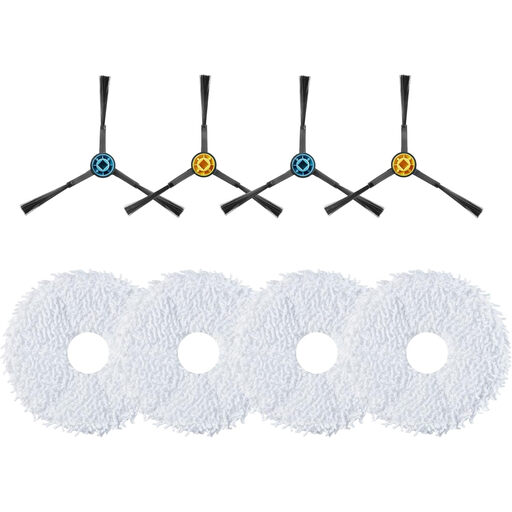
Why it suits this profile: This set is designed for basic maintenance of the Eureka J12 Ultra and contains four side brushes and four mop pads. It is a straightforward option if you mainly need to replenish consumable parts.
The product information names the exact model and lists the contents separately. It does not suggest that filters or a main brush are also included.
8 parts in total; according to the description, they can be fitted without additional tools.
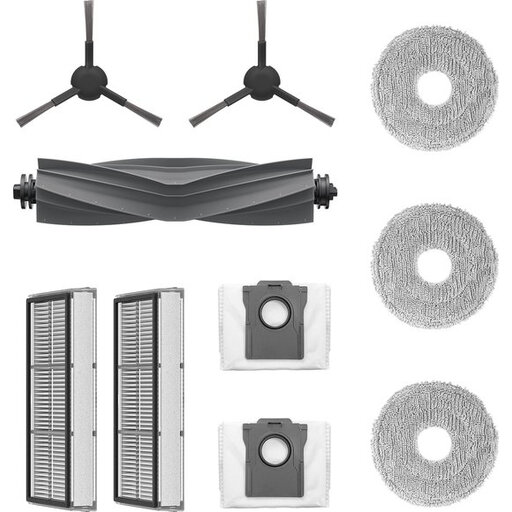
Why it suits this profile: A complete maintenance kit is suitable for users who want to replace several parts at once and limit their compatibility check to the models listed.
The kit contents are specified: one main brush, two H13 HEPA filters, three mop cloths and two side brushes. Check your own model before ordering.
10 parts; H13 filter type specified; installation without complicated modifications, according to the product description.
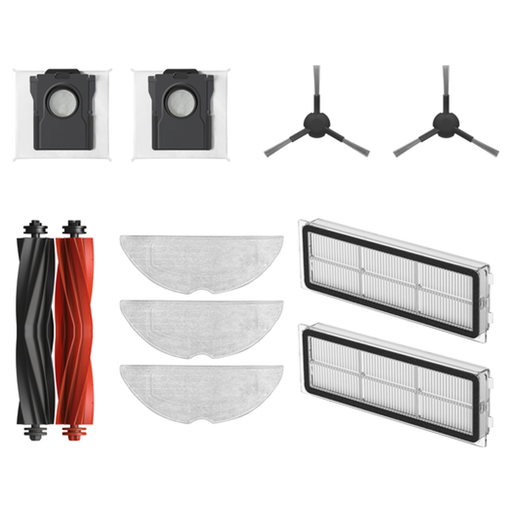
Why it suits this profile: This set is designed for the MOVA E30 Ultra and combines brushes, filters, mop pads and dust bags. It is practical for frequent use or when several parts wear out at the same time.
The product page states both the applicable model and the individual quantities. However, check the conflicting compatibility fields on the page before buying.
According to the product description: 1 main brush, 2 side brushes, 3 mop pads, 2 filters and 2 dust bags.
Switch off the robot vacuum cleaner and remove it from the charging station before replacing brushes, filters or mop pads. After fitting the part, check that the main brush can rotate freely and that the brush cover clicks firmly into place. For side brushes, the attachment point must align straight with the motor shaft.
Do not use wet filters unless the manufacturer explicitly states that they are washable. Allow washable parts to dry completely before refitting them. Remove hair from the robot vacuum cleaner brush regularly, especially if you have pets. Keep small parts such as side brushes, filter frames and dust bag attachments out of the reach of young children.
As well as individual parts, various Dreame accessories, MOVA accessories and Eureka accessories are also available. If you cannot find a part, combine the model name with “robot vacuum cleaner replacement parts” and then check the kit contents. For additional brushes and cleaning materials, you can also browse the range of vacuum cleaner brush cleaning tools.
We have put together a complete, up-to-date list of products that fully meet these strict selection criteria and the applicable European safety regulations.
Note down the full model number and compare it with the part’s compatibility list. Look out for additions such as “Ultra”, “Pro” and “Gen 2”. A similar product name does not guarantee that the connection will fit.
That depends on usage, floor area and the amount of dirt. Check brushes regularly for hair and signs of wear. Filters are often replaced after a few months; some Dreame sets recommend two to three months. Mop pads may need replacing sooner when they become thin, misshapen or less absorbent.
It can be, especially when several parts need replacing at the same time. Compare the price with that of the individual parts and check that the kit actually contains what you need: a main brush, side brushes, HEPA filter, mop pads and, if necessary, dust bags.
