
Vandaag of morgen in huis

Kwaliteit gegarandeerd

Welkomstaanbiedingen ontgrendelen: GRATIS bezorging | Tot 80% korting | Gratis 30 dagen JoyPlus-proefperiode
Download de app
A robot vacuum can take care of most everyday crumbs, dust and pet hair for you. However, models can vary considerably. An affordable robot vacuum may work perfectly well in an open-plan space with hard floors, while a busy home with carpets, pets and several rooms may need different features.
Look out for these three common pitfalls:
A powerful robot vacuum is particularly useful if you have carpets, rugs or pets. Manufacturers often state suction power in Pa. Treat this figure as a guide, rather than the only factor in your decision. Also check whether the model detects carpets, automatically increases suction and has a brush that helps loosen hair.
For a robot vacuum for carpets and hard floors, these features are also worth considering:
According to the EUREKA E20 Plus product description, this model offers 8,000 Pa of suction power, three suction settings and a 10 mm mop lift. These are specifications you can check, but actual cleaning performance also depends on the floor, how dirty it is and the setting you choose.
A robot vacuum with LiDAR navigation uses lasers to map the room and generally moves around more systematically than a model that travels randomly. With many models, you can use the app to select rooms, set cleaning zones and create virtual walls or no-go zones.
Consider the layout of your home:
Obstacle detection can help, but it won’t prevent every blockage. It’s still a good idea to clear the floor beforehand, especially when the robot is creating its first map.
A robot vacuum with a mopping function is suitable for light, everyday cleaning on hard floors. The term ‘mopping’ doesn’t automatically mean that stubborn stains will disappear completely. Check whether the system uses a cloth, a water tank or rotating mops, and how easy it is to remove the cloth after use.
A self-cleaning robot vacuum with a more advanced station can wash and dry the mop and empty the dustbin. This means less hands-on work, but the station takes up more space and needs looking after too. Empty the clean- and dirty-water tanks regularly, and only use cleaning products if the manufacturer allows them.
Basic rules apply to all models: don’t let the robot vacuum up burning objects, sharp debris, large amounts of liquid or wet dirt. Switch the appliance off before carrying out any maintenance.
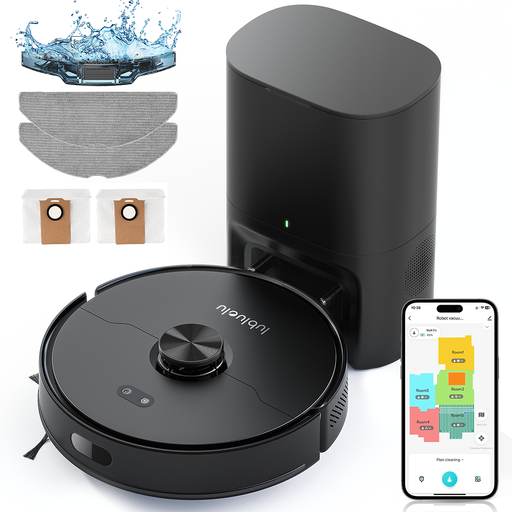
Why it suits this type of household: This model combines vacuuming, sweeping and mopping with laser navigation, app control and storage for up to five maps. It’s a good fit for households looking to organise cleaning across several rooms.
The product information lists adjustable suction power, no-go zones and automatic cleaning resumption after charging. Be sure to check how much space you’ll need around the charging station.
4,000 Pa according to the product description, LiDAR navigation, app control and storage for five maps.
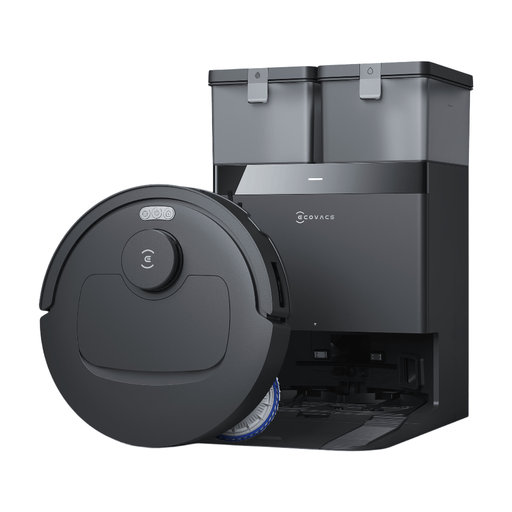
Why it suits this type of household: A good choice for larger households that value automatic operation, different floor types and an advanced station.
The product description lists automatic dust emptying, mop washing with 75 °C water, drying and self-cleaning. The station does require extra floor space.
20,000 Pa according to the product information, TrueMapping 2.0, a 4-litre clean-water tank and control via the ECOVACS Home App.
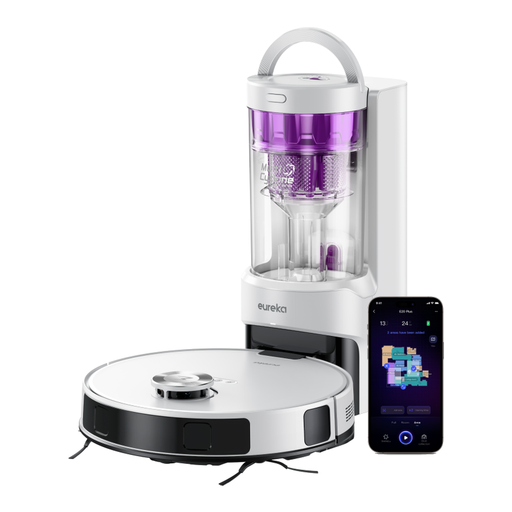
Why it suits this type of household: A practical choice for homes with pets and hard floors, where you’d like to empty the dustbin less often.
The product description lists a 2-litre dust container, anti-tangle brushes and 3D obstacle avoidance. Hair and filters still need to be checked regularly.
10,000 Pa according to the product information, up to 180 minutes of use, app control and a 10 mm mop lift.
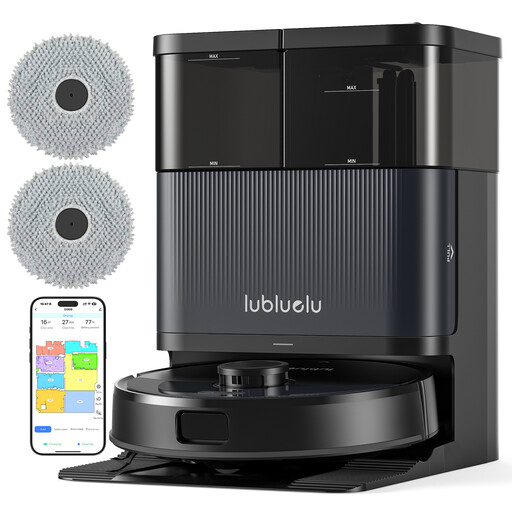
Why it suits this type of household: This model is designed for homes with carpets, hard floors and pet hair, with app control and an all-in-one station.
The product description lists carpet detection and automatic mop lifting. Let the mop pad dry after use and clean the sensors regularly.
Up to 10,000 Pa according to the product information, LiDAR mapping, app control and a stated noise level of 55 dB.
We’ve put together a complete, up-to-date list of products that meet these strict selection criteria and the applicable European safety regulations.
Place the charging station on a level surface against a wall, leaving the recommended clearance around it. Remove cables and small objects before letting the robot create its first map. Connect the robot to the app, let it complete a full run, then set up rooms, schedules and no-go zones.
Its lifespan depends on how often you use it, how well you maintain it and the parts it uses. Clean the brushes and sensors regularly, replace filters when they’re clogged, and don’t leave a mop pad wet for long periods. Before you buy, also check that replacement brushes, filters and pads are available.
As well as the purchase price, you may need to pay for electricity, filters, brushes, mop pads, dust bags and cleaning fluid. A robot vacuum with an auto-empty station can save you time, but a model that uses dust bags comes with ongoing costs. A bagless station can reduce these costs, but you’ll need to empty the collection bin yourself.
