
Vandaag of morgen in huis

Kwaliteit gegarandeerd

Welkomstaanbiedingen ontgrendelen: GRATIS bezorging | Tot 80% korting | Gratis 30 dagen JoyPlus-proefperiode
Download de app
A robot vacuum only works properly when its brushes, filters, mop pads and dust bags are still in good condition. However, robot vacuum accessories are not automatically interchangeable. A part that looks almost identical in shape may click into place differently, be too small or affect how the robot operates.
For households with a Dreame, MOVA or Eureka robot, three purchasing mistakes are particularly costly:
A sensible choice therefore starts with the exact model number and the part that actually needs replacing.
Look for the full model name on the robot, in the app or on the original packaging. Pay attention to additions such as “Ultra”, “Pro”, “Complete” or “Gen 2”. These designations may indicate a different brush, filter shape or attachment method.
For accessories for the Dreame L20 Ultra, for example, it is important to check whether the set is also suitable for the L20 Ultra Complete. According to the product information, the Dreame set mentioned is designed for both versions. For a MOVA E30 Ultra, the model information is also clearly stated for the accessory set.
Also check:
Not every part needs replacing at the same intervals. A practical breakdown:
According to research carried out by some brands, filters can trap a certain percentage of fine particles. Such figures are brand claims, not a general guarantee for every home or usage situation. Therefore, focus mainly on the stated filter type, fit and maintenance instructions.
A cheap individual brush is not always better value than a robot vacuum accessory set. If you need to replace several parts at once, a bundle may be more practical. When comparing sets, look not only at the number of items but also at how useful they are.
A set containing one main brush, two side brushes, filters and mop pads can be useful for regular maintenance. Make sure that all the parts are suitable for your model, though. A large set containing unusable accessories will not save you money.
Also pay attention to the recommended maintenance intervals. The product information for the Dreame L20 Ultra set, for example, states that filters can generally be replaced every 2 to 3 months and mop pads approximately every 1 to 2 months, depending on use. These are guidelines; a household with pets or a lot of sand may need to replace them sooner.
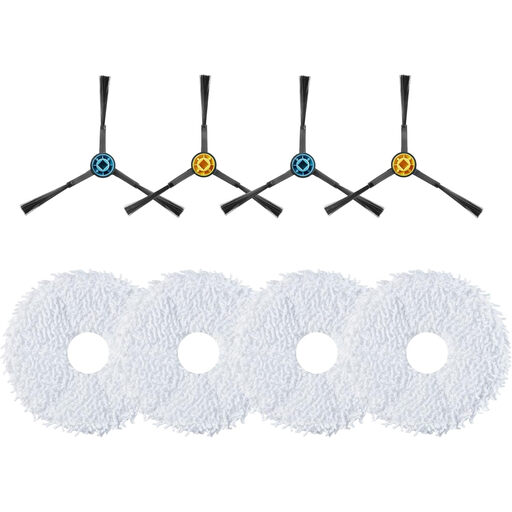
Why it suits this profile: This set is designed for regular basic maintenance and contains four side brushes and four mop pads for the Eureka J12 Ultra.
Compatibility with the Eureka J12 Ultra is stated specifically, so you are less reliant on a vague universal description.
Eight parts in total; according to the product information, installation is possible without additional tools.
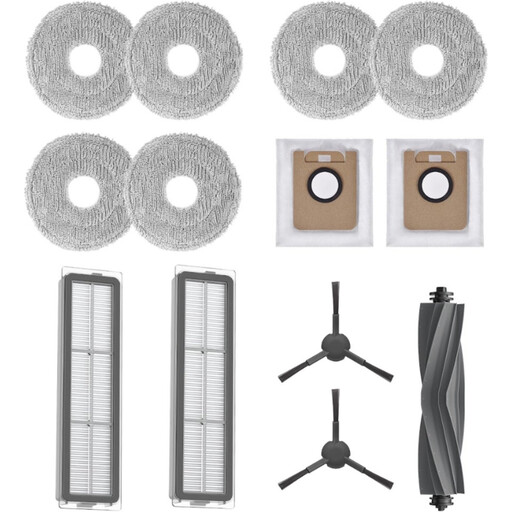
Why it suits this profile: A complete maintenance set for owners of the Dreame L20 Ultra or L20 Ultra Complete who want to replace several wear parts at the same time.
Compatibility with the models is stated clearly. This means you do not have to combine individual parts with different dimensions yourself.
The specifications list one main brush, two H13 filters, three mop cloths and two side brushes; 13 parts are specified in total.
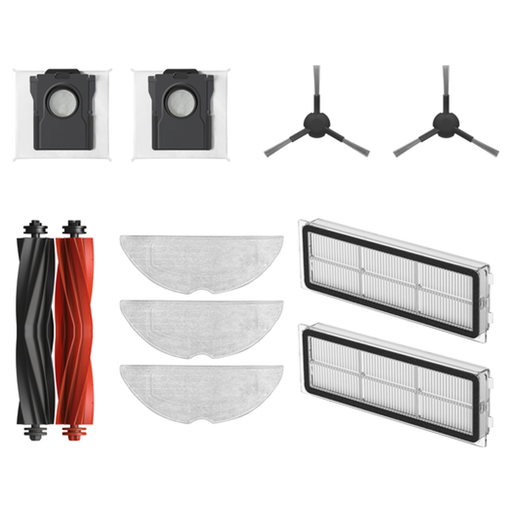
Why it suits this profile: This bundle is designed for households that use the MOVA E30 Ultra frequently and want to keep several maintenance parts in stock.
The set is not described as universal and names the MOVA E30 Ultra as a suitable model. This reduces the risk of an incorrect fit.
The contents consist of one main brush, two side brushes, three mop pads, two filters and two dust bags.
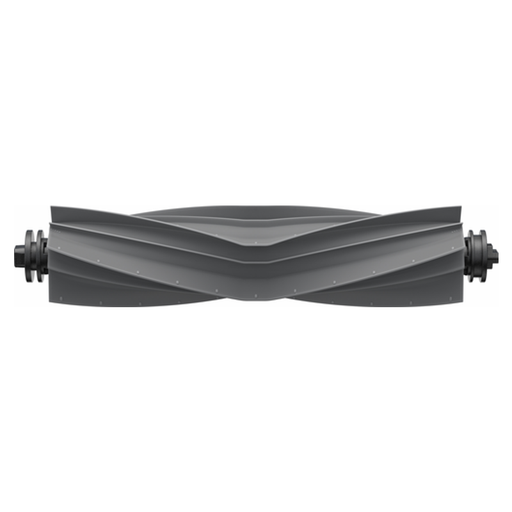
Why it suits this profile: Ideal for anyone who wants to replace a worn main brush without immediately buying a complete set.
The product information names the P10 Ultra, P10 Pro Ultra and E30 Ultra. Check these models before ordering.
A rotating brush measuring 29 cm long and 7 cm wide; the product description states that it has a TriCut design.
We have put together a complete, up-to-date list of products that fully meet these strict selection criteria and the applicable European safety regulations.
Switch off the robot and move it away from the charging station before carrying out maintenance. Remove hair and dirt from around the brush before fitting a new part. Then check that the brush cover, side brushes and filter are securely attached.
When replacing a vacuum cleaner brush, make sure that the round and square ends are correctly aligned. Do not force a part if it does not click into place. Incorrect installation can, according to the product safety information, damage the appliance or the floor.
Keep loose parts out of the reach of young children. Side brushes, filter frames and packaging materials contain small parts. Old filters, pads and dust bags should be disposed of with household waste or via a suitable collection scheme, in accordance with local regulations.
This depends on usage, floor area and the amount of dirt. Filters are often replaced after 2 to 3 months, while mop pads wear out sooner with daily wet cleaning. Check the brushes when hair starts building up, the robot becomes noisier or it is less effective at picking up dirt.
No. Dreame accessories are generally model-specific. Always check the full model name, such as L20 Ultra, L10s Pro Ultra or H12 Pro. An accessory for a stick vacuum will not automatically fit a robot vacuum from the same brand.
A set can be practical when you need several parts. Compare the price with the cost of individual replacement parts and focus especially on the contents. A set for a MOVA E30 Ultra containing brushes, filters, mop pads and dust bags only makes sense if you will actually use those parts.
