
Vandaag of morgen in huis

Kwaliteit gegarandeerd

Welkomstaanbiedingen ontgrendelen: GRATIS bezorging | Tot 80% korting | Gratis 30 dagen JoyPlus-proefperiode
Download de app
A robot vacuum cleaner only works properly when its parts are compatible with the exact model. Yet robot vacuum cleaner accessories are often advertised as universal. This can result in a brush that doesn’t turn properly, a filter that doesn’t seal or mop pads that won’t stay in place.
As a Joybuy Product Recommendation Officer, I focus on information that can be checked: model compatibility, the number of parts, materials and care instructions. This makes it easier to find the robot vacuum accessory kit that suits your needs — and to approach marketing claims with a little caution.
The main brush, side brushes and filters for a robot vacuum cleaner often have a specific shape, fitting or size. A product may appear to fit several brands but still be incompatible with your particular version. Always check the full model name, such as Dreame L20 Ultra, MOVA E30 Ultra or Eureka J15 Pro Ultra.
The term robot vacuum maintenance kit doesn’t always tell you how many parts you’ll receive. Check what’s included in the pack. A kit might contain only brushes, for example, when you also need HEPA filters, dust bags or mop pads.
Also look out for inconsistencies in the product information. Some kits are described as containing “10 parts”, while the itemised list adds up to a different total. In that case, use the specific parts list as your guide and check the current product page before ordering.
New replacement parts for robot vacuum cleaners are intended to replace worn parts. They won’t automatically make your vacuum quieter or more powerful, or make it suitable for a different model. Performance claims come from the brand or seller’s product description and aren’t guaranteed to apply to every home or floor.
Find the model number on the label underneath the vacuum, in the app or in the manual. Look out for words such as “Ultra”, “Complete”, “Pro” or “Gen 2”. For example, Dreame accessories for the L10s Ultra may differ from those for the L20 Ultra.
Examples of clear model compatibility:
A rubber main brush may handle hair and dirt differently from a brush with nylon bristles. The product information describes the MOVA main brush for the E30 and P50 Ultra as a durable rubber brush. According to the specifications, the Dreame brush for the H14 Ultra, H14 Mix, H14 Station, H12 Pro FlexReach and similar models has nylon bristles.
Also check whether you need:
A larger kit isn’t automatically better value. Work out how many filters, brushes, mop pads and dust bags you’ll actually use. The product information for the Dreame L20 Ultra kit lists filters, mop pads and brushes, among other parts. According to the specifications, the MOVA E30 Ultra kit contains 1 main brush, 2 side brushes, 3 mop pads, 2 filters and 2 dust bags.
Replace parts based on wear, dirt and the instructions in your manual. Suggested intervals, such as replacing filters every two to three months or mop pads after a certain number of washes, are care guidelines from the product information. Actual lifespan depends on floor area, pets, dust levels and how often you clean.
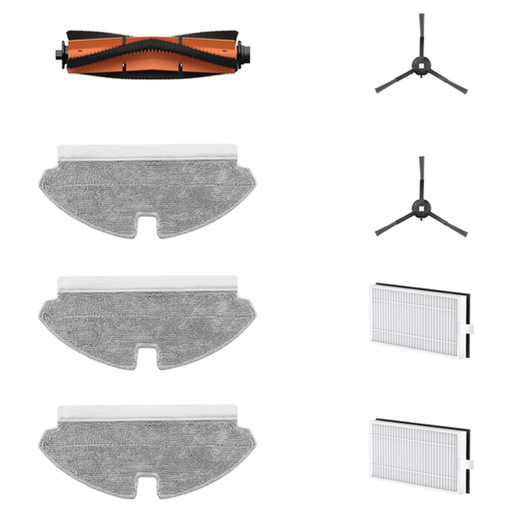
Why it suits this type of user: This kit brings together a main brush, side brush, filter and mop component for the MOVA M1 series, so you don’t have to search for several separate items straight away.
The product information specifically names the MOVA M1 series. Check your exact model before ordering.
Accessory kit for the M1 series; includes several maintenance parts in one pack.
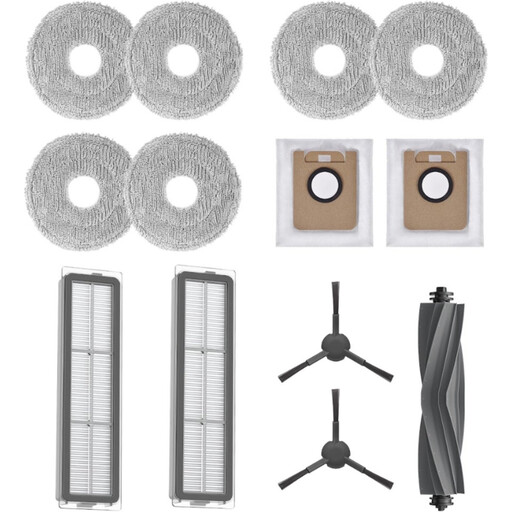
Why it suits this type of user: If you need parts for the Dreame L20 Ultra or L20 Ultra Complete, this kit offers several categories of maintenance parts.
The compatible models are listed, making it a more specific choice than a general-purpose universal kit.
Kit for the L20 Ultra; the product information lists 13 parts, including filters, mop pads and brushes.
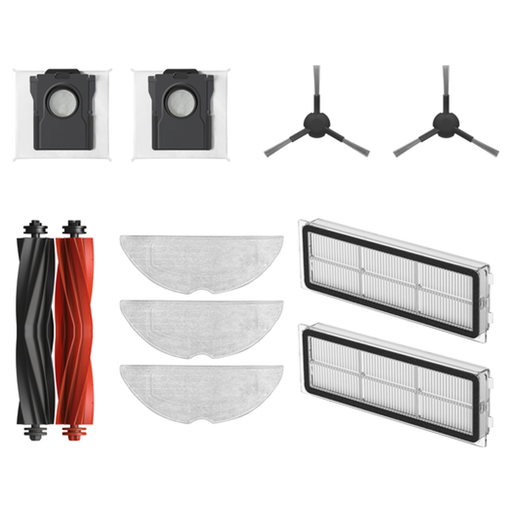
Why it suits this type of user: This kit is designed for the MOVA E30 Ultra and includes parts for brushing, filtering, mopping and collecting dust.
The E30 Ultra model name and kit contents are specified, rather than relying on a universal fit.
10 listed parts: 1 main brush, 2 side brushes, 3 mop pads, 2 filters and 2 dust bags.
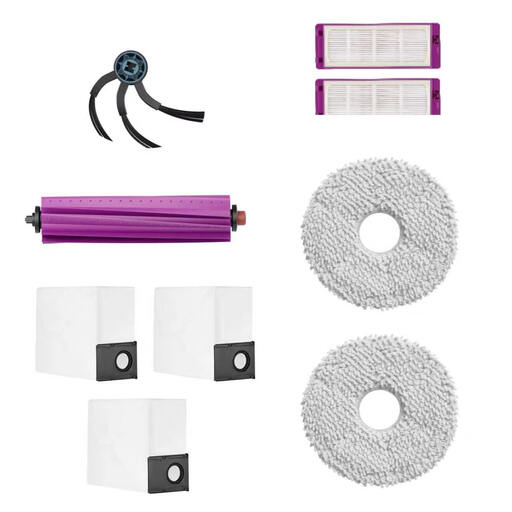
Why it suits this type of user: This pack is tailored to the J15 Pro Ultra and combines brushes, mop pads, filters and dust bags.
The kit lists the quantity of each part: 1 side brush, 2 mop pads, 1 roller brush, 2 filters and 3 dust bags.
Clearly listed contents; designed for the Eureka J15 Pro Ultra, according to the product listing.
We’ve put together a complete, up-to-date list of products that meet these strict selection criteria and the applicable European safety regulations.
Switch off the robot vacuum cleaner and remove it from the charging station before replacing a brush, filter or mop part. Once fitted, check that the brush turns freely and the filter cover closes properly.
Practical tips:
It depends on how often you use them and how much they’ve worn. Check brushes for bent bristles, cracks and built-up hair. Replace filters when they’re dirty or damaged and can no longer be cleaned properly. Use the maintenance intervals in your manual as a guide.
Usually not. Even models from the same brand can have different fittings and dimensions. Always search using the full model number. For example, a kit for the MOVA E30 Ultra won’t automatically fit the MOVA M1 or E20 Plus.
It depends on what’s included and how you use your vacuum. A complete kit can be handy if you need several parts at once. If you only need a new main brush or a few dust bags, buying individual replacement parts for your robot vacuum cleaner may make more sense. Always compare the number of parts, compatibility and total price.
